EasyManua.ls Logo

Mamiya M645 - Page 15

Mamiya M645
29 pages
Print Icon
To Next Page IconTo Next Page
To Previous Page IconTo Previous Page
Loading...
Names
and
Functions
of
Parts
(4)
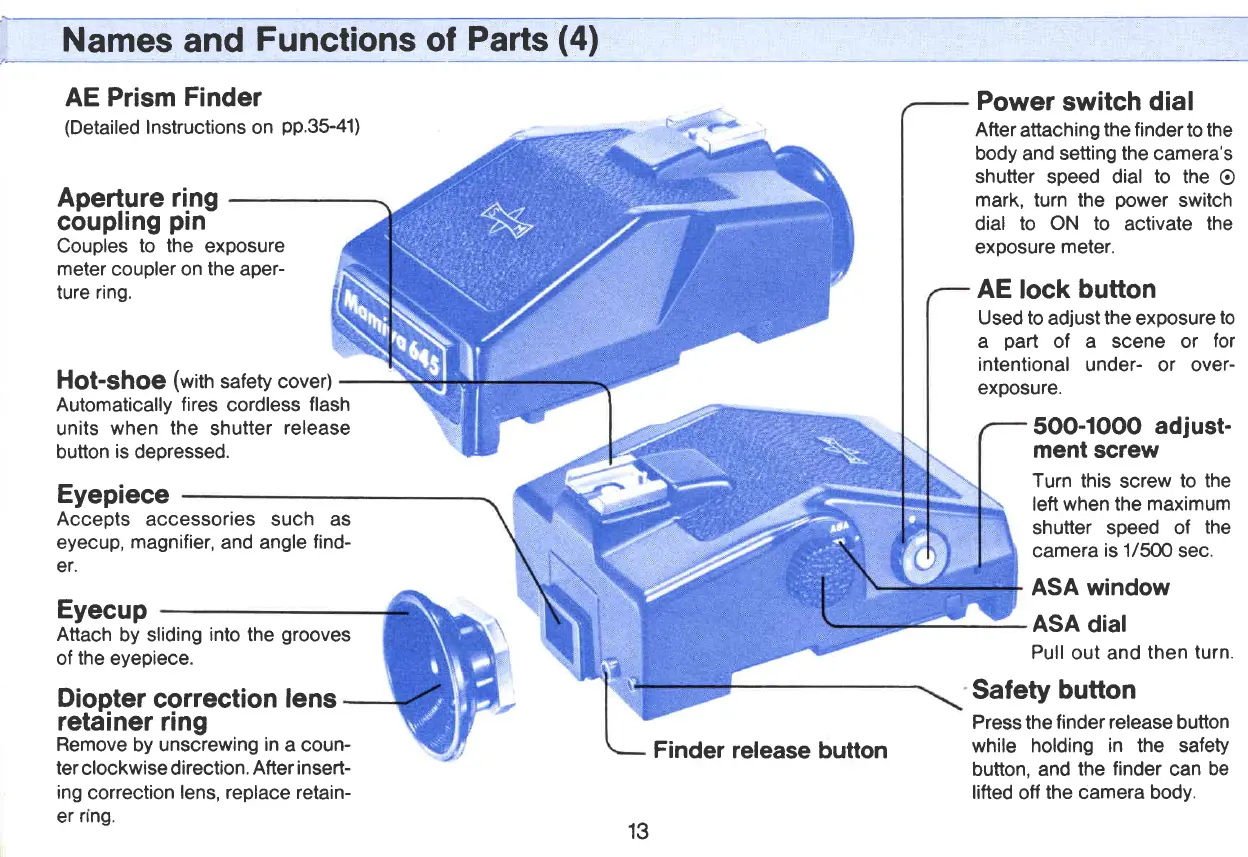
AE Prism
Finder
(Detailed
Instructions on
pp.35-41)
Power
switch
dial
Afterattaching the finderto
the
body
and
setting the
camera's
shutter speed dial
to
the
O
mark, turn the
power
switch
dial to ON
to
activate
the
exposure
meter.
AE
lock
button
Used to
adjust
the
exposure
to
a
part
of a scene or
for
intentional
under- or over-
exposure.
5OO-1OOO
adjust-
ment screw
Turn this
screw
to the
left when the
maximum
shutter speed of
the
camera
is 1/50O
sec.
ASA window
ASA
dial
Pull
out and
then
turn.
Couples
to the
exposure
meter
coupler on
the
aper-
ture ring.
HOt-sho€
(with
safety cover)
Automatically
fires
cordless
flash
units
when the
shutter
release
button
is
depressed.
Eyepiece
Accepts
accessories such as
eyecup,
magnifier,
and angle
find-
er.
Eyecup
Attach
by sliding
into
the
grooves
of
the
eyepiece.
Ape4gre ring
couplrng
ptn
Diopter
correction
lens
retainer
ring
Remove
by unscrewing
in
a coun-
ter
clockwise direction.
After insert-
ing
correction
lens, replace retain-
er
nng.
Safety
button
Press
the
finder release
button
while
holding in the safety
button, and
the
finder
can
be
lifted
off
the camera body.
13
Finder
release button
www.orphancameras.com

Related product manuals