EasyManua.ls Logo

Mamiya M645 - Page 16

Mamiya M645
29 pages
Print Icon
To Next Page IconTo Next Page
To Previous Page IconTo Previous Page
Loading...
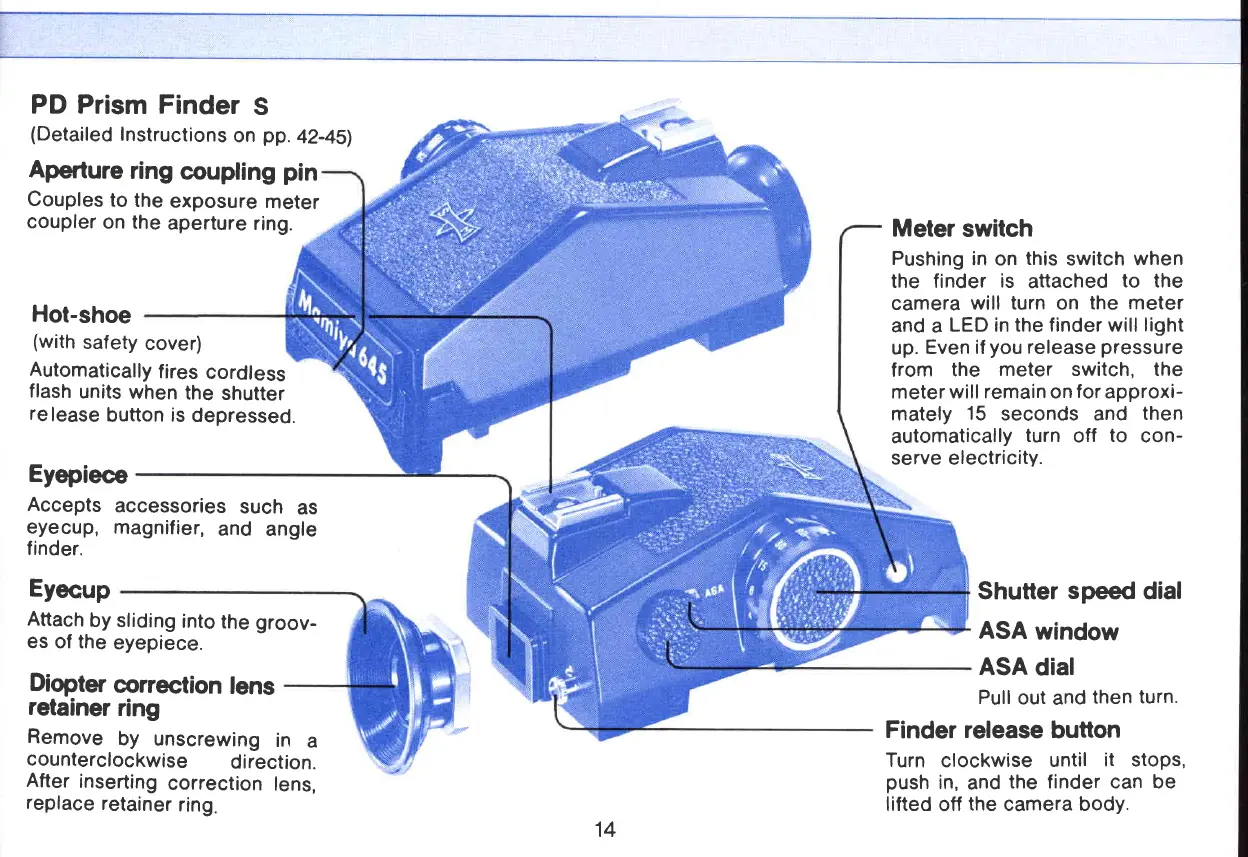
PD Prism Finder
S
(Detailed
Instructions
on
pp.
a7-a5l
Aperture
ring
coupling
pin
Couples
to
the
exposure
meter
coupler
on the
aperture
ring.
Hot-shoe
(with
safety
cover)
Automatically
fires
cordf
ess
flash
units
when
the
shutter
re
lease
button
is
depressed.
Eyepiece
Meter
switch
Pushing
in on
this
switch when
the finder
is
attached
to the
camera
will turn on
the meter
and a
LED in the finder will
light
up.
Even if
you
release
pressure
f
rom
the
meter switch, the
meter
will remain on
for
approxi-
mately
15
seconds and
then
automatically
turn
off
to
con-
serve electricity.
Shutter
speed
dial
ASA
window
ASA
dial
Pull
out
and
then
turn.
Finder release
button
Turn
clockwise
until
it stops,
push
in,
and
the finder can be
lifted
otf
the
camera body.
Accepts
eyecup,
finder.
Eyecup
Attach
by
sliding
into
the
groov-
es of the
eyepiece.
Diopter
correction
lens
retainer
ring
Remove
by
unscrewing
in
a
counterclockwise
direction.
After
inserting
correction
lens,
replace
retainer
ring.
accessories
such
as
magnifier,
and angle
14
www.orphancameras.com

Related product manuals