EasyManua.ls Logo

Mamiya M645 - Inserting a Battery; Insert the battery; CAUTION

Mamiya M645
29 pages
Print Icon
To Next Page IconTo Next Page
To Previous Page IconTo Previous Page
Loading...
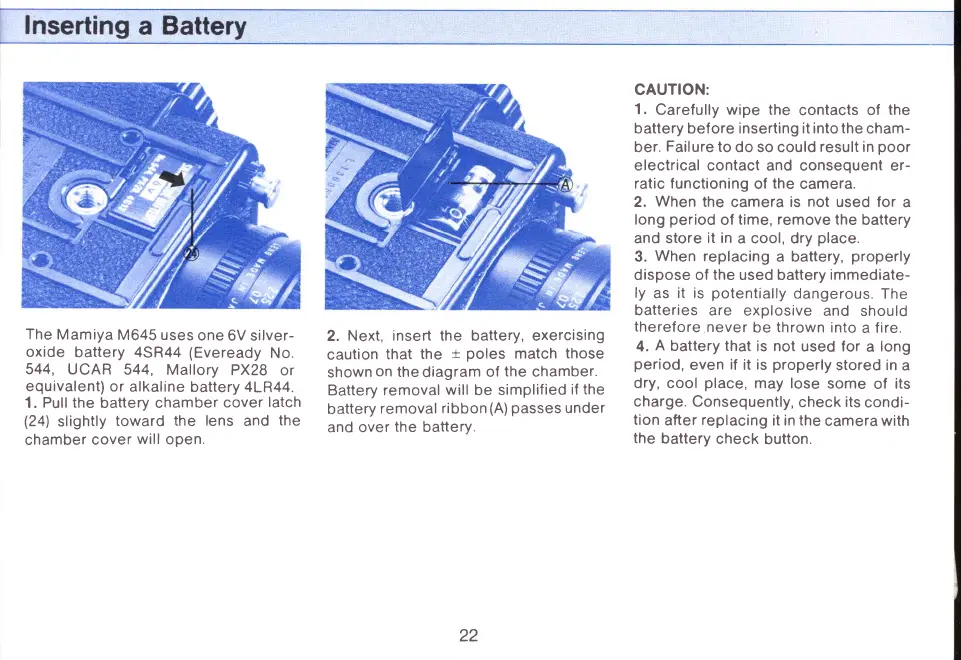
The
Mamiya
M645
uses
one
6V silver-
oxide
battery 4SR44
(Eveready
No.
544, U
CAR 544,
Mallory
PX28
or
equivalent)
or
alkaline
battery 4LR44.
1.
Pull the
battery chamber
cover
latch
(24l'
slightly
toward
the lens
and
the
chamber
cover
will
open.
2.
Next, insert the battery, exercising
caution
that
the
t
poles
match
those
shown
on
the
diagram
of
the
chamber.
Battery
removal
will
be
simplified
if
the
battery
removal
ribbon(A)
passes
under
and
over
the
battery.
CAUTION:
1.
Carefully wipe the
contacts
of
the
battery bef ore
inserting it into the
cham-
ber.
Failure
to
do so could
result in
poor
electrical contact and consequent er-
ratic
functioning
of
the
camera.
2.
When
the
camera
is
not
used
for
a
long
period
of
time,
remove
the
battery
and
store it in
a cool, dry
place.
3.
When
replacing
a battery,
properly
dispose of
the
used battery
immediate-
ly
as
it
is
potentially
dangerous.
The
batteries
are
explosive
and should
therefore
never
be
thrown
into
a
fire.
4.
A
battery that
is not
used for
a
long
period,
even
if
it
is
properly
stored in
a
dry, cool
place,
may lose
some
of
its
charge.
Consequently,
check
its
condi-
tion
after
replacing
it
in the
camera with
the
battery
check
button.
22
www.orphancameras.com

Related product manuals