EasyManua.ls Logo

Mamiya M645 - Page 23

Mamiya M645
29 pages
Print Icon
To Next Page IconTo Next Page
To Previous Page IconTo Previous Page
Loading...
O
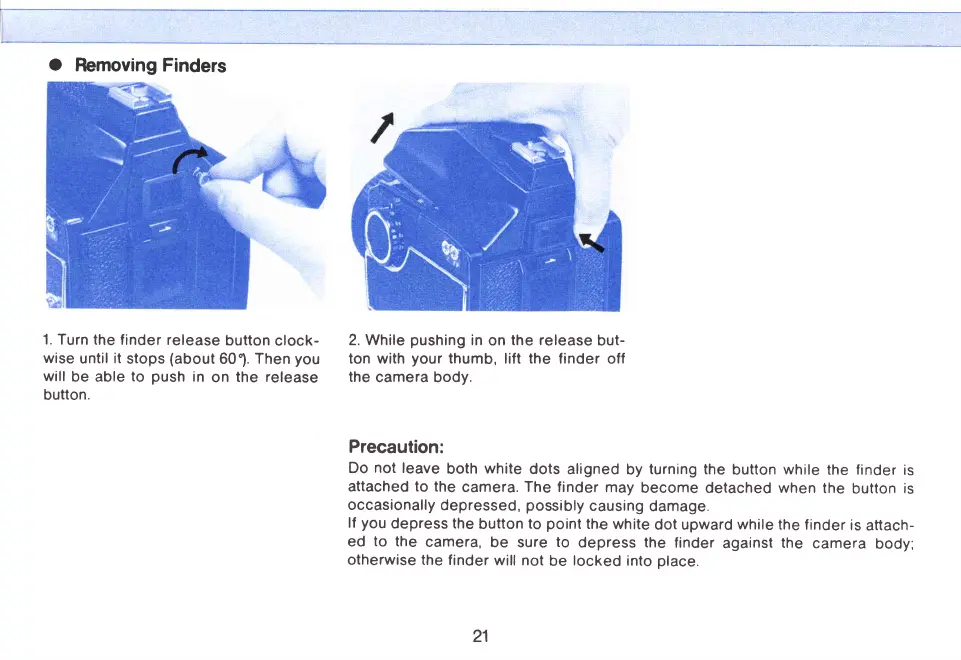
Removing Finders
1.
Turn the finder
release
button
clock-
wise
until
it
stops
(about
60").
Then
you
will
be able
to
push
in
on
the release
button.
2. While
pushing
in
on
the release
but-
ton with
your
thumb,
lift
the
finder off
the
camera body.
Precaution:
Do
not
leave
both
white
dots aligned
by
turning
the
button
while
the
finder
is
attached to the
camera.
The
finder may
become detached when
the
button
is
occasionally
depressed,
possibly
causing
damage.
lf
you
depress the
button
to
point
the white
dot upward
while
the finder
is
attach-
ed
to
the
camera,
be
sure
to
depress the
finder
against
the
camera
body;
otherwise
the finder
will
not
be
locked
into
place.
21
www.orphancameras.com

Related product manuals