EasyManua.ls Logo

Mamiya M645 - Loading the Film Insert; Insertion of the Film Insert

Mamiya M645
29 pages
Print Icon
To Next Page IconTo Next Page
To Previous Page IconTo Previous Page
Loading...
Loading
the
Film
Insert
O
Opening
the
Back
Cover
o
Removing
the Film
Insert
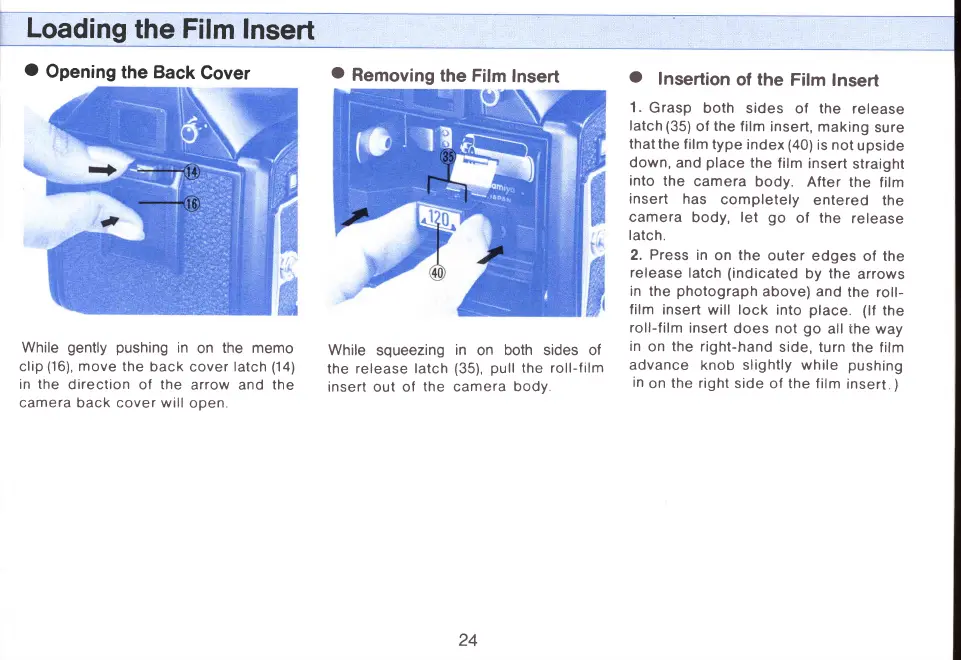
While
gently pushtng
in
on
the memo
clip
(16),
move
the
back
cover
latch
(14)
in the
direction
of
the
arrow and
the
camera back cover will
open
While
squeezing
in
on
both sides of
the
release
latch
(35),
pull
the roll-f
ilm
insert out of
the camera
body
o
Insertion
of
the
Film
Insert
1 .
G
rasp
both
sides
of the release
latch (35)
of
the
film
insert,
making
sure
thatthe
film
type
index
(40)
is
not
upside
down,
and
place
the
film
insert
straight
into
the
camera
body.
After
the
film
insert
has
completely
entered
the
camera
body, let
go
of
the
release
latc
h.
2.
Press
in
on the
outer
edges
of the
release
latch
(indicated
by the
arrows
in
the
photograph
above) and
the
roll-
film
insert
will lock into
place.
(lf
the
roll-film
insert
does not
go
all
ihe
way
in
on
the
right-hand
side, turn
the
film
advance
knob slightly
while
pushing
in
on
the
right
side of the film
insert
)
24
www.orphancameras.com

Related product manuals