EasyManua.ls Logo

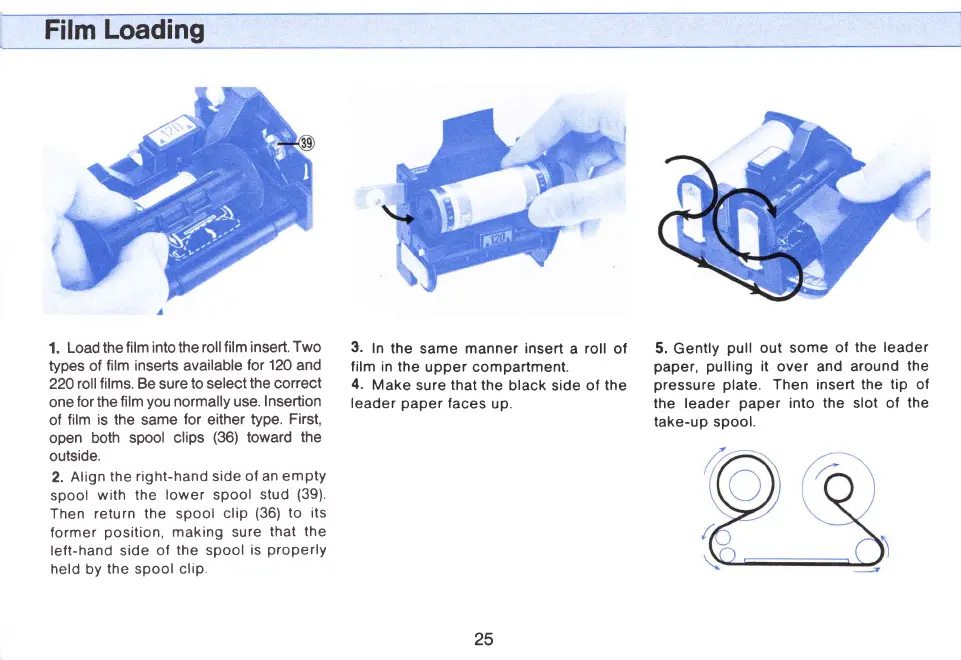
Mamiya M645 - Film Loading; Load film into insert; Insert film in upper compartment; Pull leader paper to take-up spool

Mamiya M645
29 pages
Print Icon
To Next Page IconTo Next Page
To Previous Page IconTo Previous Page
Loading...
Film
Loading
1.
Load the
film into the
roll
film insert.
Two
types of
film inserts available
for
120
and
22O
roll films. Be
sure
to select
the correct
one
for
the
film
you
normally use.
Insertion
of
film
is the
same
for
either
type.
First,
open both
spool
clips
(36)
toward
the
outside.
2.
Align
the
right-hand side
of an
empty
spool
with the
lower spool
stud
(39)
Then
return the spool
clip
(36)
to its
former
position,
making sure
that
the
left-hand side
of
the
spool
is
properly
held by
the spool clip
3.
In
the same manner insert
a
roll
of
film in the
upper compartment.
4.
Make
sure
that
the
black side ol
the
leader
paper
faces
up.
5.
Gently
pull
out
some
of
the
leader
paper, pulling
it
over and
around
the
pressure plate.
Then insert
the
tip
of
the leader
paper
into the
slot of
the
take-up
spool.
25
www.orphancameras.com

Related product manuals