EasyManua.ls Logo

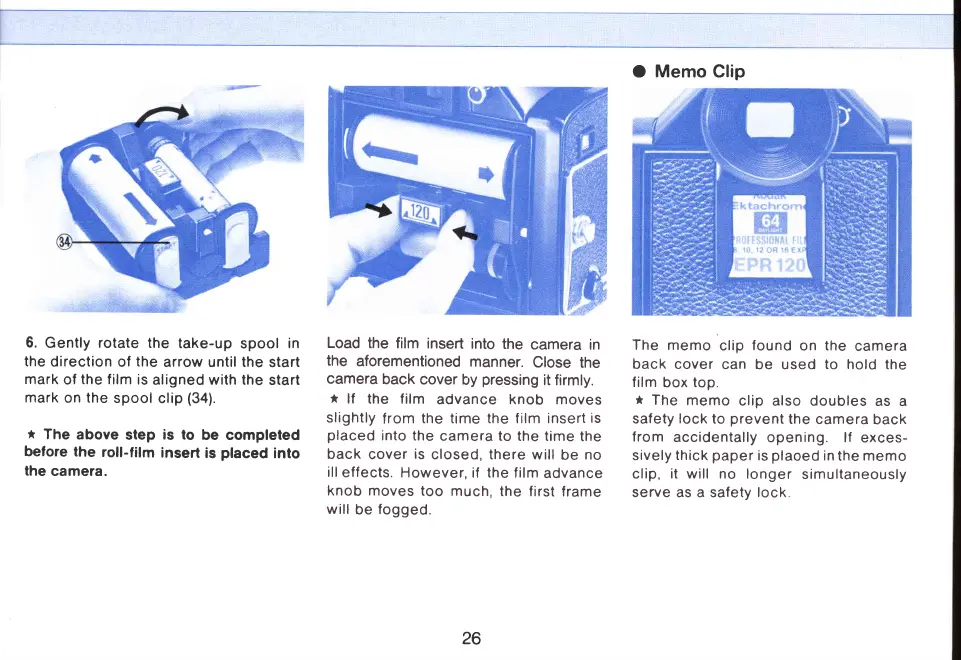
Mamiya M645 - Rotate take-up spool; Load film insert into camera

Mamiya M645
29 pages
Print Icon
To Next Page IconTo Next Page
To Previous Page IconTo Previous Page
Loading...
O
Memo
Clip
6.
Gently
rotate
the
take-up
spool
in
the
direction of
the
arrow until the
start
mark
of
the film
is
aligned
with the
start
mark
on the
spool
clip
(34).
t
The
above
step
is
to
be completed
belore the
roll-film
insert
is
placed
into
the
camera.
Load
the
film
insert
into
the
camera
in
the
aforementioned
manner.
Close
the
camera
back
cover
by
pressing
it firmly.
t
lf
the f ilm
advance knob moves
slightly
from
the time the f ilm insert
is
placed
into the
camera
to the time
the
back
cover
is
closed, there will
be
no
ill
effects. However,
if
the
film
advance
knob moves
too
much,
the first
frame
will
be
fogged.
The
memo
clip
found
on the
camera
back
cover
can be used to hold the
film
box
top.
*
The
memo
clip also doubles
as
a
safety lock
to
prevent
the
camera
back
from
accidentally
opening. lf
exces-
sively
thick
paper
is
plaoed
in
the memo
clip,
it
will no longer
simultaneously
serve as a safety lock
26
www.orphancameras.com

Related product manuals