18
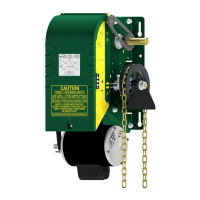
5.5. MANUAL OPERATION OF OPERA-MJ
1- Pull on the disconnect chain until feel a resistance.
2- Engage the chain in the chain keeper. The door is disconnected from the electrical motor and ready
to be manually operated.
3- Just make free the disconnect chain from the chain keeper to ‘’reconnect’’ the operator and return the
standard electrical operation.
5.6. OPERATOR START-UP AND TESTING GUIDE
This guide is a procedure you can follow to test every feature of your door operator.
If a 3 button push-button station is wired to the operator, disconnect it and then place a normally-closed contact
between terminals 2 and 3 to simulate a "Stop" push-button (use a spare limit switch or any such device).
Interrupting the power between these terminals will stop the operator.
Using a small wire jumper, momentarily jump (short-circuit) the following terminals:
A. Momentarily jump terminals 3 and 4.
The door will open instantly. Allow it open completely.
B. Momentarily jump terminals 3 and 5.
The door will close instantly. Allow it close completely.
C. Momentarily jump terminals 7 and 8.
The door will open instantly. Allow it to open completely.
D. Momentarily jump terminals 7 and 8.
The door will close instantly. While closing, go to step E.
E. Momentarily jump terminals 7 and 8 again.
The door will reverse to open. Allow it to open completely.
F. Momentarily jump terminals 7 and 8.
The door will close. While closing, go to step G.
G. Momentarily jump terminals 3 and 6.
The door will reverse to open. Allow it to open completely.
H. Momentarily jump terminals 7 and 8 again.
The door will close. Allow it to close completely.
I. Momentarily jump terminals 3 and 6.
The door should remain still.
This procedure can be repeated using the radio-control terminal strip located on the outside of the control box
by using terminals "24VAC" and "CONTACT" instead of terminals 7 and 8.
6. TROUBLE-SHOOTING GUIDE
All operators are thoroughly tested and adjusted before shipping. In most cases, it is after installation and hook-
up to external devices that a problem will arise.
If after connecting external devices to the operator, you encounter problems, the trouble often lies in the
external devices or in the wiring leading to the external devices. Verify all external wiring making certain that
there are no wires pinched anywhere shorting to ground and that there are no voltages being sent into the
control circuit. The operator functions ONLY with dry contacts: all voltages necessary for proper functioning are
generated by the operator transformer.
The following trouble-shooting guide (TABLE 3) will help you identify the source of the problem given a
particular symptom.


 To Next Page