Simple solutions for everyday independence
5
Camel
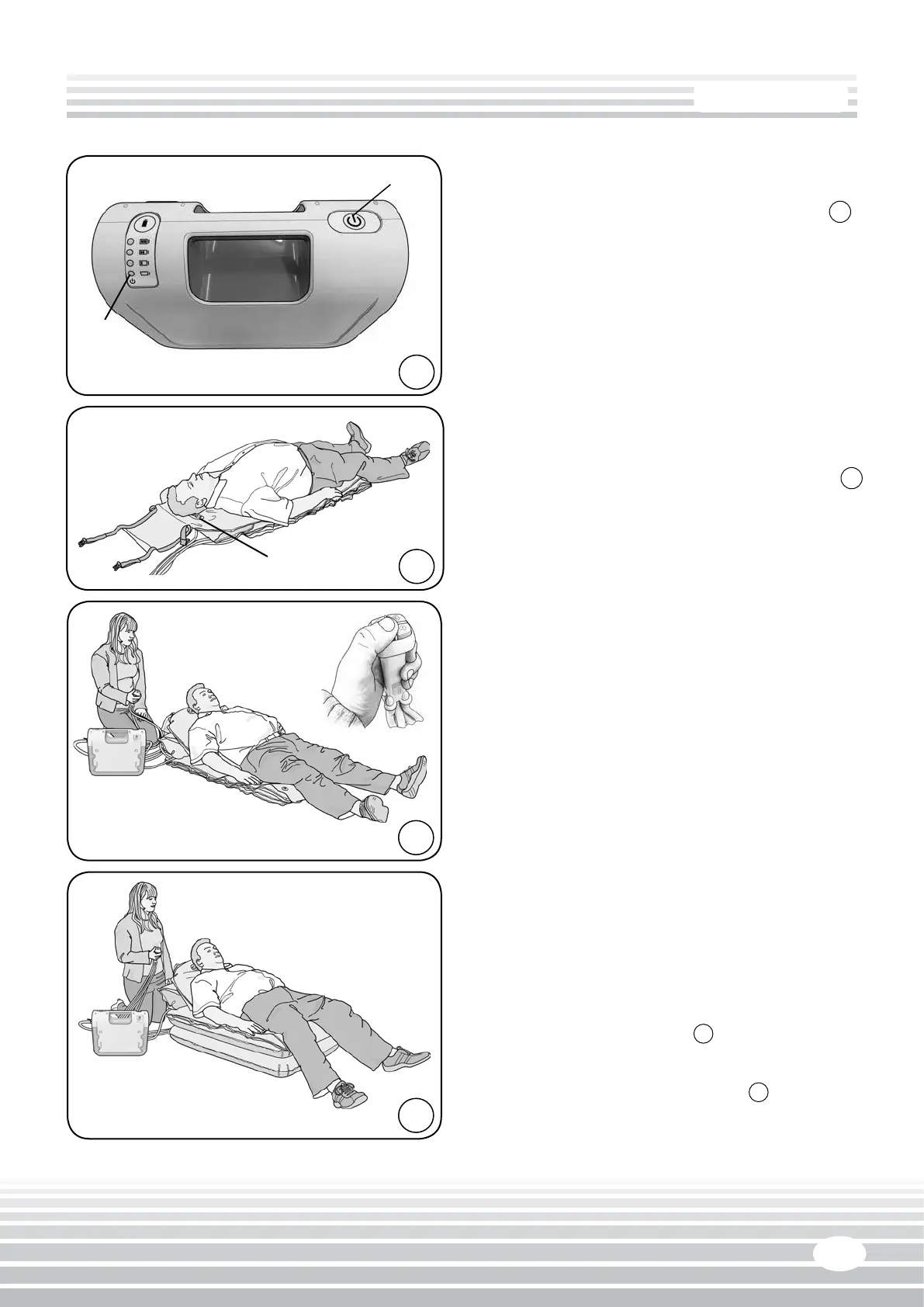
Switching the Airo 24 ‘On’ & ‘O’ - g.
3
• To switch on, momentarily press the ‘Power’
buon (A g.3). The boom baery status
indicator light (B) will come on.
• To switch o, momentarily press the ‘Power’
buon. The boom baery status indicator light
will go out.
Posioning the paent on the Camel - g.
4
• Posion the Camel at the side of the paent so
that the paent’s head is level with the Camel
badge (A). NOTE: Place a blanket, groundsheet,
towel or similar under the Camel if using it on a
rough surface.
• Transfer the paent onto the Camel. The head
should lie on the Camel badge (A) and the body
should lie centrally.
Operang
The following instrucons apply equally when
the Camel is being operated by a person raising
themselves without assistance, or by an assistant
raising a paent.
WARNING: If a slide sheet has been used to transfer
the paent onto the Camel it must be removed from
under the paent before commencing a li.
• Switch the Airo 24 to ‘On’. Press the number
1 buon on the hand control to parally inate
the backrest secon unl the paent is in a
comfortable posion - g.
5
• Press the number 2 buon to inate the boom
secon unl it becomes rigid - g.
6
A
A
B
3
4
5
6


 To Next Page