20
YOUR REMOTE
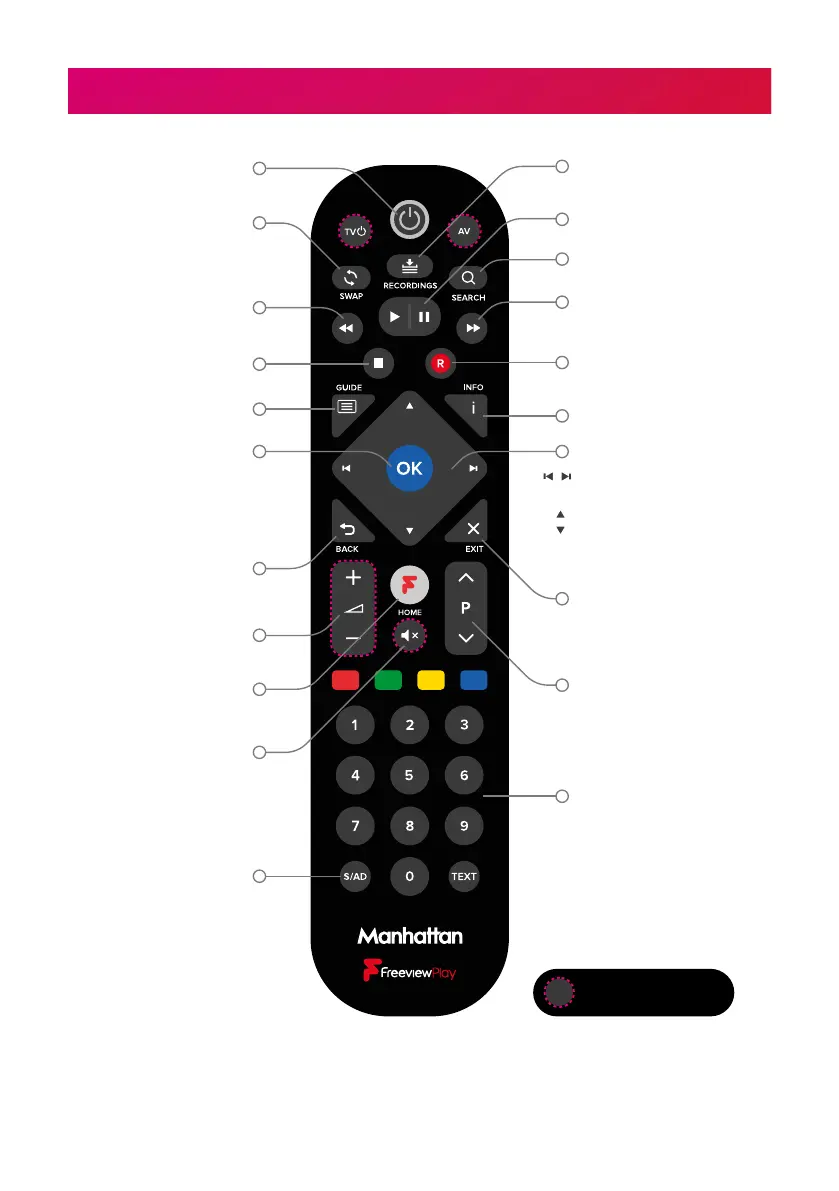
Volume up/down
Show the TV Guide
Mute
Subtitles/Audio Description
on/off
Enter a channel number
Show the Home screen
Back to previous menu
or to watching TV
Select options & perform
on-screen actions
Show Channel Browser
when watching TV
Show the Recordings menu
Swap to the last
channel viewed
Stop playback or live pause
Set recordings & display
record options
Fast Forward
Skip forward 24 hours in Guide
Rewind
Skip back 24 hours in Guide
Show detailed programme info
Standby on/off
Programmable buttons
Show the Settings menu
Pause live TV/playback
Navigate menus
Skip forwards/backwards
during live pause & playback
Show Channel Browser
when watching TV
Next/previous channel
when watching TV
Page up/down the TV
Guide & other menus
Exit all menus & watch TV
Stop Playback or Live Pause
Change Blink Mode
By default, the LED on the T3•R remote blinks when a button is pressed. Toggle this o or
on by holding the S/AD and ‘1’ buttons for 3 seconds until the LED blinks.


 To Next Page
 Loading...