EN
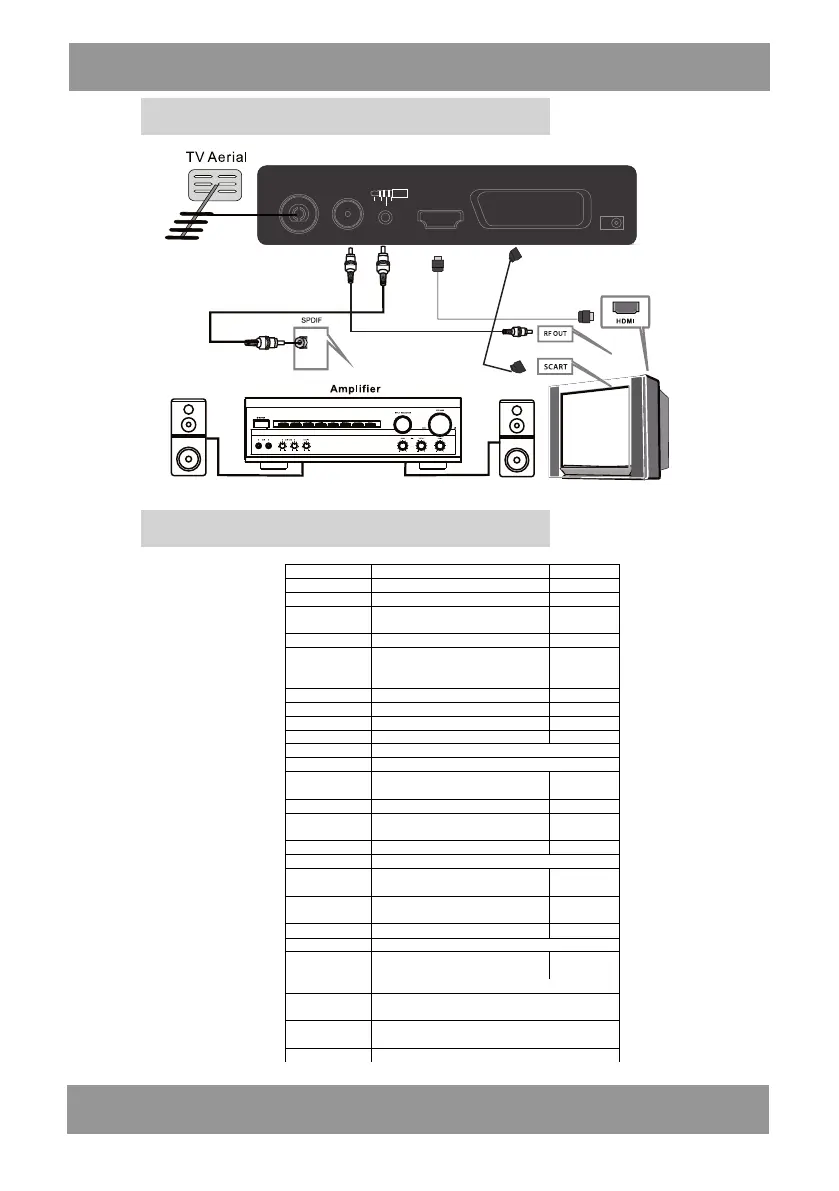
Instalation
Rear Panel
ANT IN ANT OUT AUDIO HD OUT SCART
DC IN
COAX L GND
R
Setup menu SUB Menu Options Default
Program Edit Input password 000000
EPG Program Guide /
Sort
By LCN/By ONID/By Service Name
/By Service ID
By LCN
Program
LCN on/off off
Aspect Ratio
16:9PillarBox/16:9Pan&Scan/4:3Letter
Box/4:3Pan&Scan/4:3Full/16:9Wide
Screen/Auto
16:9PillarBox
Resolution 1080i/1080P(50Hz)/576i/576p/720p 1080i
TV Format PAL/NTSC PAL
Picture
Video Output RGB RGB
Auto Search Automatically channel Search
Manual Search Scan new channels
Time
Power On/Off Select power on/off time
OSD Language To selec t OS D Languag e Polish
Subtitle Language To sele ct Subtit le Langua ge Off
Audio Language To select Aud io Lang uage Polish
Option
Digital Audio PCM/RAW HDMI ON/RAW HDMI OFF/Off PCM
Parental Guidance Input password 000000
Set password Set your own password
Restore Factory
Default
Reset /
Information View model,hardware and software information
System
Software Update upgrade the newest software manually by USB device
Multimedia To select Mu sic/Photo /Mov ie/PVR op tion
Photo Configure To set photo configure
Movie Configure To set movie configure
USB
PVR Configure To set PVR configure
Channel Search
Select sleep time Off
Sleep
Country
Select your country of residence
Antenna Power
Country Region
Time Zone
GMT+1
GMT-12~GMT+12
Warsaw
Warsaw
Time Offset
Auto/Manual
Auto
On/Off Off
DVBT010SXT2


 To Next Page