1 23 45
DC IN
PC
Audio
VGASCART
Earphone
6
7
8
9
10
11
YPbPr CI AVRFUSB
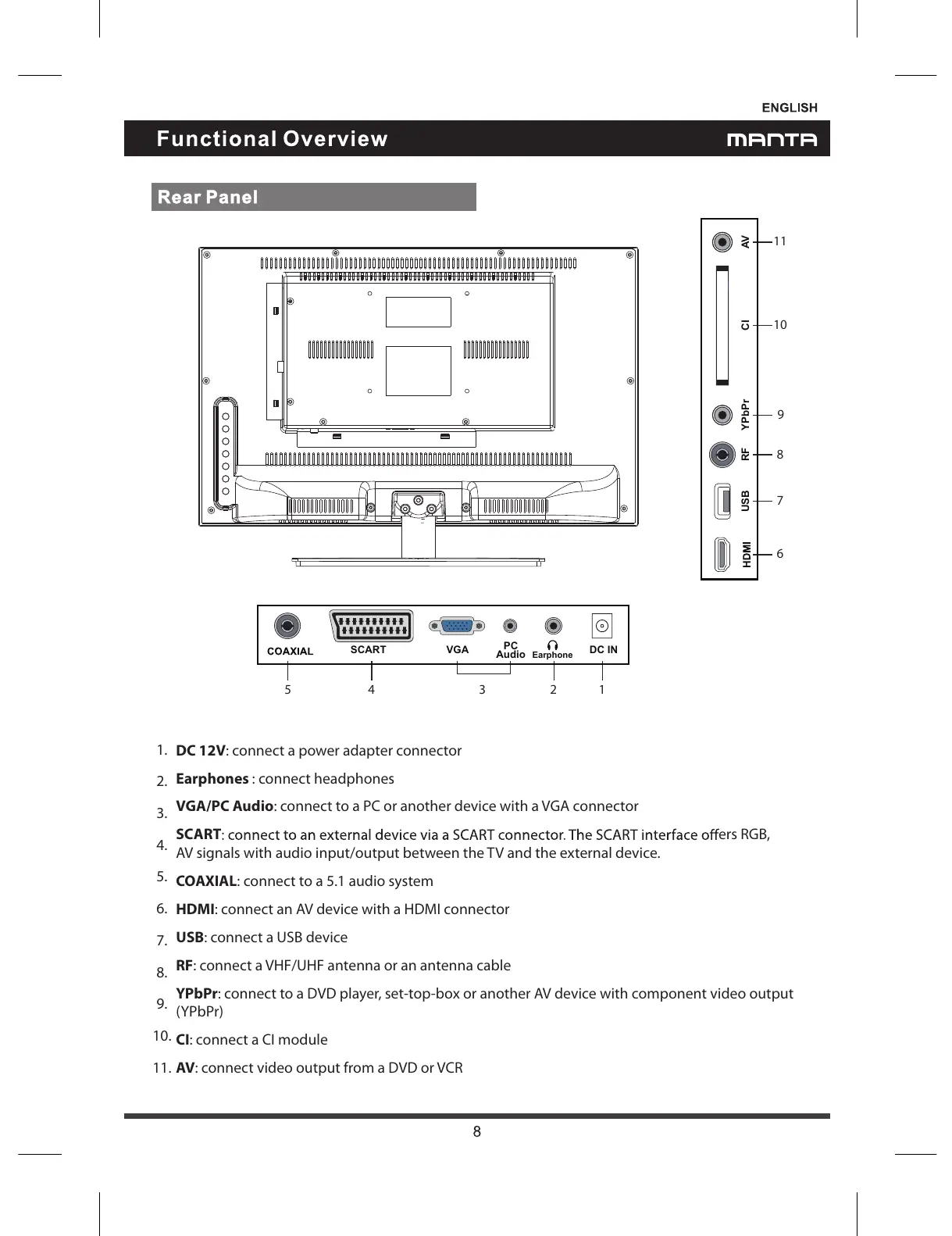
AV: connect video output from aDVD or VCR
2.
1.
YPbPr: connect to aDVD player, set-top-box or another AV device with component video output
(YPbPr)
3.
RF: connect aVHF/UHF antenna or an antenna cable
4.
SCART
ers RGB,
AVsignals with audio input/output between the TV and the external device.
5.
VGA/PC Audio: connect to aPC or another device with aVGA connector
6.
Earphones : connect headphones
7.
DC 12V: connect apower adapter connector
8.
COAXIAL: connect to a5.1 audio system
9.
USB: connect aUSB device
10.
HDMI: connect an AV device with aHDMI connector
11.
CI: connect aCI module


 To Next Page