EasyManua.ls Logo

Manta MM361 - User Manual

Manta MM361
37 pages
Go to English
Print Icon
To Next Page IconTo Next Page
Loading...
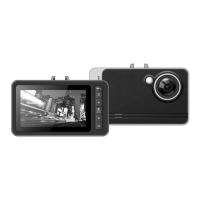
DVR CAR CAMERA
Model:
MM361
Instrukcja obsługi
User’s Manual
Bedienungsanleitung
Manual de usuario
Istruzioni duso
Náv od k obsluze
Инструкция использования
Question and Answer IconNeed help?

Do you have a question about the Manta MM361 and is the answer not in the manual?

Summary

Product Structure and Basic Operation

Device Components

Overview of the DVR car camera components, including buttons, screen, lens, and ports.

Charging Instructions

Guidance on initial and subsequent charging for optimal battery performance.

Power On and Off Modes

Steps for turning the camera on and off, and switching between recording modes.

Key Functions and Settings

Core Device Functions

Explanation of main button functions for video, camera, and playback modes.

Menu and System Settings

Configuration options for video recording, exposure, motion detection, and cycling recording.

Camera Settings

Adjusting image size, quality, exposure, brightness, saturation, sharpness, and color.

Advanced Settings and Playback

Playback Mode Settings

Options for file locking, deletion, slideshows, voice memos, and boot screen settings.

System Configuration

Settings for formatting, language, screensaver, factory defaults, USB function, TV standard, and date/time.

Operational Modes and Features

Video Recording Operation

Details on starting, stopping, and cycling video recording, including night vision.

Camera Mode Operation

Instructions for taking still photos, using self-timers, and adjusting camera-specific options.

Playback Mode Operation

How to navigate and play video or sound files, and manage recorded content.

File Management and Additional Functions

File Deletion and Management

Procedures for deleting specific files or all recorded media.

Playback Options

Selecting and initiating interval play or cycling play for media files.

Summary

Product Structure and Basic Operation

Device Components

Overview of the DVR car camera components, including buttons, screen, lens, and ports.

Charging Instructions

Guidance on initial and subsequent charging for optimal battery performance.

Power On and Off Modes

Steps for turning the camera on and off, and switching between recording modes.

Key Functions and Settings

Core Device Functions

Explanation of main button functions for video, camera, and playback modes.

Menu and System Settings

Configuration options for video recording, exposure, motion detection, and cycling recording.

Camera Settings

Adjusting image size, quality, exposure, brightness, saturation, sharpness, and color.

Advanced Settings and Playback

Playback Mode Settings

Options for file locking, deletion, slideshows, voice memos, and boot screen settings.

System Configuration

Settings for formatting, language, screensaver, factory defaults, USB function, TV standard, and date/time.

Operational Modes and Features

Video Recording Operation

Details on starting, stopping, and cycling video recording, including night vision.

Camera Mode Operation

Instructions for taking still photos, using self-timers, and adjusting camera-specific options.

Playback Mode Operation

How to navigate and play video or sound files, and manage recorded content.

File Management and Additional Functions

File Deletion and Management

Procedures for deleting specific files or all recorded media.

Playback Options

Selecting and initiating interval play or cycling play for media files.

Manta MM361 Specifications

General IconGeneral
Display Size2.7 in
Sensor TypeCMOS
Effective Pixels12 MP
LCD Screen Size2.7 in
Storage MediaSD Card
Battery TypeAA
Dimensions96 x 62 x 26 mm
Weight95 g