Need help?
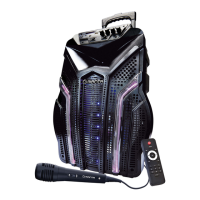
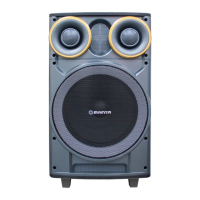
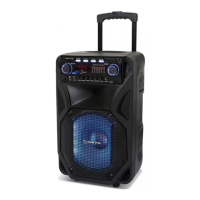
Do you have a question about the Manta SPK5033 and is the answer not in the manual?
Control for the LED illumination ON/OFF switch.
Connects USB drives and SD cards for media playback.
Main power switch for the device.
Adjusts microphone volume, treble, bass, and master volume.
Functions for skipping to the next or previous audio track.
Controls playback, FM station search, and TWS pairing.
Repeats the current track or audio selection.
Records audio from USB/SD devices and controls playback.
Allows selection of different playback modes or inputs.
Activates the microphone priority function.
Connects external audio devices via the AUX port.
Port for charging the device using a 9V adapter.
Displays the status of the battery charging process.
Connects a wired microphone to the unit.
Covers reading the manual, keeping instructions, and general handling.
Advice on avoiding liquids, flames, ventilation, temperature, and placement.
Covers power outlets, wet hands, plug fitting, and storm unplugging.
Details on gentle operation, parts, battery disposal, cleaning, and servicing.
Highlights risks like inserting objects, no mounting, and magnetic fields.
Defines the 'DANGER' symbol for imminent hazardous situations.
Defines the 'WARNING' symbol for potentially hazardous situations.
Defines the 'CAUTION' symbol for potential minor hazards.
Explains the lightning flash symbol indicating electric shock risk.
Ensures proper power cord placement and safe unplugging techniques.
Provides requirements for adequate airflow and unit placement.
Instructions against dismantling and for professional repair services.
Action to take if smoke or unusual smells are detected from the unit.
Enables wireless audio streaming from compatible devices.
Allows pairing two speakers for enhanced stereo sound.
Plays MP3, WAV, WMA files from USB and SD card storage.
Features FM radio, microphone input, and auxiliary input.
Includes remote operation and a built-in rechargeable battery.
Details AC power compatibility and battery charging indicators.
Step-by-step instructions for pairing two speakers wirelessly.
Instructions on how to connect the speaker to Bluetooth devices.
Information on charging times, battery lifespan, and power saving.
Turns the device on or puts it into standby mode.
Cycles through audio input modes: USB/SD, Line, Bluetooth.
Controls previous/next track or FM channel selection.
Starts, pauses, or stops audio playback.
Sets track repeat mode or stops playback.
Increases or decreases the audio volume level.
Temporarily silences the audio output.
Adjusts sound equalization settings.
Used for track selection or other numeric inputs.
Controls the ON/OFF state of the LED light.
Input ports for USB drives and SD memory cards.
Switch to power the device ON or OFF.
Adjusts microphone volume, treble, bass, and overall volume.
Advances to the next audio track.
Play/pause media, scan FM, and activate TWS mode.
Returns to the previous audio track.
Enables or disables the repeat playback function.
Initiates, stops, and plays back recordings from USB/SD.
Selects the active playback mode.
Activates the microphone priority feature.
Connects external audio devices via the AUX input.
Input socket for the 9V charging adapter.
Shows the status of the battery's charging cycle.
Socket for connecting a wired microphone.
Interruptor para el alumbrado LED.
Puerto para conectar dispositivos USB o tarjetas SD.
Interruptor de alimentación principal.
Ajuste de volumen del micrófono, tonos altos y bajos, volumen general.
Función para pasar a la siguiente pista.
Reproducir/pausar, búsqueda FM y TWS ON/OFF.
Función para volver a la pista anterior.
Función de repetición de pista.
Graba desde USB/SD y reproduce la grabación.
Permite elegir el modo de reproducción.
Prioridad del micrófono sobre la música.
Entrada auxiliar para audio externo.
Enchufe para la carga de 9V.
Indicador de carga de la batería.
Entrada para micrófono con cable.
Puts the unit into standby or powers it on.
Selects audio input from USB/SD, Line, or Bluetooth.
Navigates between tracks or FM stations.
Controls audio playback actions.
Sets repeat mode or silences the audio.
Adjusts the overall audio volume level.
Modifies audio equalization settings.
For direct track selection or other numeric inputs.
Switch for the LED light illumination.
Ports for connecting USB drives and SD cards.
Main power switch for the unit.
Adjusts mic volume, treble, bass, and master volume.
Selects the next audio track.
Controls playback, FM scan, and TWS pairing.
Selects the previous audio track.
Repeats the current track or selection.
Initiates, stops, and plays back audio recordings.
Chooses the desired playback mode.
Activates microphone priority over music.
Connects external audio sources via AUX.
Port for connecting the 9V power adapter.
Light indicating the battery charging status.
Jack for connecting a wired microphone.
Interruptor da iluminação LED.
Entrada USB / SD para reprodução de mídia.
Interruptor de alimentação principal.
Ajusta volume do microfone, tons altos, baixos e geral.
Seleciona a próxima faixa de áudio.
Reproduzir/pausar, buscar FM, e ligar/desligar TWS.
Seleciona a faixa de áudio anterior.
Repete a faixa atual ou a seleção.
Grava áudio de USB/SD e reproduz gravações.
Escolhe o modo de reprodução desejado.
Ativa a prioridade do microfone sobre a música.
Conecta fontes de áudio externas via entrada AUX.
Tomada para carregar com adaptador de 9V.
Indicador do estado de carregamento da bateria.
Entrada para microfone com fio.
LED lučka in stikalo za vklop/izklop.
USB vhodi za predvajanje medijev.
Stikalo za vklop/izklop.
Nastavitev glasnosti mikrofona, višine, nizkih tonov in splošne glasnosti.
Naslednja skladba.
Predvajanje/pavza, iskanje radijskih postaj, TWS ON/OFF.
Prejšnja skladba.
Ponovitev skladbe.
Snemanje in predvajanje posnetkov z USB/SD.
Izbira načina predvajanja.
Stikalo za prioriteto mikrofona.
Aux vhodi.
Vtičnica za napajanje naprave.
Indikator polnjenja baterije.
Vhod za žični mikrofon.
Information on environmentally responsible disposal of the device.
Note on potential changes to technical parameters and software.
Details on the speaker's output power (P.M.P.O/RMS) and woofer size.
Supported audio file formats and Bluetooth version.
List of available input ports: USB, SD, MIC, AUX.
Highlights TWS, digital amplifier, FM radio, LED effects, mic priority, recording, super bass.
Details on frequency response, sensitivity, weight, and dimensions.
Information on power supply voltage and built-in battery.
Lists items included in the package: remote, mic, manual, etc.
 General
| Brand | Manta |
|---|---|
| Model | SPK5033 |
| Category | Karaoke System |
| Language | English |

 To Next Page