www.mantelmount.com
Mailing Address: 2647 Gateway Road Ste. 105-435 Carlsbad, CA 92009
Customer Satisfaction Is Our Highest Priority!
For missing/damaged parts or questions during installation, please
contact our Customer Support team at 1.800.897.9755 ext.1 or
support@mantelmount.com.
63
52
15
14
23
61
11
64
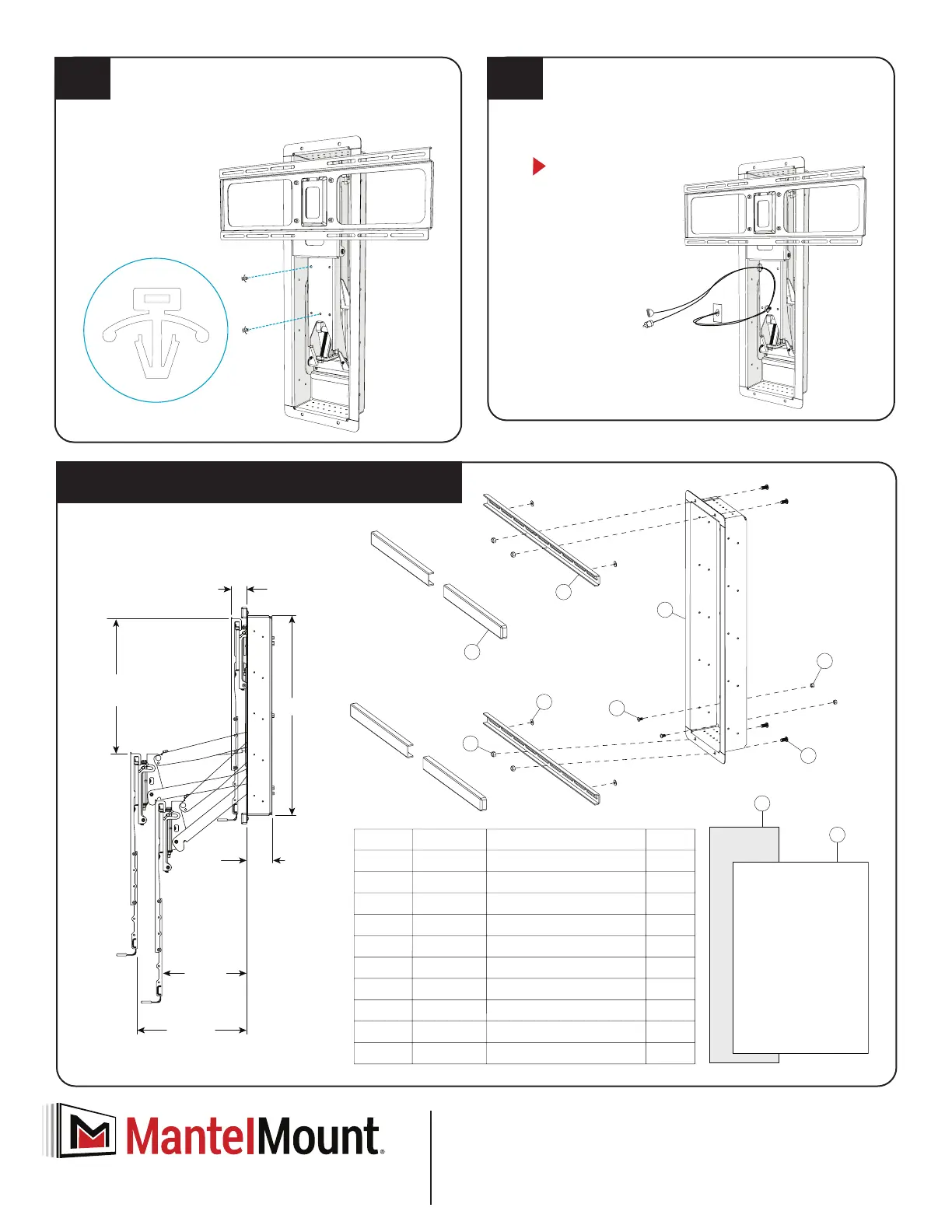
Item NO.Part Number Description QTY.
64
12110
4
Brace Cover
63
13048
2
Recess Brace 26” max spacing
61
13050
1
Recess Box
15
12178
2
Round Head Screw M6 x 10
14
12176
4
Round Head Screw M8 x 16
52
12187
4
Locknut M8
23
12185
2Nut M6
11
4
14126
Washer M8
66
1
15041
Cardboard Template
67
1RB100A
Addendum MM340-MM540
67
66
16.0
Max. Clearance
12.0
Min. Clearance
27.0
Maximum Drop
1.75
Thickness
3.7
Recess
Depth
28.2
MantelMount RB100 Recess Box
Insert Cable Tie Anchors into Lifting Arm.
Insert two Cable Tie Anchors {22} into the front holes on
the lower part of the Lifting Arm. Press rmly until at.
Use the included Cable Ties to attach cables.
Ensure Cable Ties {24} are sideways to the lower part of the
Lifting Arm {35}, making a gentle loop. The gure below
illustrates the recommended way to attach cables.
You can now proceed to step four of your installation manual.
{22}
Cables must be
long enough to
accommodate
the extension
and swivel of the
mount. Check all
ranges of motion
before tightening
the Cable Ties.
3.8 3.9


 To Previous Page