12
DTCXSL02EN - v2
8 - MAIN FUNCTIONS
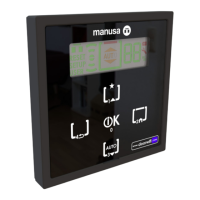
To avoid undesired manipulations, you may block the
selector keypad by simultaneously pressing the left and
right buttons for 2 seconds. Zone 5 of the display will show
a small lock sign
In this mode, if any button is pressed, the message
KEYPAD BLOCK will show on the display.
To unblock the keypad, simultaneously press again the left
and right buttons for 2 seconds. Then enter the pin code to
unblock.
8.1 - KEYPAD BLOCK
8.2 - PIN CHANGE
By default, the PIN is set to 1111. To modify it, access the
PIN menu (refer to section 9).
8.3 - REDUCED OPENING
In Automatic and Exit Only mode, the door may be
programmed to “Reduction opening” to reduce the opening
width of the door when the this opens.
To activate this mode, select option ACTIV REDUCT
OPEN in the ADJUSTMENTS menu.
8.4 - PEOPLE COUNTING SENSOR
8.5 - DATE AND TIME MANAGEMENT
8.6 - LANGUAGE
8.7 - CONTRAST
Subject to model features, the Visio operator also has a
people counting sensor. If you wish to view the count on
the display, select menu SHOW, and then option PEOPLE.
If you wish to reset the people counting sensor to zero, you
must select the option RESET NUM. PEOPLE on the menu
COUNTING MECHANISMS (refer to section 6)
The SMART selector may show the current time in area 3
of the display.
To view the time, select option TIME from the menu
SHOW. (refer to section 9)
To adjust the date and time, go to options DATE and TIME
in the menu CLOCK.
There are four languages available: Catalan, Spanish,
English and French. To change the language, select option
LANGUAGE from the menu ADJUSTMENTS.
To modify the contrast of the display, go to option
CONTRAST in the menu ADJUSTMENTS (see section 6).
9 - USER MENU
9.1 - MENU NAVIGATION
- Enter the user menu:
Press the central button for 1 second.
- Navigate through the different submenus:
To navigate through the different menu
options, press the left and right buttons.
- To validate selection and set-up changes:
Press the central button to validate the set-up
changes and to validate the selection of an
option or submenu.
- To exit a menu or submenu:
Select the option EXIT and press the central
button to exit the current menu or submenu
and go to the main screen or the menu imme-
diately above.
NAVIGATION MAP:
USER MENU
ADJUSTMENTS
ACTIVATE REDUCED OP.
PIN CODE
SHOW
TIME
PEOPLE COUNTER
CYCLES
BLANK
EXIT
CLOCK
DATE
TIME
EXIT
LANGUAGE
CATALAN
SPANISH
ENGLISH
FRENCH
EXIT
COUNTING SETTINGS
RESET CYCLES
RESET PEOPLE CTR
EXIT
CONTRAST [0-15]
EXIT
INFO
INSTALLATION
MAINTENANCE
CYCLES INST.
SELECTOR SW VERSION
DOOR SW VERSION
EXIT
EXIT



 To Next Page
 Loading...