Quick Reference Guide Series
Maplejet Co
www.maplejet.com
technical@maplejet.com
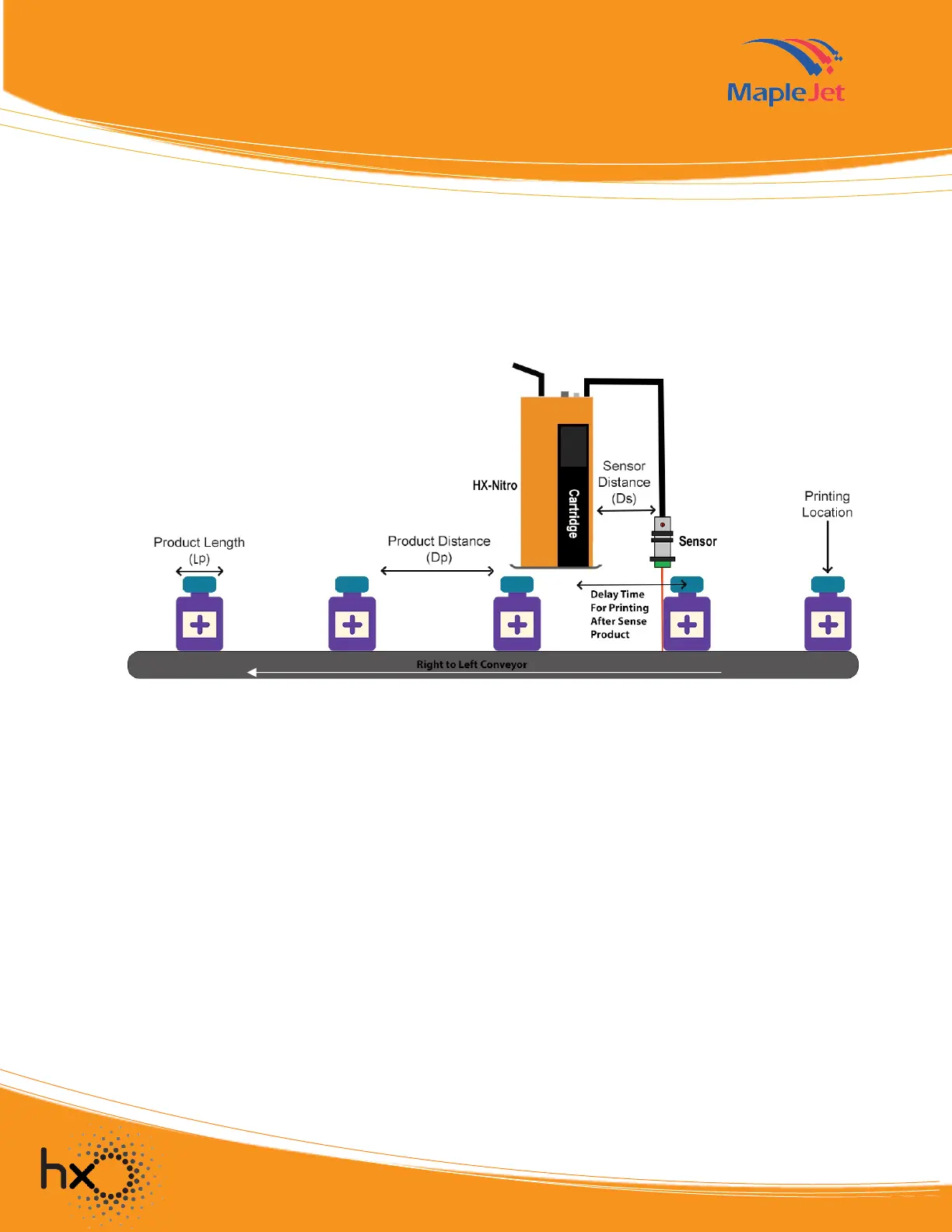
The distance between the print position and the printer nozzle depends on the sensor's distance from the
printer.
A shorter distance between the sensor and the printer causes higher printing precision. Therefore,
it is best to position the sensor closer to the printer. By reducing this distance, the delay time in print
parameter setting in Vanguard Create should also be reduced.
Installation Note
• The sensor's distance from the printer’s nozzles should not exceed the product distance (Dp) and
the product length (Lp). 𝐷𝑠 < (𝐿𝑝 + 𝐷𝑝)
• The print time is the total of the delay time and the duration of the actual message printing. This
time should not be longer than the time of the next product to reach the sensor.
• It is best to install the sensor closer to the printer.
• In order to have the highest printing speed, the delay should be as close as possible to zero.
Figure 6. Sensor and printer distance illustration


 To Next Page
 Loading...