EasyManua.ls Logo

Marantz 4100 - Channel Separation

Marantz 4100
27 pages
Print Icon
To Next Page IconTo Next Page
To Previous Page IconTo Previous Page
Loading...
9.
10.
1.
a
AWN
.
Measure
the
total
harmonic
distortion
with
the
analyzer
and
verify
it
is
less
than
0.3%.
NOTE:
Any
parasitic
oscillation
in
the
amplifier
will
be
displayed
on
the
oscilloscope,
when
capacitance
is.switched
into
the
load.
Switch
the
distortion
analyzer
back
to
SET
LEVEL
MANUAL.
(Do
not
adjust
sensitivity
of
analyzer.)
Change
the
frequency
of
the
audio
oscillator
and
distortion
analyzer
to
1KHz.
Adjust
audio
oscillator
output
as
necessary
to
have
a
full
scale
reading
on
the
O-1
scale
on
the
analyzer.
Measure
the
distortion,
verifying
it
is
no
greater
than
0.3%.
Repeat
steps
7
and
8,
changing
frequency
to
20Hz.
Distortion
should
be
no
more
than
0.3%.
Check
for
parasitic
oscillations;
there
should
be
none.
F.
Channel
Separation
Set
audio
oscillator
to
20KHz.
Connect
oscillator
to
front
left
channel
AUX
input
only,
with
shorting
plug
(10K
ohm)
in
all
other
channels
AUX
input.
Connect
distortion
analyzer
to
front
left
channel
speaker
output
terminals.
Adjust
oscillator
output
until
distortion
analyzer
indicates
0
dB
(2.8V).
Measure
RF,
LR,
RR
channel
output.
Distortion
analyzer
should
indicate
-30
dB
or
less.
Repeat
step
1
and
2
with
substituted
channel
driving.
If
indication
is
not
less
than
-30
dB,
adjust
input
wires
to
preamp
board
until
reading
is
-30
dB
or
less.
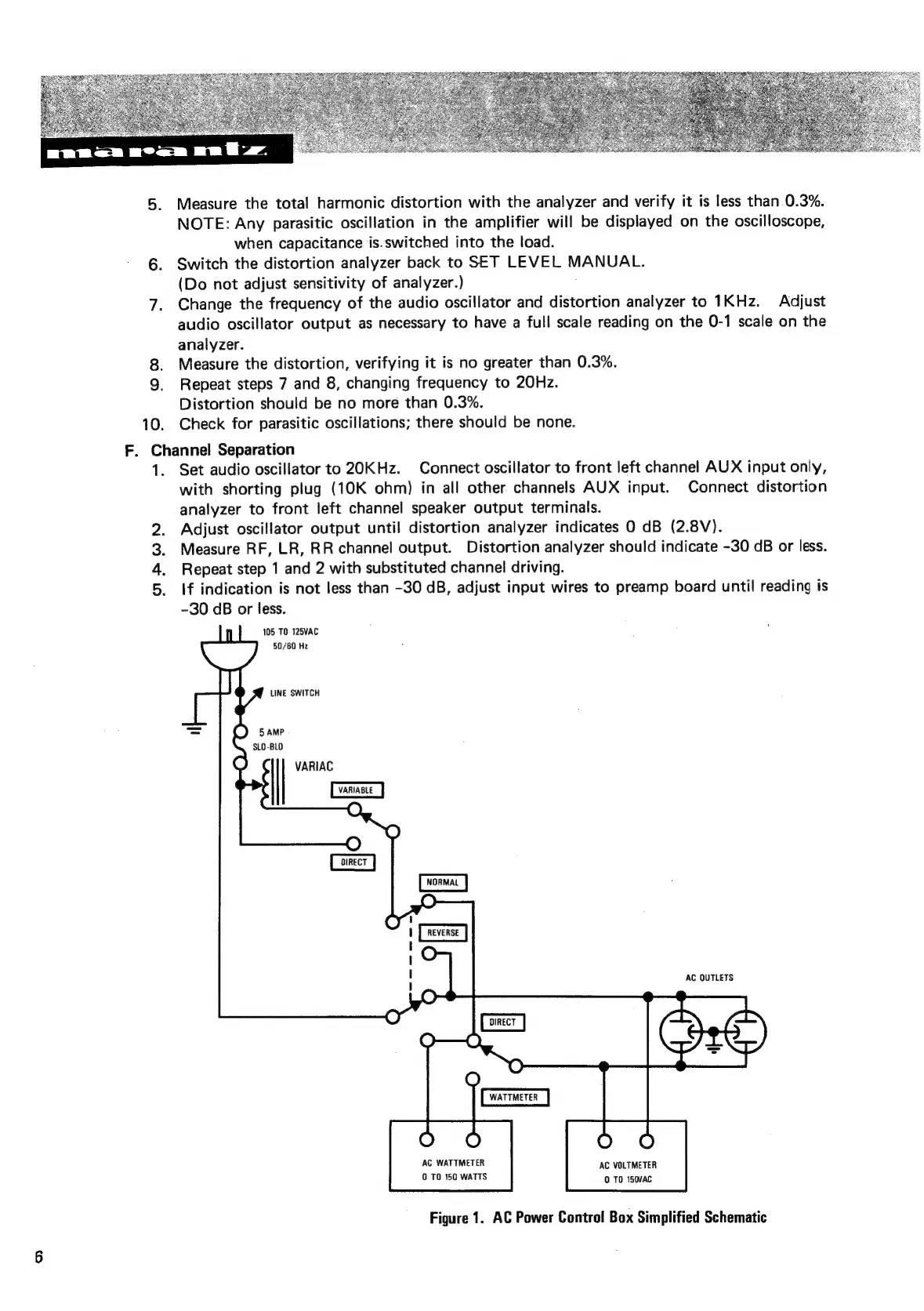
105
TO
125VAC
50/60
Hz
SLO
-BLO
VARIAG
AC
OUTLETS
WATTMETER
AC
WATTMETER
O
TO
150
WATTS
AC
VOLTMETER
0
TO
150VAC
Figure
1.
AC
Power
Control
Box
Simplified
Schematic

Related product manuals