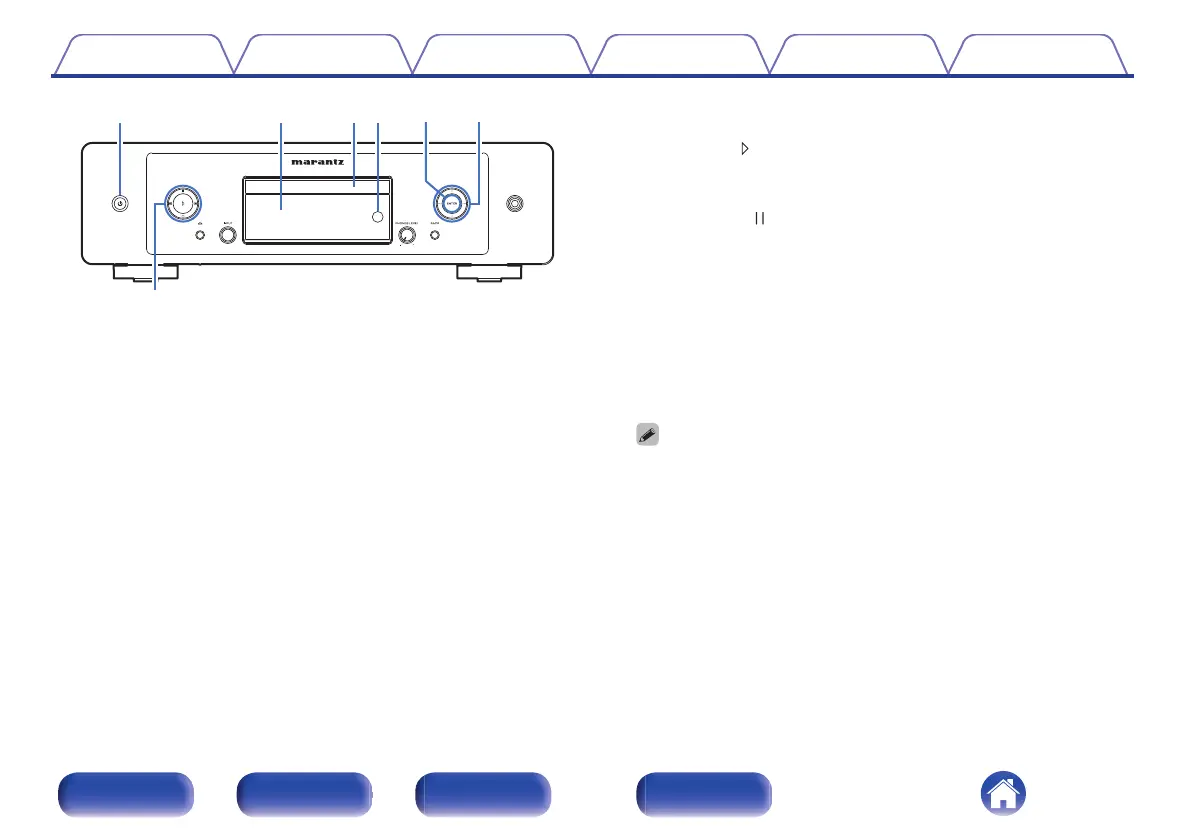
A
Power (X) button
This turns the power on/off (standby). (v p. 37)
B
Display
This displays various pieces of information.
C
Disc tray
Used to insert a disc. (v p. 137)
D
Remote control sensor
This receives signals from the remote control unit. (v p. 8)
E
ENTER button
Plays back and pauses tracks, and enters the selected content.
F
Cursor buttons
These select items.
G
System buttons
These perform playback related operations.
0
Play button ( )
If pressed while paused or stopped, resumes playback from the last
track played.
0
Pause button ( )
Press this button to pause during playback.
0
Forward-skip button (j)
Press this button during playback to play the next track.
0
Reverse-skip button (k)
Press this button during playback to restart the current track or play
the previous track.
0
Stop button (i)
Press this button to stop during playback.
0
Depending on the input source and online service, the operation cannot be
performed.
Contents Connections Playback Settings Tips Appendix
10
Front panel Rear panel
Remote control
unit
Index



 To Next Page