Playback order of music files
When there are multiple folders containing music files, the playback order
of folders is automatically set when this unit reads the media. Files in each
folder are played in alphabetical order of file name.
CD-R/CD-RW
For playback of files on CD-R or CD-RW, files in all folders on the first
layer are played first, next on the second layer, then next on the third layer,
and so on in this order.
0
The playback order displayed on a PC may differ from the actual playback order.
0
The playback order with a CD-R/CD-RW may differ, depending on the writing
software.
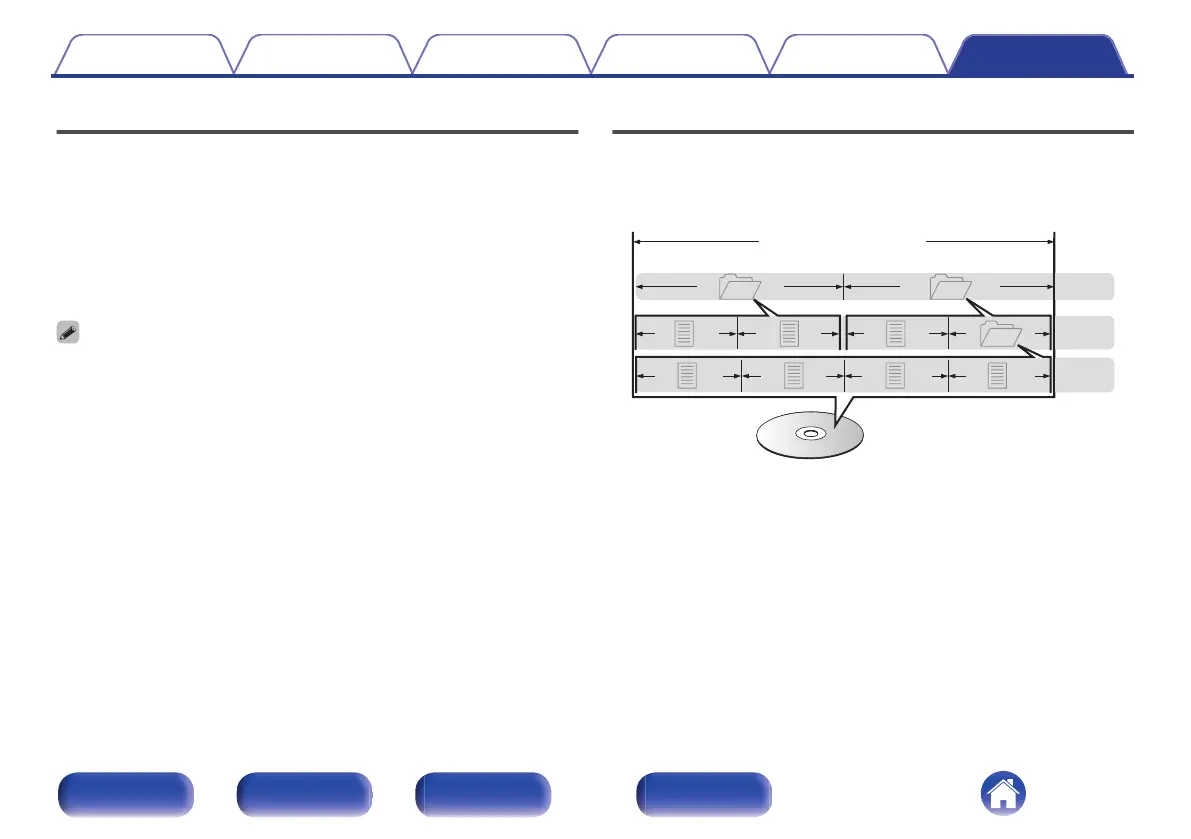
About discs and files
Music files recorded on CD-R/CD-RW are divided into large segments
(folders) and small segments (files). Files are stored in folders, and folders
can be placed for storage in a hierarchy. The unit can recognize up to 16
levels of folders.
3rd level
File 7
File 6
File 5
File 4
2nd level
Folder 3
File 3File 2
File 1
1st level
Folder 1 Folder 2
CD-R/CD-RW
0
When writing music files on a CD-R/CD-RW disc, set the writing
software’s format to “ISO9660”. The files may not play properly if they
are recorded in other formats. For details, refer to the instructions of
your writing software.
Contents
Connections Playback Settings Tips Appendix
134
Front panel Rear panel
Remote control
unit
Index



 To Next Page