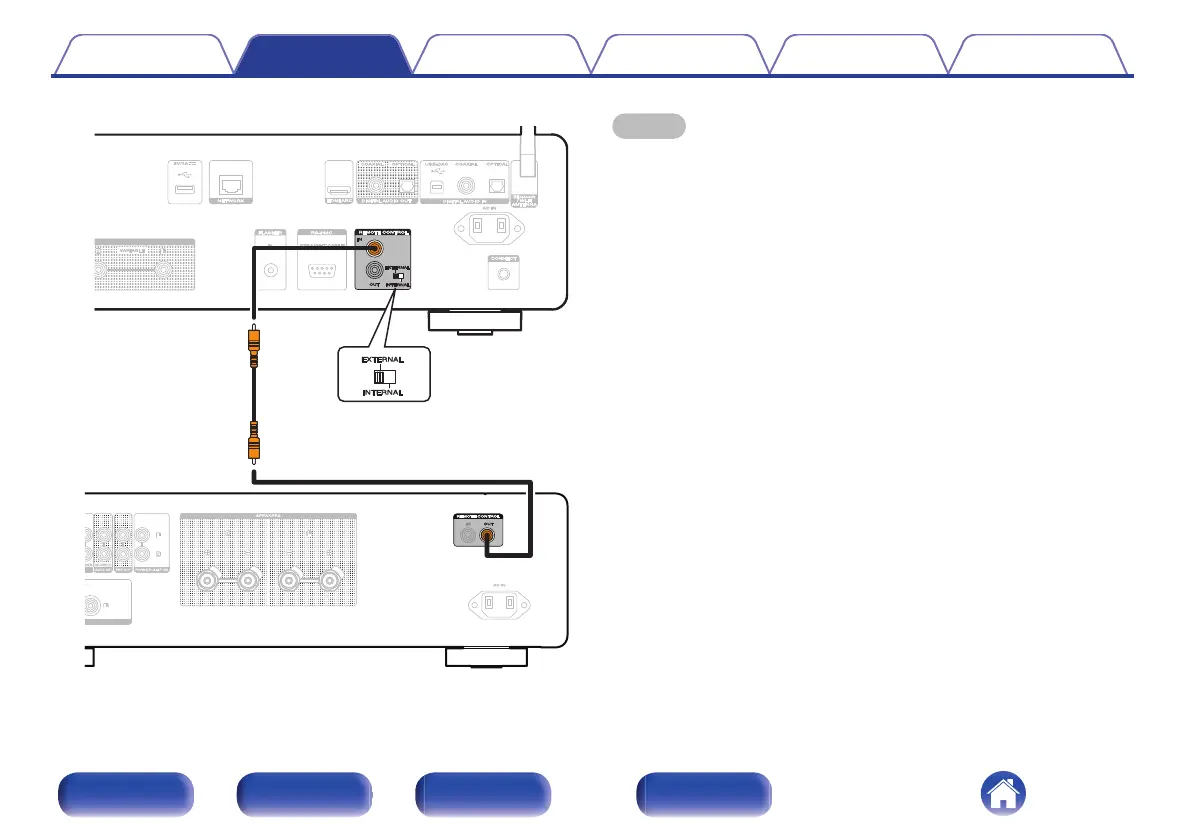
DER RECORDER
AUDIO OUT
PRE OUT
POWER AMP IN
This unit
Set to
“EXTERNAL”.
Amplifier
Remote
connector cable
(included)
NOTE
0
When connecting some Marantz amplifiers, it may be necessary to configure the
following settings to easily adjust the volume using the HDMI ARC function of your
TV.
0
If there is an EXTERNAL/INTERNAL switch on the rear panel of your amplifier.
1. Turn the EXTERNAL/INTERNAL switch on this unit to
“INTERNAL”.
2. Turn the EXTERNAL/INTERNAL switch on this amplifier to
“EXTERNAL”.
0
This setting will disable remote sensor reception of this amplifier.
0
To operate the unit, point the remote control at the remote sensor of this unit.
0
If your amplifier’s remote sensor reception function can be set to “Disable”.
1. Turn the EXTERNAL/INTERNAL switch on this unit to
“INTERNAL”.
2. Set the remote sensor reception function to “Disable ”.
0
This setting will disable remote sensor reception of this amplifier.
0
To operate the unit, point the remote control at the remote sensor of this unit.
Contents Connections Playback Settings Tips Appendix
34
Front panel Rear panel
Remote control
unit
Index



 To Next Page