EasyManua.ls Logo

Marantz cp430 - Playback Noise Measurement; MPX Filter Adjustment; Record;Playback Frequency Response and Recording Level Adjustment; Aligniment. Ponts

Marantz cp430
26 pages
Print Icon
To Next Page IconTo Next Page
To Previous Page IconTo Previous Page
Loading...
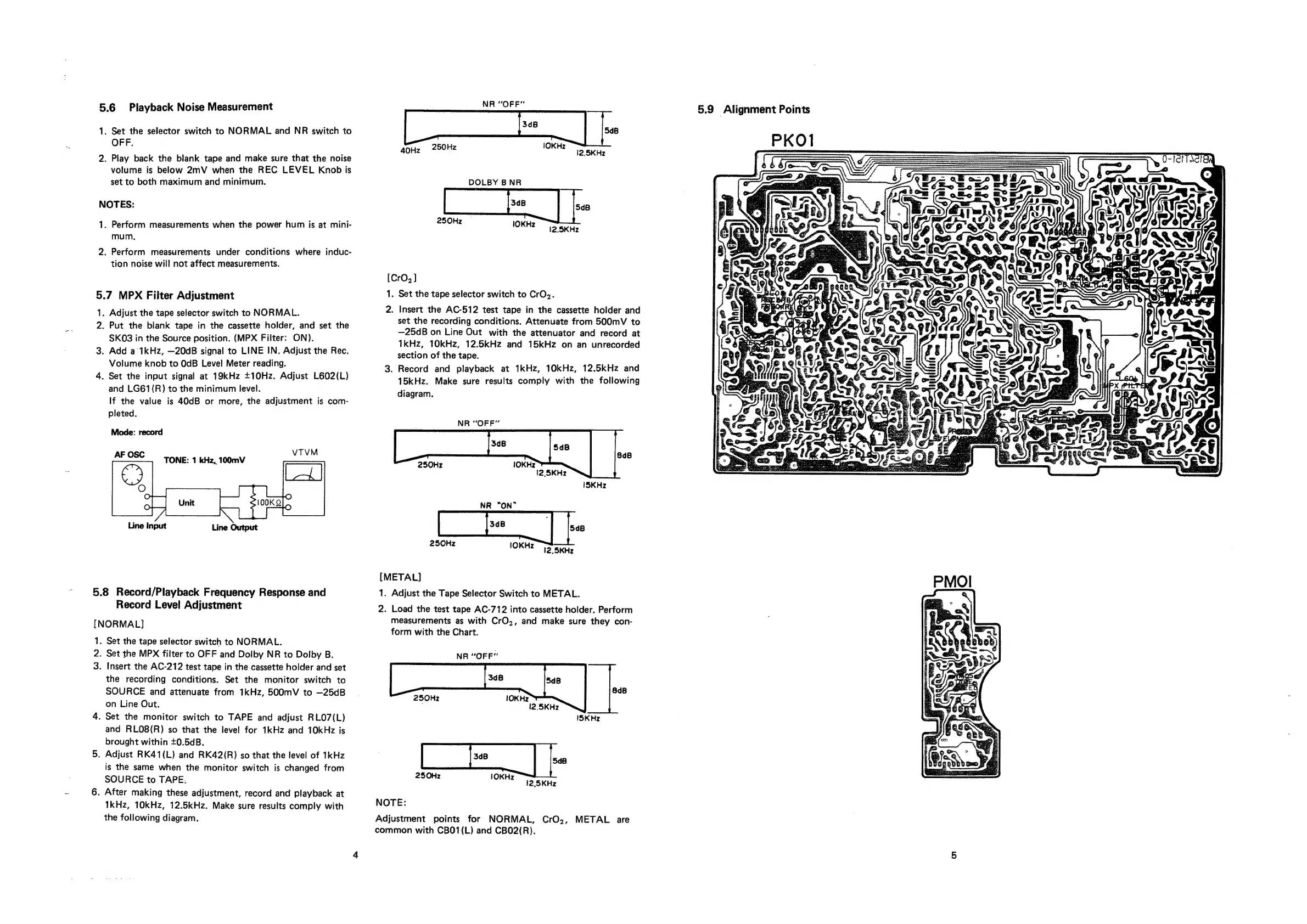
5.6
Playback
Noise
Measurement
NS
ORF
5.9
Alignment
Points
1.
Set
the
selector
switch
to
NORMAL
and
NR
switch
to
ae
ae
side
40Hz
250Hz
lOKHz
12
SKHz
2.
Play
back
the
blank
tape
and
make
sure
that
the
noise
:
volume
is
below
2mV
when
the
REC
LEVEL
Knob
is
set
to
both
maximum
and
minimum.
DOLBY
BNR
1.
Perform
measurements
when
the
power
hum
is
at
mini-
250Hz
IOKHz
12.
5KHz
Hi
ay
"
mum.
e
4
>
2.
Perform
measurements
under
conditions
where
induc-
Cin
ee
>
OF
le
tion
noise
will
not
affect
measurements.
:
ok
=
[CrO,]
us
jens
@
seat
5.7
MPX
Filter
Adjustment
1.
Set
the
tape
selector
switch
to
CrO2.
N
iy
1.
Adjust
the
tape
selector
switch
to
NORMAL.
2.
Insert
the
AC-512
test
tape
in
the
cassette
holder
and
Tes
2.
Put
the
blank
tape
in
the
cassette
holder,
and
set
the
set
the
recording
conditions.
Attenuate
from
500mV
to
;
:
we
MPX
Filter:
ON)
—25dB
on
Line
Out
with
the
attenuator
and
record
at
A
Po
BIOs
ies
tie
Source
pastsiore.|
nats
1kHz,
10kHz,
12.5kHz
and
15kHz
on
an
unrecorded
ey
ony
3.
Add
a
1kHz,
—20dB
signal
to
LINE
IN.
Adjust
the
Rec.
section
of
the
tape.
aN
<
NG
gm
Volume
knob
r0
OgB
Level
Meter
reading.
- .
Record
and
playback
at
1kHz,
10kHz,
12.5kHz
and
dR,
f
mo
Fr
4.
Set
the
input
signal
at
19kHz
+10Hz.
Adjust
L602(L)
15kHz.
Make
sure
results
comply
with
the
following
f
ng
a:
Ze
is
and
LG61(R)
to
the
minimum
level.
If
the
value
is
40dB
or
more,
the
adjustment
is
com-
pleted.
Mode:
record
diagram.
NR
“OFF”
8dB
1OKH
z
12,
5KHz
ISKHz
NR
“ON”
[fe
|
i
250Hz
1OKHz
12.
5KHz
Se,
TILLY,
a,
rt
;
r
é
SSO.
z
Mea
se
[METAL]
1.
Adjust
the
Tape
Selector
Switch
to
METAL.
2.
Load
the
test
tape
AC-712
into
cassette
holder.
Perform
measurements
as
with
CrO.,
and
make
sure
they
con-
form
with
the
Chart.
5.8
Record/Playback Frequency
Response
and
Record
Level
Adjustment
[NORMAL]
.
Set
the
tape
selector
switch
to
NORMAL.
.
Set
the
MPX
filter
to
OFF
and
Dolby
NR
to
Dolby
B.
3.
Insert
the
AC-212
test
tape
in
the
cassette
holder
and
set
the
recording
conditions.
Set
the
monitor
switch
to
SOURCE
and
attenuate
from
1kHz,
500mV
to
—25dB_
lOKH>
on
Line
Out.
12.5KHz
4.
Set
the
monitor
switch
to
TAPE
and
adjust
RLO7(L)
and
RLO8(R)
so
that
the
level
for
1kHz
and
10kHz
is
brought
within
+0.5dB.
5.
Adjust
RK41(L)
and
RK42(R)
so
that
the
level
of
1kHz
[
be
|
is
the
same
when
the
monitor
switch
is
changed
from
SOURCE
to
TAPE.
eae
lOKH2
"12.
SKHz
6.
After
making
these
adjustment,
record
and
playback
at
NOTE:
1kHz,
10kHz,
12.5kHz.
Make
sure
results
comply
with
the
following
diagram.
Adjustment
points
for
NORMAL,
CrO,,
METAL
are
common
with
CB01(L)
and
CB02(R).
_
NR
“OFF”
nN
8dB
ISKHz

Other manuals for Marantz cp430

Related product manuals