English
9
1 Connection to mains
2
AANNAALLOOGG OOUUTT
(CD) ....connects CD player deck to the
line input of an amplifier (left and
right)
3
DDIIGGIITTAALL OOUUTT
(CD) ....connects CD player deck to the
digital coaxial input of e.g.
amplifier or recording device
4
AANNAALLOOGG IINN
(CDR) ......connects to the line output of an
amplifier (left and right)
5
AANNAALLOOGG OOUUTT
(CDR & CD)
......................................connects to the line input of an
amplifier (left and right)
6
DDIIGGIITTAALL IINN
(CDR) ......connects to the digital coaxial
output of an external CD player
7
DDIIGGIITTAALL OOUUTT
(CDR & CD)
......................................connects to the digital coaxial
input of e.g. amplifier or recording
device
8
OOPPTTIICCAALL IINN
(CDR) ......connects to the digital optical
output of an external CD player
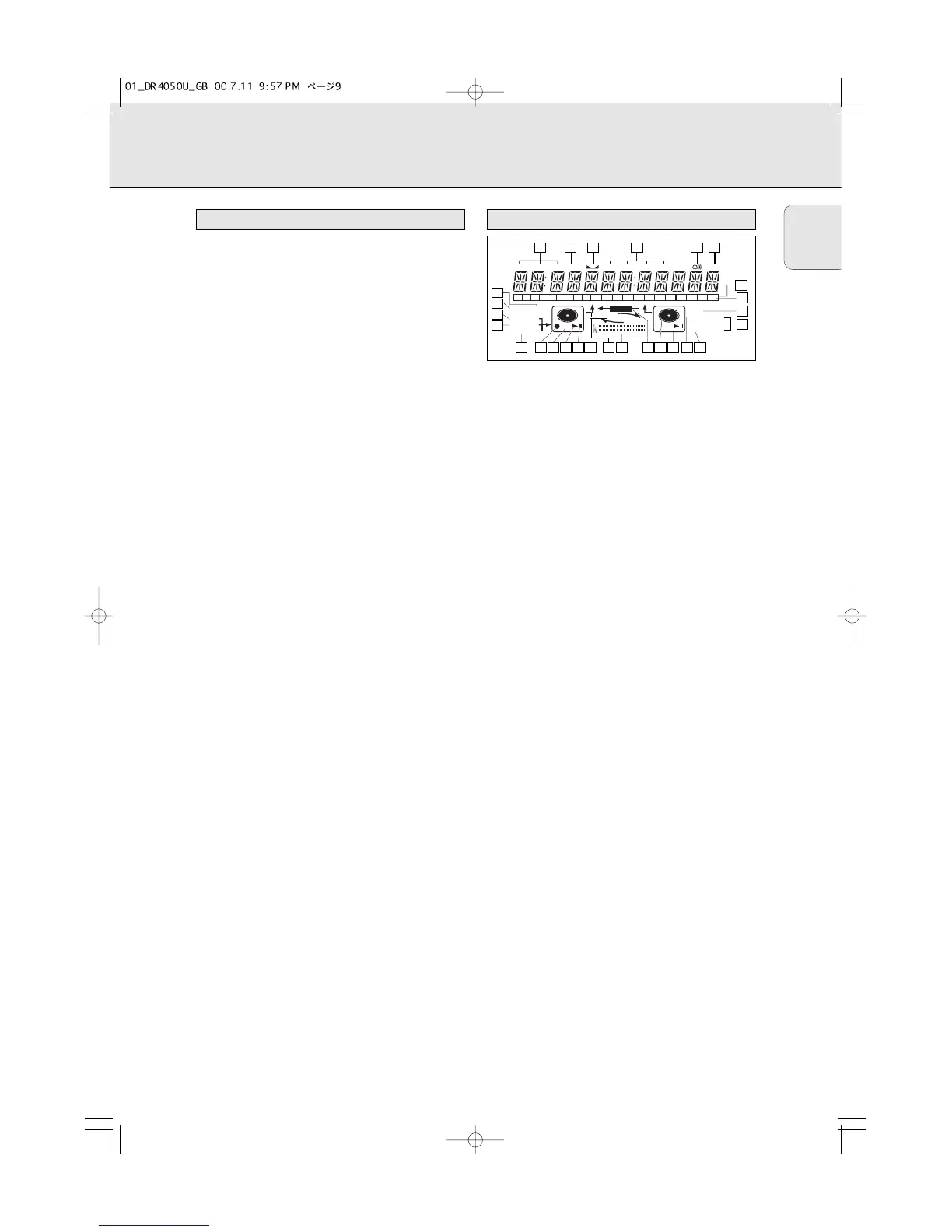
1
RREEMM//RREECC TTIIMMEE
..........remaining time/remaining
recording time/recording time
2
TTRRAACCKK
........................track number
3
FE
..............................balance (lights during balance
adjustment)
4
TTOOTTAALL RREEMM
TTRRAACCKK TTIIMMEE
..............total or remaining time of disc or
track
5
}}
................................remote control active
6
SSTTEEPP
............................indicates the number of tracks in a
program
7
TTrraacckk bbaarr
....................indicates:
- tracks on a disc or in a program
- track in play
8
++ 2200
..............................disc or program contains more
than 20 tracks
9
PPRROOGG
(ram) ..................flashes during programming/lights
in program mode
0
RREEPPEEAATT TTRRAACCKK//AALLLL
..lights up when a track/ complete
disc (or program) is repeated
!
SSCCAANN
..........................lights up when the first 10
seconds of each track are played
@
SSHHUUFFFFLLEE
......................plays tracks in random order
# s ..............................CD player deck selected
$
c
..............................CD inserted (a pre-recorded CD or
finalized CDR or CDRW disc)
% f
RREECCOORRDD
g ............lights during recording from the
internal CD
^
LL
/
RR
; ;........................record/play level bar. Indicates the
audio signal level
& j k ........................DJ mode selected
* i
CCHHAANNGGEERR
h ........changer mode selected
( ; ..................................pause function active
) B ................................lights during play
¡
RR((WW))
............................unfinalized CDR(W) disc inserted
™ 0 ................................lights during recording
£
AANNAALLOOGG
......................- analog input selected for
external recording
- analog recording
≤
OOPPTTIICCAALL II
..................optical input I selected for external
recording
∞
DDIIGGIITTAALL II
....................digital input I selected for external
recording
§
SSYYNNCC
..........................automatic or synchronised start of
external recording
≥
MMAANNUUAALL
....................manual start of external recording



 To Next Page