8
6. BACK END / FRONT END SOFTWARE
(Firmware) VERSION CHECK
1. First, connect TV monitor to the unit.
2. Press the POWER ON/STANDBY button to turn on the
unit.
3. Press the OPEN/CLOSE button to open the tray.
4. Press the CLEAR, 2, 5, 8, 0 and CLEAR button in order
on the remote controller.
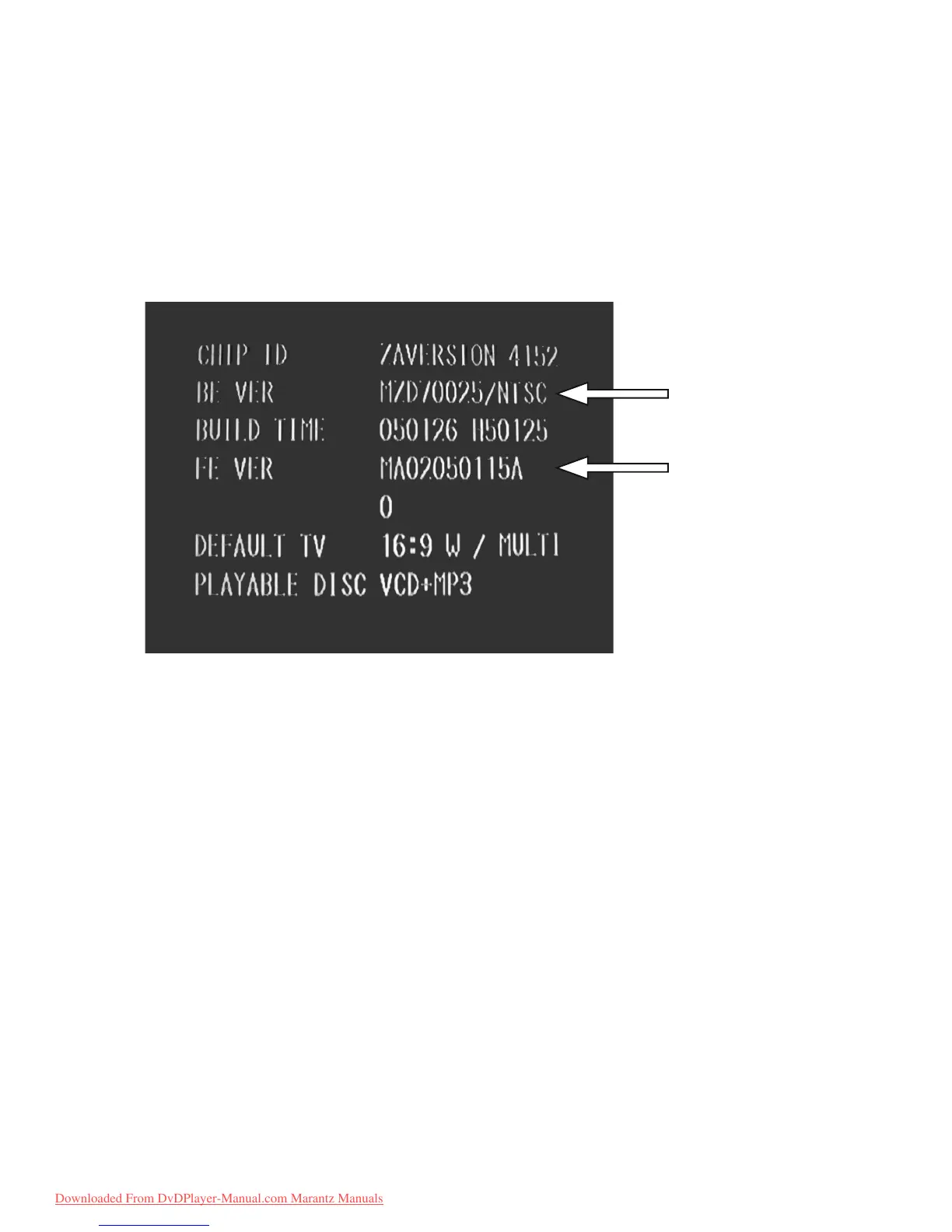
5. The following information is displayed on the TV screen.
The firmware version is shown.
6. Press the POWER ON/STANDBY button to quit
SERVICE MODE.
BACK END version
FRONT END version
6. BACK END / FRONT END SOFTWARE
(Firmware) VERSION CHECK
1.࣏ƣȢȋǿȸǛዓƠƯƘƩƞƍŵ
2. POWER ON/STANDBY ǛƠƯஜೞƷᩓเǛλǕLJƢŵ
3. OPEN/CLOSE ǛƠƯ TRAY ǛЈƠLJƢŵ
4. ȪȢdzȳư CLEAR, 2, 5, 8, 0, CLEAR ƷƴƠLJƢŵ
5. VERSION ᄩᛐဒ᩿ƕᘙᅆƞǕLJƢŵ
6. POWER ON/STANDBY ǛƠƯᩓเǛЏǓLJƢŵ
Downloaded From DvDPlayer-Manual.com Marantz Manuals



 To Next Page