10
NAMES AND
FUNCTIONS
BASIC
OPERATIONS
ADVANCED
OPERATIONS
TROUBLESHOOTING
OTHERS
ENGLISH
BASIC
OPERATIONS
BASIC OPERATIONS
IS-LINK (WIRED) CONNECTIONS
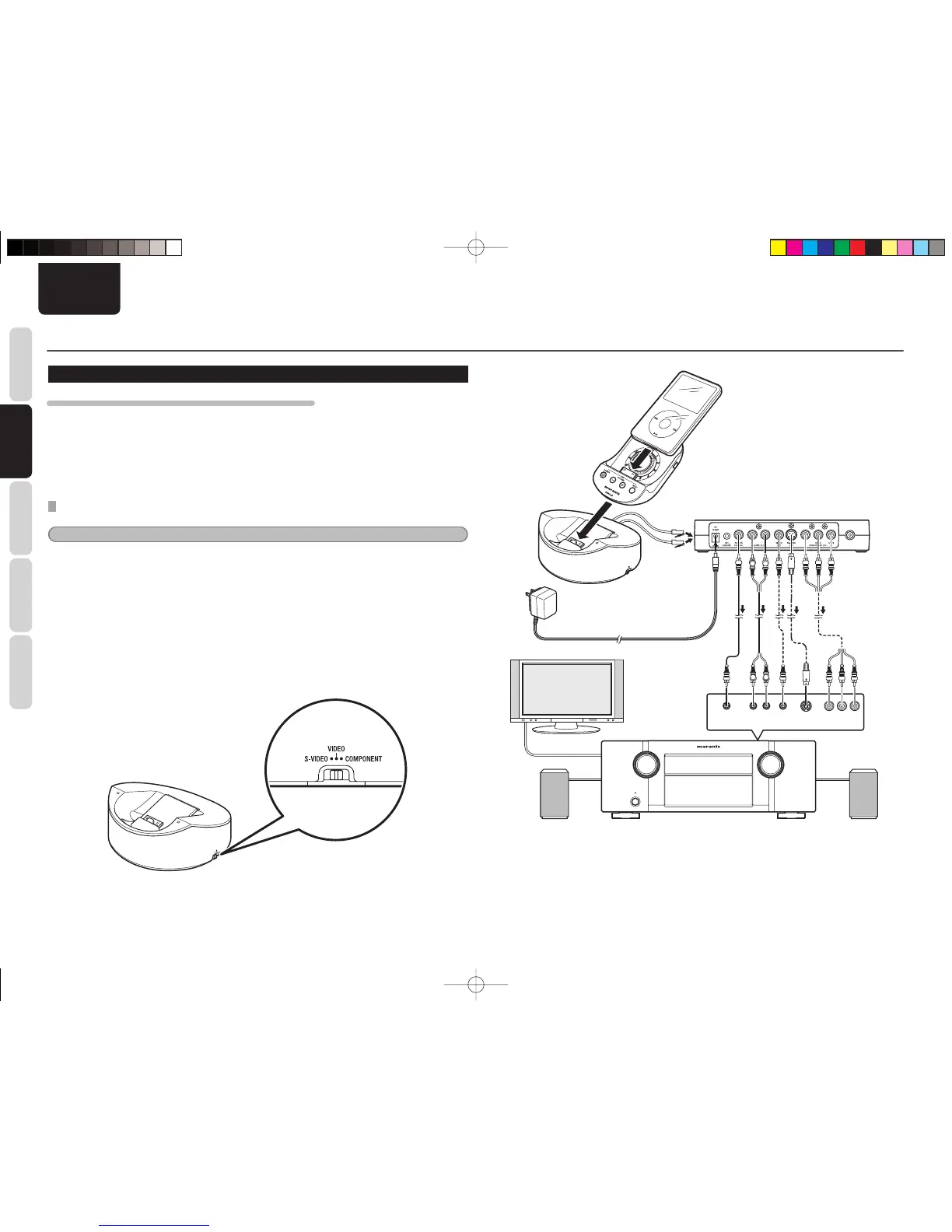
WHAT ARE AVAILABLE WHEN IS-LINK CONNECTIONS ARE USED
• Audio and video playback
• Remote operations of a Marantz amplifi er or receiver, using the AMP control buttons on the handset
• Remote control of a Marantz amplifi er, using the supplied remote controller
• Use of the base unit as an infrared signal receiver for controlling a Marantz product
BEFORE CONNECTION
Notes
• What are NOT available when IS-LINK connections are made are as follows:
• Video playback of an iPod when the iPod and the handset are detached from the base unit
• During IS-LINK connection, power is supplied to the base unit from the extender. Therefore, it is not necessary
to connect the AC adaptor to the base unit.
• Three types of video signals are output from the extender. Set the Video selection switch of the base unit
according to the video output signal to be used.
• If the Video selection switch is switched during video playback, the output signal may not be switched,
depending on the type of iPods being connected. In such a case, go back to the MENU screen then restart video
playback.
• Some iPods do not support component video output.
• The video playback signal may not be output from the iPod immediately after the iPod is attached to the handset
and the base unit that is connected with the extender via the IS-LINK cables. In such a case, wait a while, go
back to the MENU screen for video selection on the iPod, then restart playback.
VID
E
O
COMPON
ENT
S-
VID
EO
COMPONENT
S-VIDEO
USB
MENU
VIDEO
REMOTE AUDIO IN
LR
S-VIDEO
IN
VIDEO
IN
Y Cb / Pb Cr / Pr
COMPONENT
VIDEO IN
LR
L R
IS-LINK cables
Handset
Base unit
Extender
IS301E01Eng.indd10IS301E01Eng.indd10 09.1.305:36:38PM09.1.305:36:38PM



 To Next Page