3
NAMES AND
FUNCTIONS
ENGLISH
BASIC
OPERATIONS
ADVANCED
OPERATIONS
TROUBLESHOOTING
OTHERS
NAMES AND
FUNCTIONS
HANDSET (IS301)
uo
ew
i
r
qyt
NAMES AND FUNCTIONS
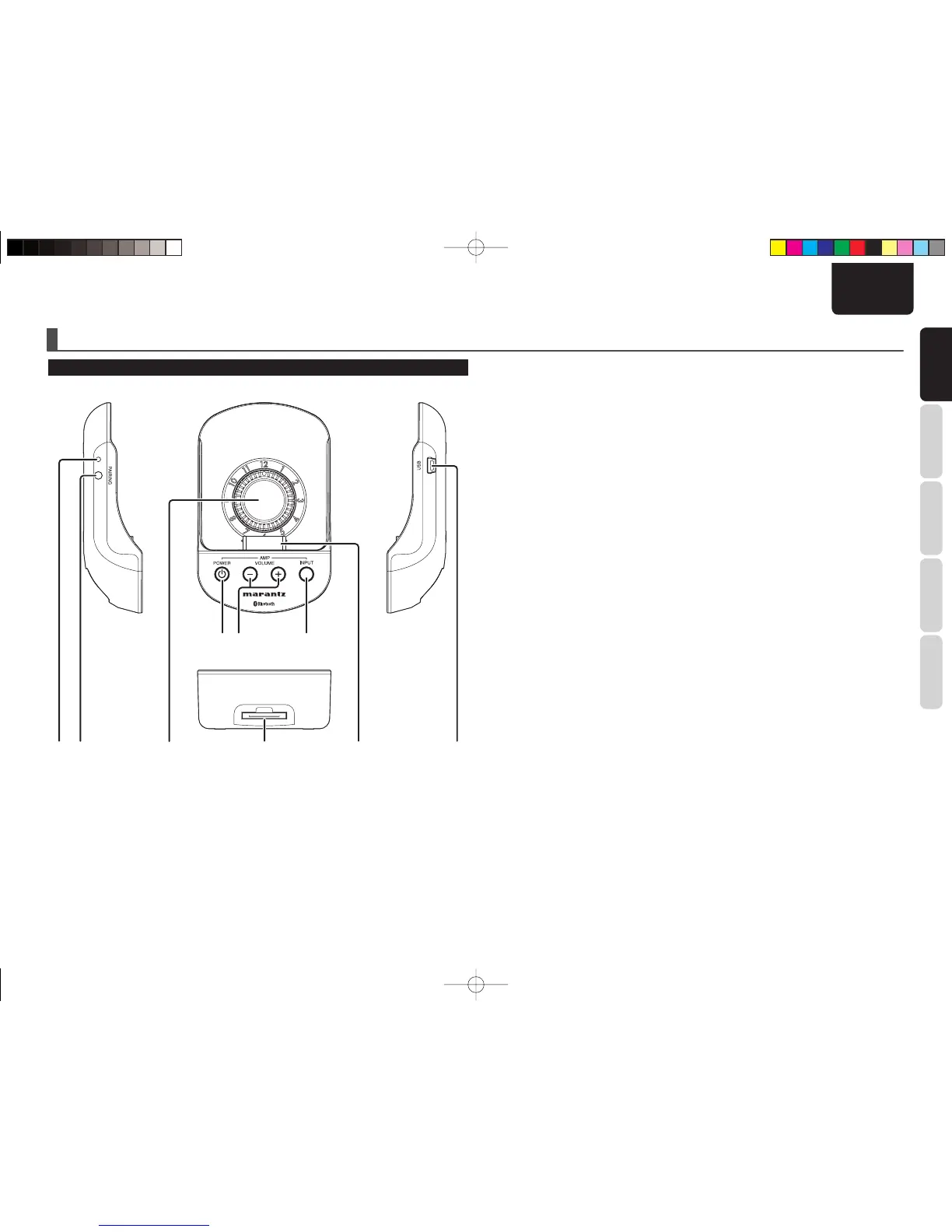
q USB connector
Connect your PC, using the supplied USB cable.
Synchronizing the iPod with iTunes is possible with
your iPod docked in the handset.
When an iPod is connected to your PC via the USB
connector on the handset, the PC may not recognize
the iPod, depending on the type of iPod used or PC
environment. In such a case, detach then reattach
the iPod from/to the handset, or use the USB cable
supplied with the iPod.
w iPod docking connector
Connect the docking connector of the iPod.
e Base connector
Connect the Handset connector of the base unit.
r Thickness adjustment knob
Turn this knob to adjust the thickness, according to
the thickness of your iPod product. Inappropriate
thickness adjustment may result in damage to the
connectors.
For details, see “CONNECTING YOUR iPOD WITH
THE HANDSET” (page 8).
t PAIRING button
Use this button to establish Bluetooth connection
with the extender.
y PAIRING indicator
This indicates connection status with the extender
with lighting/fl ashing and colors.
u POWER button
(AMP control buttons)
This button turns ON/OFF the Marantz amplifi er/
receiver that is remotely connected with the
extender.
i VOL +/– buttons
(AMP control buttons)
These buttons increase/decrease the volume of
the Marantz amplifier/receiver that is remotely
connected with the extender.
o INPUT button
(AMP control buttons)
This button switches the input sources of the
Marantz amplifier/AV receiver that is remotely
connected with the extender.
(Some products do not correspond to this function.)
IS301E01Eng.indd3IS301E01Eng.indd3 09.1.305:35:51PM09.1.305:35:51PM



 To Next Page