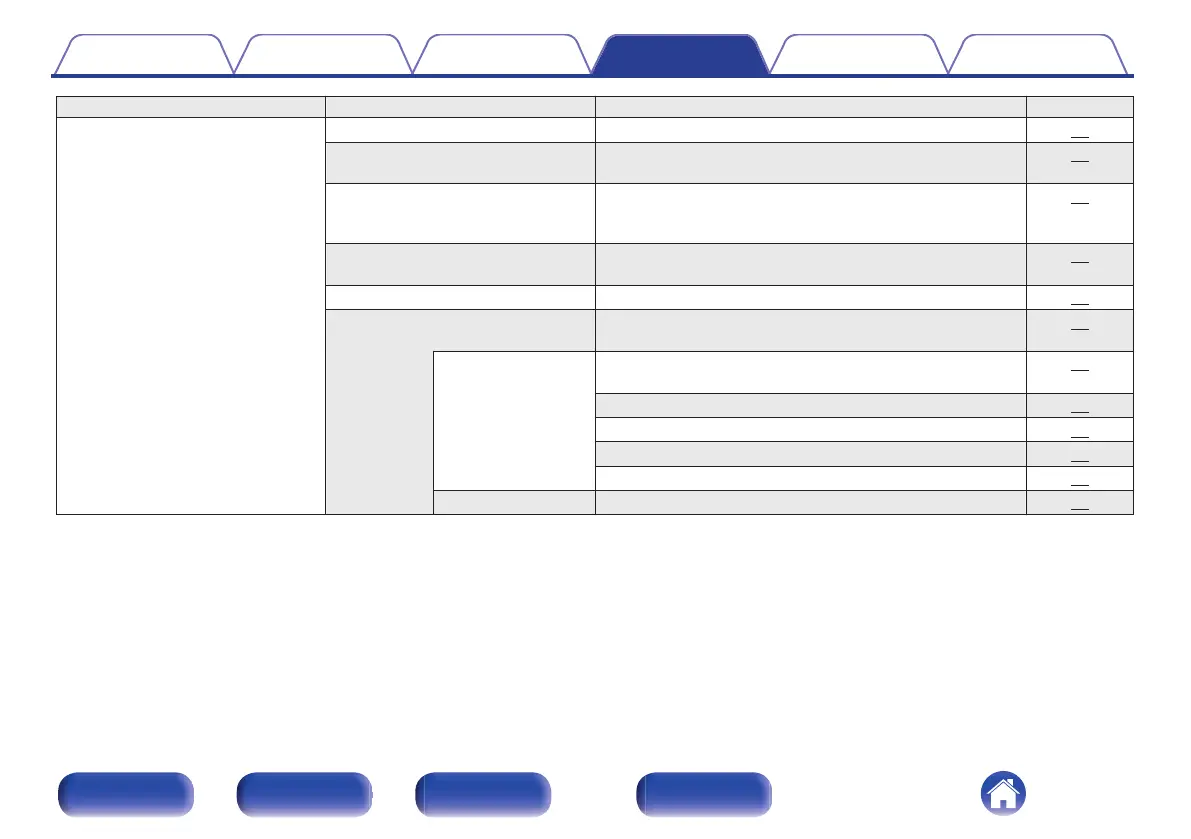
Setting items Detailed items Description/Detailed items Page
Network Network Information Displays various information about the network. 79
Wi-Fi The Wi-Fi function can be stopped to prevent noise that
affects the sound quality.
79
Bluetooth Stopping Bluetooth function reduces a source of noise that
affects sound quality, enabling higher sound quality
playback.
79
Network Control Performs the on/off settings for the network function when in
standby mode.
80
Friendly Name Edits a name displayed on the Internet. 80
Connection Choose whether to connect the home network to a wireless
LAN or a wired LAN.
81
Wi-Fi Use the wireless LAN (Wi-Fi) function to connect to a
network.
81
Auto-Scan 81
Share Wi-Fi setting from an iOS device 82
WPS Router 82
Manual 83
Wired Use a LAN cable to connect to a network. 81
Contents Connections Playback Settings Tips Appendix
65
Front panel Rear panel
Remote control
unit
Index



 To Next Page