4
12. Tempo Control: Press and release this knob to access the Tempo Control (t
C
) and turn the knob to to adjust the
tempo of the audio playback in a range from -15% to +15%, in 1.5 increments. Press this knob again to lock the
Tempo (t
L
).
13. Track Select/Search Buttons: In CD, USB, BT, or SD Mode, press and release the |<</<< button to go to the
previous track. Press and release the >>/>>| button to go to the next track. In CD, USB, or SD Mode Press and
hold the |<</<< button to rewind through a track at 5 times the normal playback speed. Press and hold the
>>/>>| button to fast-forward through a track at 5 times the normal playback speed.
14. Stop Button: Press this button to stop playback. To view current firmware version, hold the stop button while
powering on the unit.
15. Play/Pause Button: Press this button to start, resume, or pause playback.
16. Number Buttons (0–9): In CD Mode, press one of these buttons to directly select a track to play. If the track
number is two digits, press the buttons in succession (e.g., 1 then 2 for Track 12).
17. SD Card Slot: Insert your SD card here to play music files.
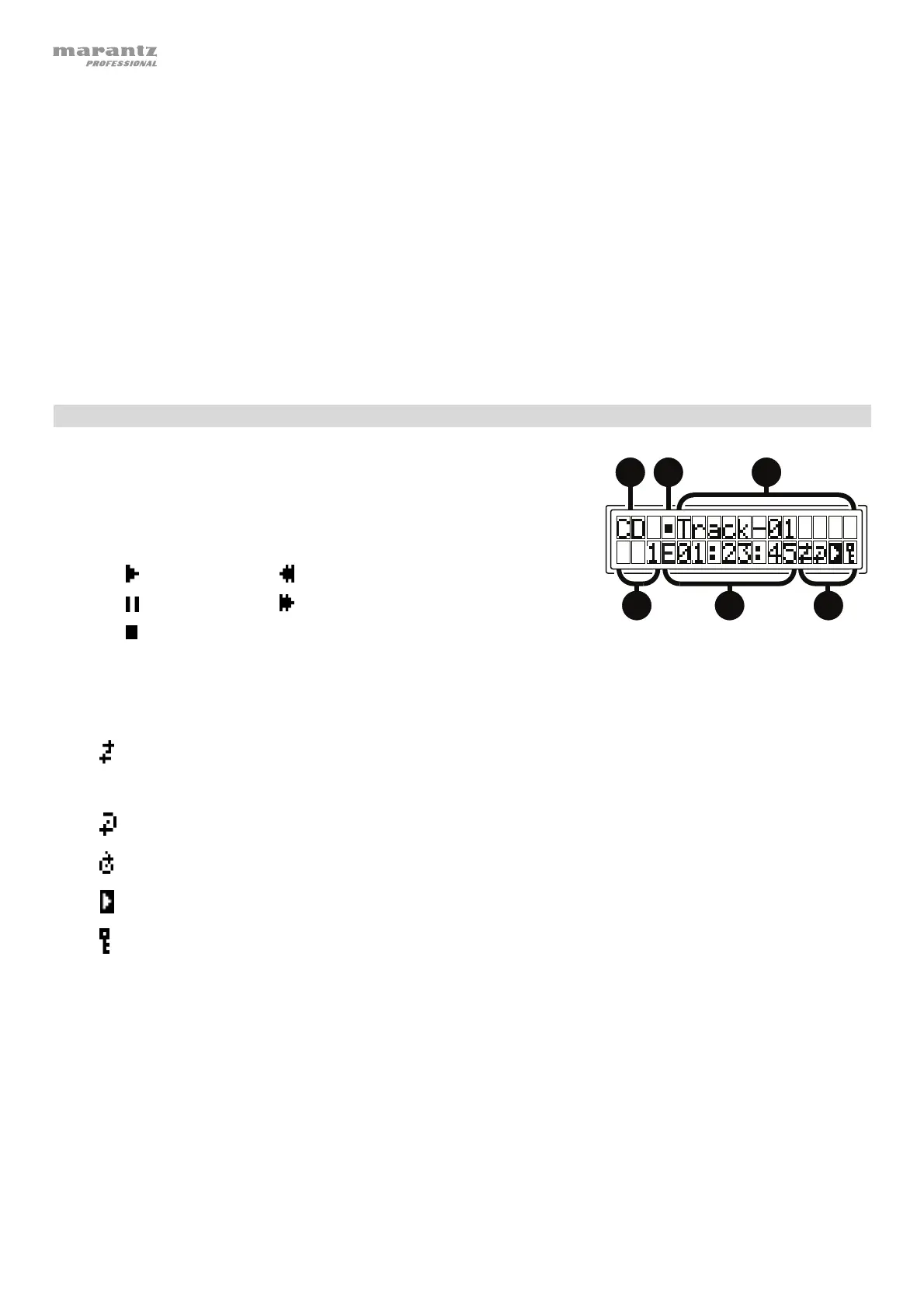
Display
1. Media Type: This is the currently selected media: CD, AUX, USB, SD or
Bluetooth. See Operation > Selecting Media Playback Mode for more
information.
2. Playback Operation Icon: This shows various symbols to indicate the
current playback status:
Playing Rewinding
Paused Fast-Forwarding
Stopped
3. Information: This shows extra information about the media being played.
4. Track/File Number: This is the number of the track or file.
5. Function Icons: This shows various symbols to indicate these current functions:
Random Playback (see Operation > Playing Audio CDs for more information)
Single Play Mode (see Operation > Playing Audio CDs for more information)
Repeat One (see Operation > Playing Audio CDs for more information)
Repeat All (see Operation > Playing Audio CDs for more information)
Power-On Play (see Operation > Additional Funct
ons > Powe
-On Play for more information)
Panel Lock (see Operation > Additional Functions > Panel Lock for more information)
t
C
Tempo Control (see Features > Front Panel > Tempo Contro
for more information)
t
L
Tempo Lock (see Features > Front Panel > Tempo Contro
for more information)
6. Time: In CD, SD and USB Mode, this displays how much time has elapsed, the remaining time, total elapsed
time, or the total remaining time (for CD mode only) shown as hh:mm:ss (hours, minutes, and seconds).
See Operation > Playing Audio CDs for more information.
1
23
56
4


 To Next Page
 Loading...






