EasyManua.ls Logo

Marantz PMD201 - Operating Instructions; Preliminary Control Settings; Recording Connections; Recording Procedure

Marantz PMD201
7 pages
Print Icon
To Next Page IconTo Next Page
To Previous Page IconTo Previous Page
Loading...
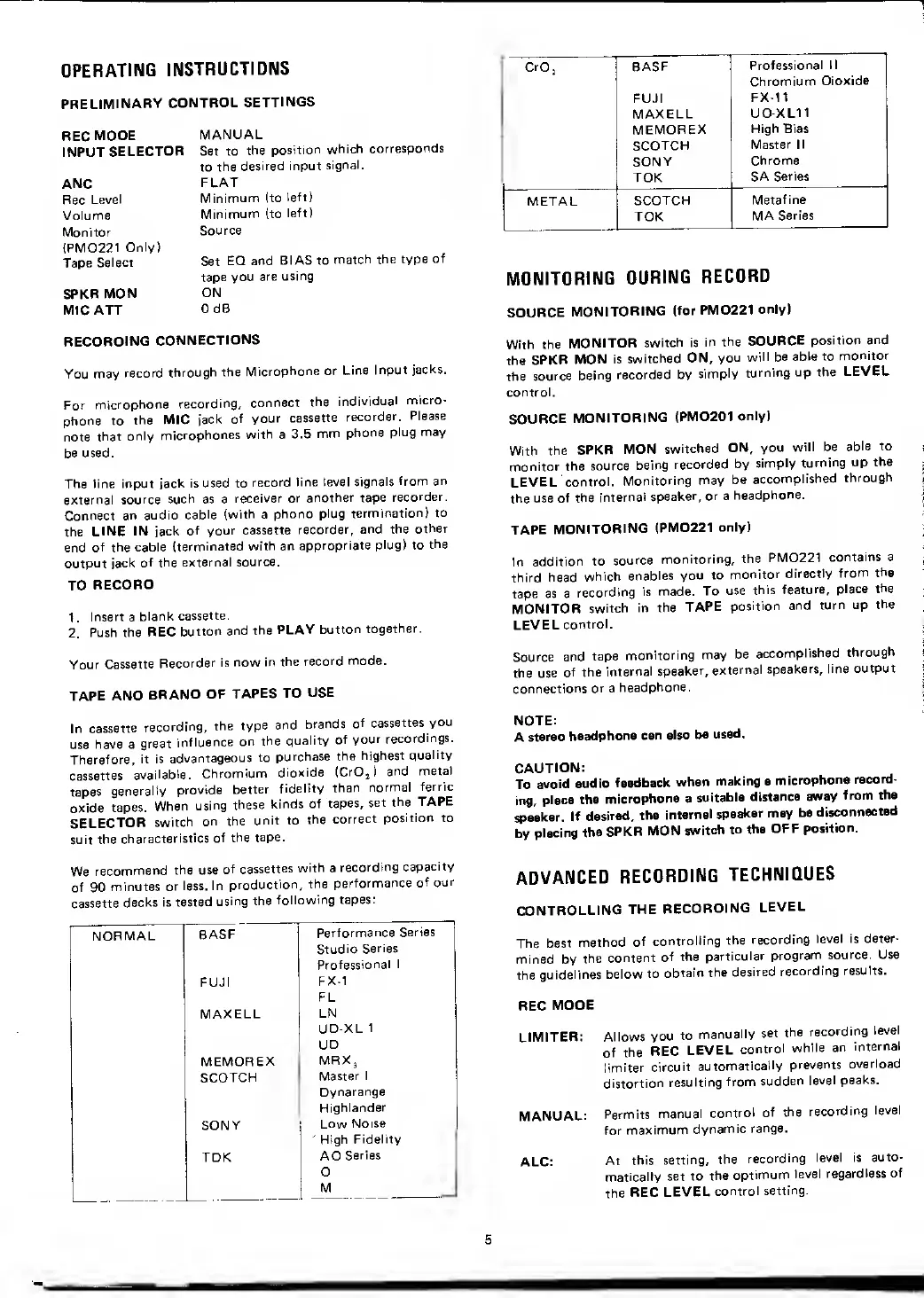
OPERATING
INSTRUCTIONS
PRELIMINARY
CONTROL
SETTINGS
REC
MODE
INPUT
SELECTOR
ANC
Rec
Level
Volume
Monitor
{PMD221
Only)
Tape
Select
SPKR
MON
MIC ATT
MANUAL
Set to
the
position
which
corresponds
to
the
desired input
signal.
FLAT
Minimum (to
left)
Minimum (to
left)
Source
Set
EQ and
BIAS to
match the type
of
tape you
are
using
ON
0 dB
RECORDING
CONNECTIONS
You may
record
through
the
Microphone or
Line
Input
jacks.
For
microphone
recording,
connect
the
individual
micro-
phone to
the MIC
jack
of
your
cassette
recorder.
Please
note
that
only
microphones
with
a
3.5
mm
phone
plug may
be used.
The line input
jack is used to
record
line level
signals
from an
external
source such as a
receiver
or
another tape
recorder.
Connect
an audio
cable
(with
a
phono
plug termination)
to
the
LINE IN jack
of your cassette
recorder, and the
other
end
of the cable
{terminated
with an
appropriate
plug)
to
the
output jack
of the external
source.
TO
RECORD
1
.
Insert
a
blank
cassette.
2.
Push the
REC
button
and
the
PLAY
button
together.
Your
Cassette
Recorder
is
now in
the
record mode.
TAPE AND
BRAND OF
TAPES
TO
USE
In
cassette
recording,
the
type and
brands
of
cassettes
you
use
have a
great
influence
on the
quality
of
your
recordings.
Therefore,
it is
advantageous
to
purchase
the
highest
quality
cassettes
available.
Chromium
dioxide
(Cr0
2
)
and
metal
tapes
generally
provide
better
fidelity
than
normal
ferric
oxide
tapes.
When
using
these
kinds of
tapes,
set
the
TAPE
SELECTOR
switch
on the
unit to
the
correct
position to
suit the
characteristics
of the
tape.
We
recommend
the use
of cassettes
with
a
recording
capacity
of 90
minutes
or
less. In
production,
the
performance
of our
cassette
decks
is
tested
using the
following tapes:
NORMAL
BASF
Performance
Series
Studio
Series
Professional
I
FUJI
FX-1
FL
MAXELL
LN
UD-XL
1
UD
MEMOREX
MRX
3
SCOTCH
Master 1
Dynarange
Highlander
SONY
Low Noise
'
High
Fidelity
TDK
AD
Series
D
M
CrO
j
BASF
Professional II
Chromium
Dioxide
FUJI
FX-11
MAXELL
UD-XL11
MEMOREX
High Bias
SCOTCH
Master II
SONY
Chrome
SA
Series
METAL
SCOTCH
Metaf ine
TDK
MA Series
MONITORING
DURING
RECORD
SOURCE
MONITORING
(for
PMD221
only)
With the
MONITOR
switch is
in
the
SOURCE
position
and
the
SPKR
MON is
switched
ON,
you
will be
able to
monitor
the
source
being
recorded by
simply
turning
up the
LEVEL
control.
SOURCE
MONITORING
(PMD201
only)
With
the
SPKR
MON
switched
ON, you
will be
able to
monitor
the source
being
recorded
by
simply turning
up
the
LEVEL
control.
Monitoring may
be
accomplished
through
the use
of the
internal
speaker,
or a
headphone.
TAPE
MONITORING
(PMD221
only)
In
addition
to
source
monitoring,
the
PMD221
contains a
third head
which
enables
you to
monitor
directly
from
the
tape as a
recording
is made.
To
use
this
feature,
place
the
MONITOR
switch
in the
TAPE
position
and
turn up
the
LEVEL
control.
Source and
tape
monitoring may
be
accomplished
through
the
use
of the
internal
speaker,
external
speakers,
line output
connections
or a
headphone.
NOTE:
A
stereo
headphone
can
also
be
used.
CAUTION:
To
avoid
audio
feedback
when
making a
microphone
record-
ing,
place
the
microphone a
suitable
distance
away
from
the
speaker.
If
desired,
the
internal
speaker may
be
disconnected
by
placing
the
SPKR
MON
switch
to the
OFF
position.
ADVANCED
RECORDING
TECHNIQUES
CONTROLLING
THE
RECORDING
LEVEL
The
best
method
of
controlling
the
recording
level is deter-
mined by
the
content
of the
particular
program
source. Use
the
guidelines below
to
obtain
the
desired
recording
results.
REC
MODE
LIMITER:
MANUAL:
ALC:
Allows
you
to
manually
set
the
recording
level
of
the
REC
LEVEL
control
while
an
internal
Itmiter
circuit
automatically
prevents
overload
distortion
resulting
from
sudden
level
peaks.
Permits
manual
control
of
the
recording
level
for
maximum
dynamic
range.
At
this
setting, the
recording
level is
auto-
matically
set to
the
optimum
level
regardless
of
the
REC
LEVEL
control
setting.
5

Related product manuals