6
ENGLISH
FRANCAIS
DEUTSCH
NEDERLANDS
ESPANOLITALINO PORTUGUES
SVENSKA
DANSK
DANSK
SVENSKAPORTUGUES ITALINOESPANOL NEDERLANDSDEUTSCH
FRANCAIS
ENGLISH
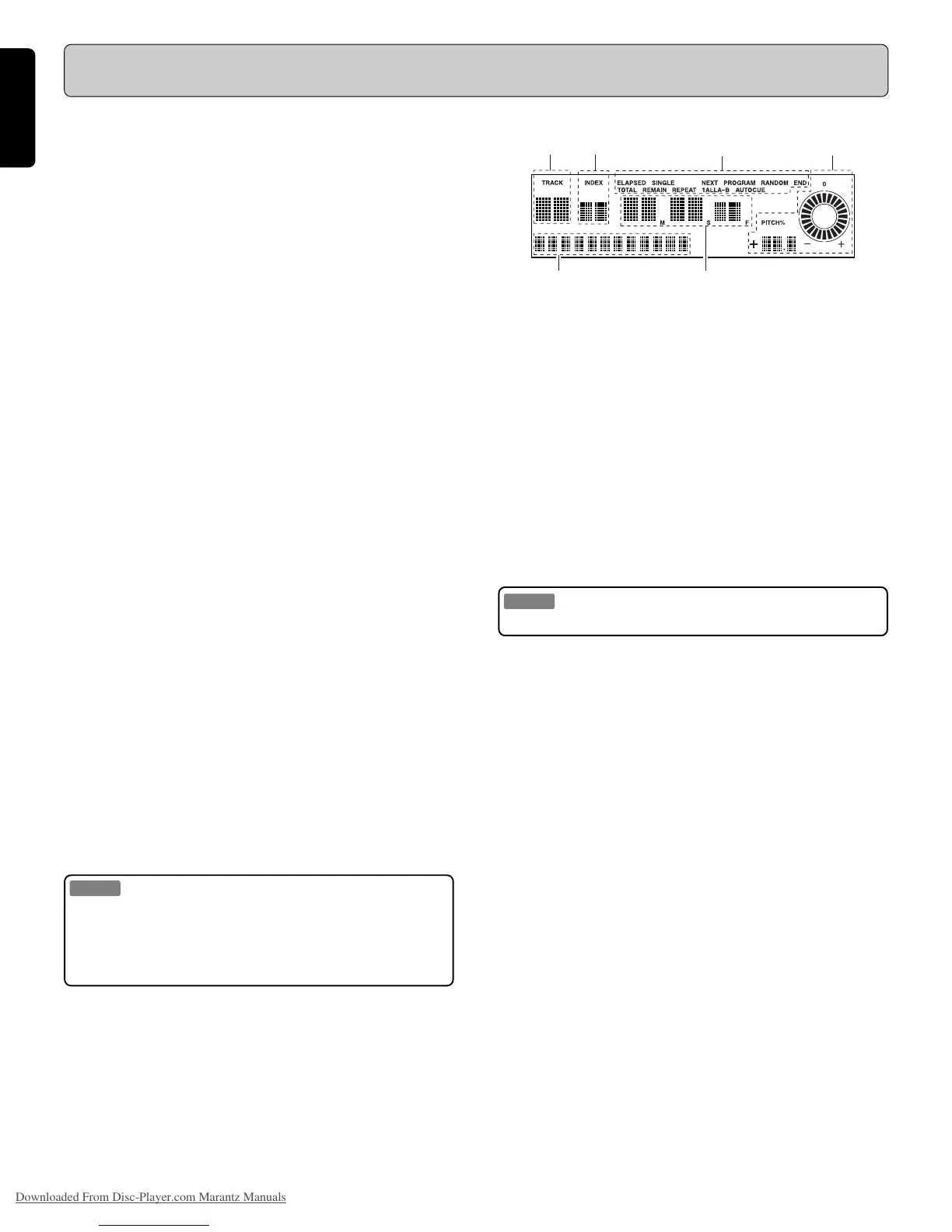
Display
A TRACK
Displays the disc track number.
B INDEX
Displays the disc index number.
C Operation display
Displays the play mode that is set.
D Playing time display
Displays the position on the disc currently being played, with
“M” representing minutes, “S” representing seconds, and “F”
representing frames.
There are 75 frames in each second.
E Character display
- Displays messages when performing a preset operation or a
programming operation.
- The 10-segment bar indicates the track playing position.
- Displays CD-TEXT information.
- Also displays other various messages.
F PITCH display
Displays the PITCH speed numerically with a precision of 0.1%.
The round pitch indicator also changes according to the pitch
speed.
Name and Operation of Each Part
E D
B
A
C
F
@5 A - B
This button is used to specify a start point A and an end point
B for repeated playback between the two points.
(See also page 10.)
@6 PITCH ON/OFF
- Press this button again to return the PITCH speed to the
value indicated on the LCD display F.
- Press this button while the PITCH speed has been changed
to return the playback speed to 0 % (no change).
(See also page 10.)
@7 PITCH + (PMD330 only)
Press this button to increase the CD PITCH speed.
(maximum: +12%)
@8 PITCH - (PMD330 only)
Press this button to decrease the CD PITCH speed.
(maximum: –12%)
@7 PITCH BEND + (PMD331/PMD340 only)
Press this button to temporarily increase the PITCH speed of
the CD that is currently being played back.
(+8%)
(See also page 10.)
@8 PITCH BEND - (PMD331/PMD340 only)
Press this button to temporarily decrease the PITCH speed of
the CD that is currently being played back.
( – 8%)
(See also page 10.)
@9 IR (Infrared remote sensor)
This sensor picks up signals from a RC5 based infrared re-
mote control transmitter.
Note:
This unit does not come with an infrared remote control trans-
mitter.
Please contact your dealer for more information on available
remote controls for this CD player.
Downloaded From Disc-Player.com Marantz Manuals



 To Next Page