EasyManua.ls Logo

Marantz SD1010 - Page 13

Marantz SD1010
44 pages
Print Icon
To Next Page IconTo Next Page
To Previous Page IconTo Previous Page
Loading...
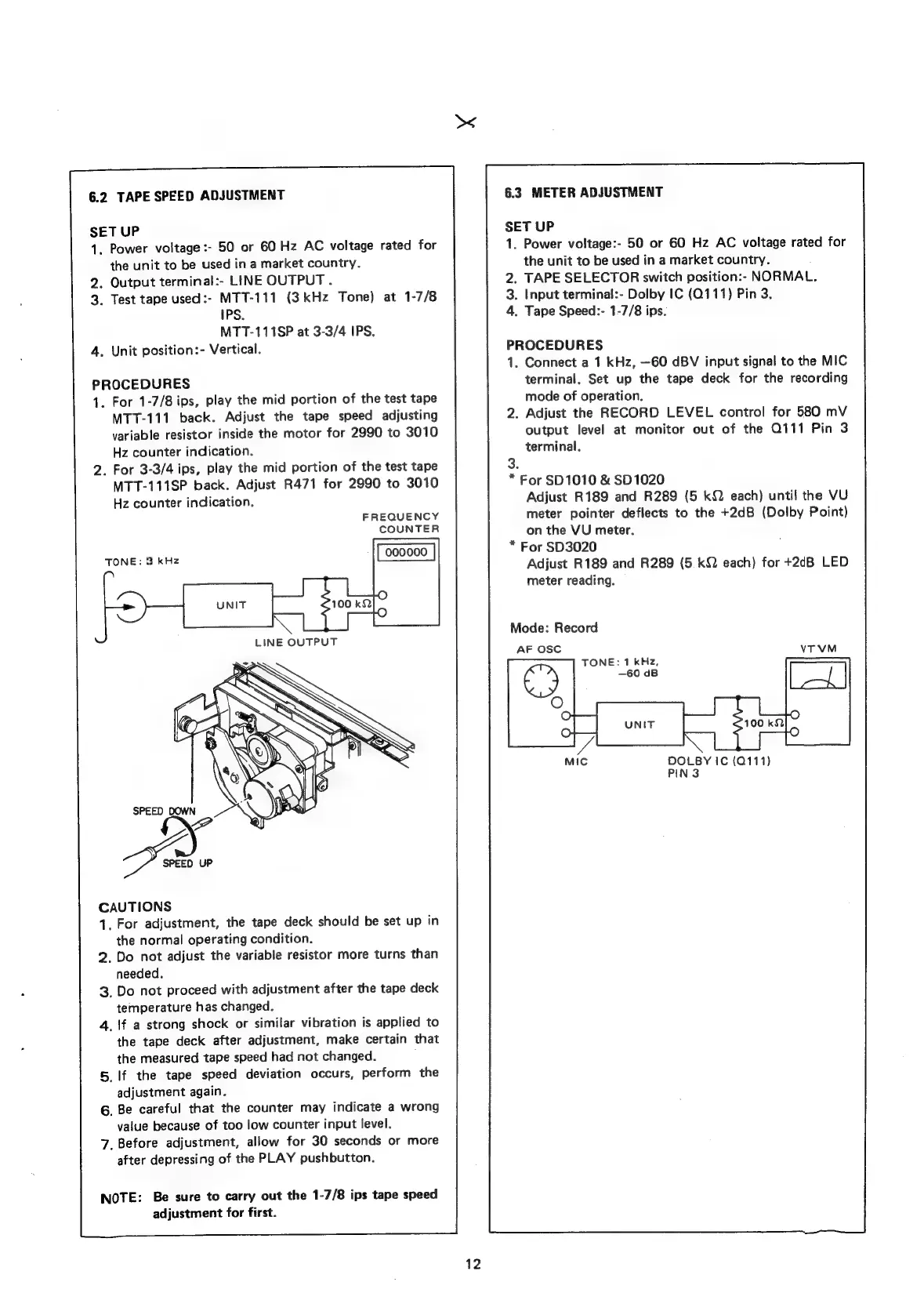
6.2
TAPE
SPEED
ADJUSTMENT
SET
UP
1.
Power
voltage
:-
50
or
60
Hz
AC
voltage
rated
for
the
unit
to
be
used
in
a
market
country.
2.
Output
terminal:-
LINE
OUTPUT.
3.
Test
tape
used:-
MTT-111
(3kHz
Tone)
at
1-7/8
IPS.
MTT-111SP
at
3-3/4
IPS.
.
Unit
position:-
Vertical.
PROCEDURES
1.
For
1-7/8
ips,
play
the
mid
portion
of
the
test
tape
MTT-111
back.
Adjust
the
tape
speed
adjusting
variable
resistor
inside
the
motor
for
2990
to
3010
Hz
counter
indication.
2.
For
3-3/4
ips,
play
the
mid
portion
of
the
test
tape
MTT-111SP
back.
Adjust
R471
for
2990
to
3010
Hz
counter
indication.
FREQUENCY
COUNTER
TONE:
3
kHz
CAUTIONS
1.
For
adjustment,
the
tape
deck
should
be
set
up
in
the
normal
operating
condition.
2.
Do
not
adjust
the
variable
resistor
more
turns
than
needed.
3,
Do
not
proceed
with
adjustment
after
the
tape
deck
temperature
has
changed.
4,
\f
a
strong
shock
or
similar
vibration
is
applied
to
the
tape
deck
after
adjustment,
make
certain
that
the
measured
tape
speed
had
not
changed.
5.
If
the
tape
speed
deviation
occurs,
perform
the
adjustment
again.
6.
Be
careful
that
the
counter
may
indicate
a
wrong
value
because
of
too
low
counter
input
level.
7,
Before
adjustment,
allow
for
30
seconds
or
more
after
depressing
of
the
PLAY
pushbutton.
NOTE:
Be
sure
to
carry
out
the
1-7/8
ips
tape
speed
adjustment
for
first.
12
6.3
METER
ADJUSTMENT
SET
UP
1.
Power
voltage:-
50
or
60
Hz
AC
voltage
rated
for
the
unit
to
be
used
in
a
market
country.
:
2.
TAPE
SELECTOR
switch
position:-
NORMAL
3.
Input
terminal:-
Dolby
IC
(Q111)
Pin
3.
4.
Tape
Speed:-
1-7/8
ips.
PROCEDURES
1.
Connect
a
1
kHz,
—60
dBV
input
signal
to
the
MIC
terminal.
Set
up
the
tape
deck
for
the
recording
mode
of
operation.
.
Adjust
the
RECORD
LEVEL
control
for
580
mV
output
level
at
monitor
out
of
the
Q111
Pin
3
terminal.
3.
*
For
SD1010
&
SD1020
Adjust
R189
and
R289
(5
kQ
each)
until
the
VU
meter
pointer
deflects
to
the
+2dB
(Dolby
Point)
on
the
VU
meter.
*
For
SD3020
Adjust
R189
and
R289
(5
kQ
each)
for
+2dB
LED
meter
reading.
Mode:
Record
AF
OSC
TONE:
1
kHz,
DOLBY
IC
(Q111)
PIN
3

Related product manuals