EasyManua.ls Logo

Marantz SD4000 - Positioning Various Switches

Marantz SD4000
47 pages
Print Icon
To Next Page IconTo Next Page
To Previous Page IconTo Previous Page
Loading...
CASSETTE
SWITCH
MOTOR
SWITCH
PAUSE
MUTING
SWITCH
\
&
©)
Ss”
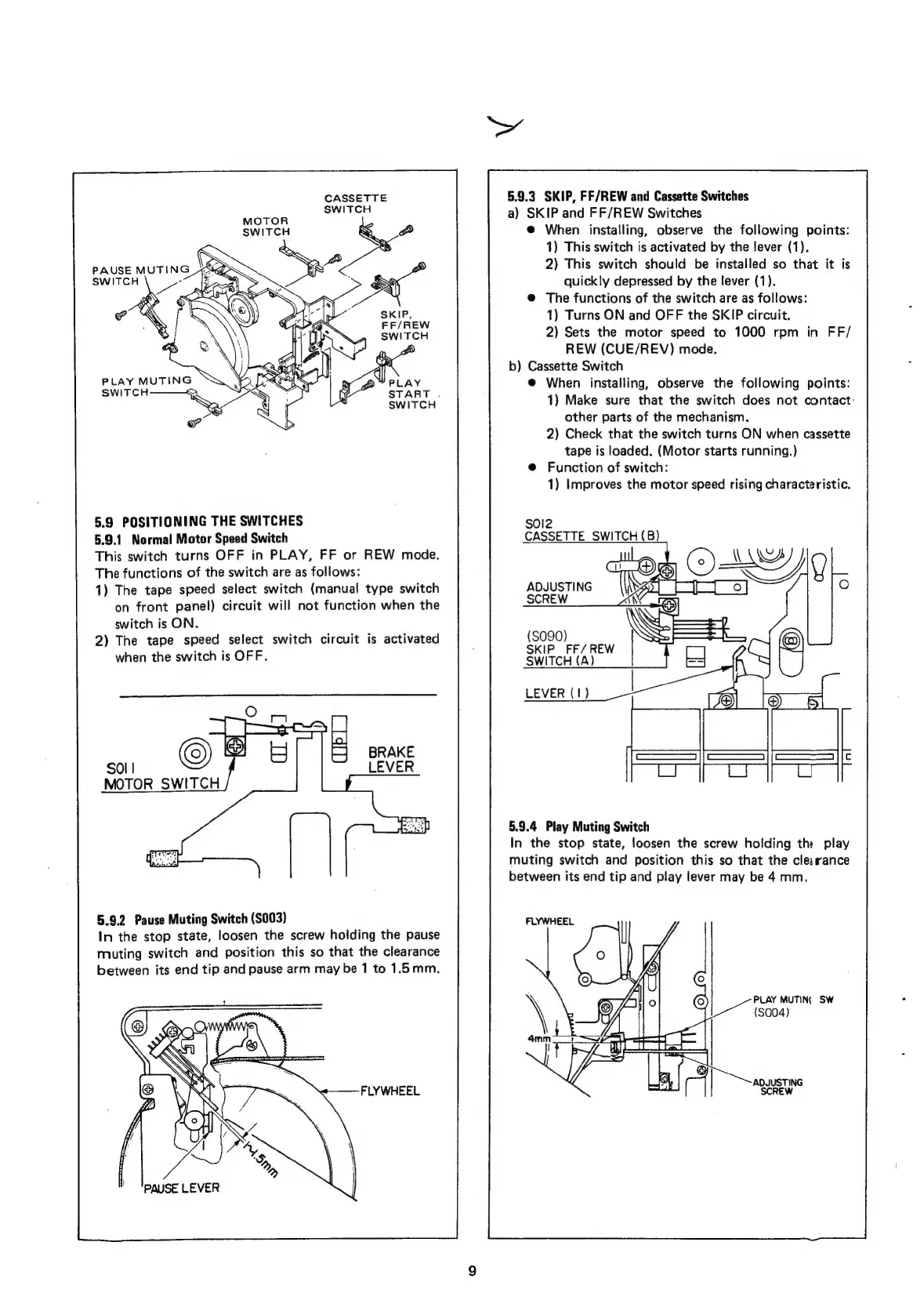
5.9
POSITIONING
THE
SWITCHES
5.9.1
Normal
Motor
Speed
Switch
This
switch
turns
OFF
in
PLAY,
FF
or
REW
mode.
The
functions
of
the
switch
are
as
follows:
1)
The
tape
speed
select
switch
(manual
type
switch
on
front
panel)
circuit
will
not
function
when
the
switch
is
ON.
2)
The
tape
speed
select
switch
circuit
is
activated
when
the
switch
is
OFF.
SO!
|
MOTOR
SWITCH
5.9.2
Pause
Muting
Switch
(S003)
In
the
stop
state,
loosen
the
screw
holding
the
pause
muting
switch
and
position
this
so
that
the
clearance
between
its
end
tip
and
pause
arm
may
be
1
to
1.5mm.
FLYWHEEL
5.9.3
SKIP,
FF/REW
and
Cassette
Switches
a)
SKIP
and
FF/REW
Switches
@
When
installing,
observe
the
following
points:
1)
This
switch
is
activated
by
the
lever
(1).
2)
This
switch
should
be
installed
so
that
it
is
quickly
depressed
by
the
lever
(1).
@
The
functions
of
the
switch
are
as
follows:
1)
Turns
ON
and
OFF
the
SKIP
circuit.
2)
Sets
the
motor
speed
to
1000
rpm
in
FF/
REW
(CUE/REV)
mode.
b)
Cassette
Switch
@
When
installing,
observe
the
following
points:
1)
Make
sure
that
the
switch
does
not
contact:
other
parts
of
the
mechanism.
2)
Check
that
the
switch
turns
ON
when
cassette
tape
is
loaded.
(Motor
starts
running.)
@
Function
of
switch:
1)
Improves
the
motor
speed
rising
characteristic.
sola
CASSETTE
SWITCH
(B)
ts
ADJUSTING
Fy)
|
ScREW
i
3
&
(S090)
SS
SKIP_FF/REW
SWITCH
(A)
LEVER
(1)
5.9.4
Play
Muting
Switch
In
the
stop
state,
loosen
the
screw
holding
the
play
muting
switch
and
position
this
so
that
the
clearance
between
its
end
tip
and
play
lever
may
be
4
mm.
FLYWHEEL
PLAY
MUTING
SW
(S004)
AQJUSTING
SCREW

Related product manuals