EasyManua.ls Logo

Marantz SD555 - Adjusting the Electrical Sections

Marantz SD555
28 pages
Print Icon
To Next Page IconTo Next Page
To Previous Page IconTo Previous Page
Loading...
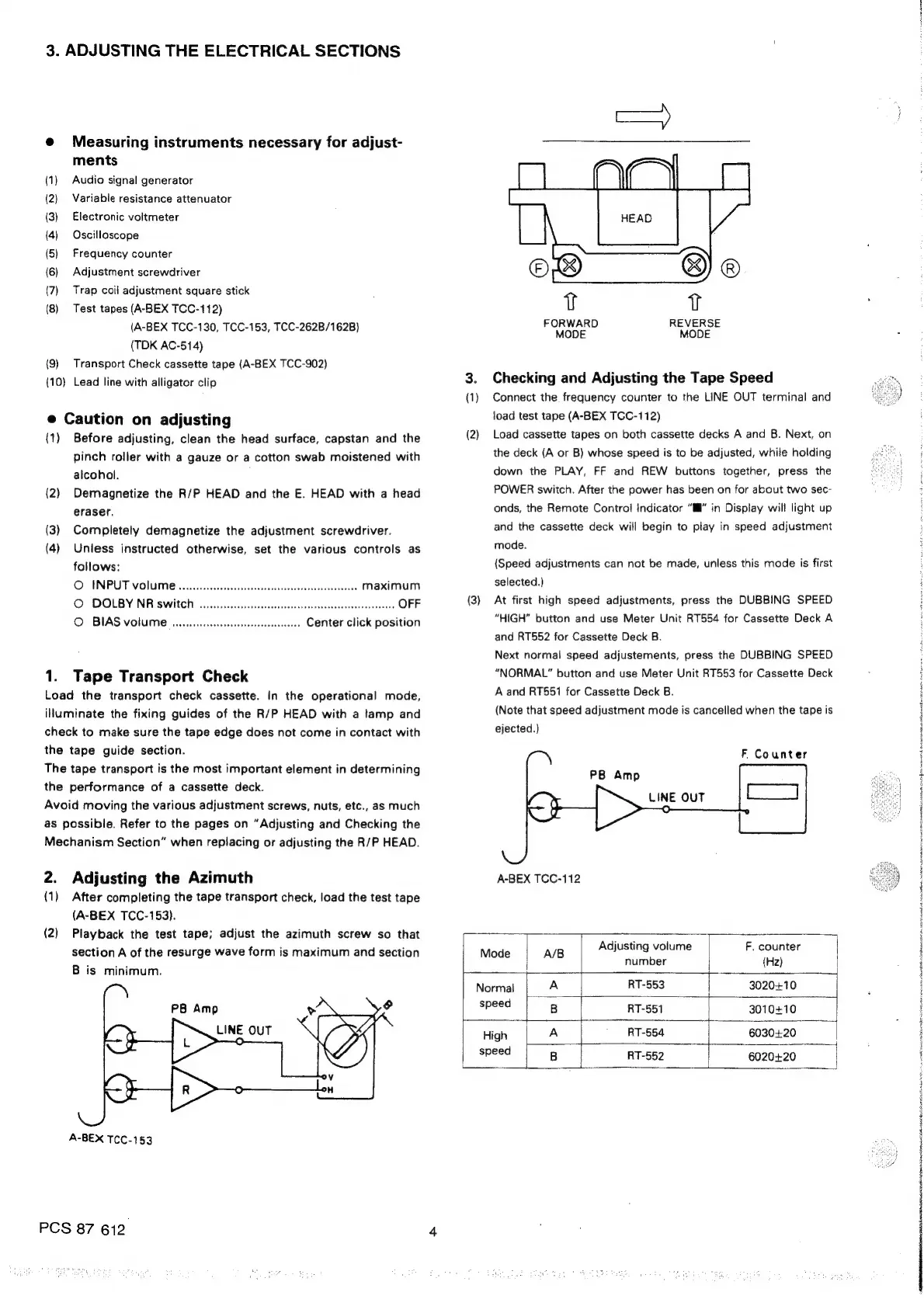
3.
ADJUSTING
THE
ELECTRICAL
SECTIONS
@
Measuring
instruments
necessary
for
adjust-
ments
(1)
Audio
signal
generator
(2)
Variable
resistance
attenuator
(3)
Electronic
voltmeter
(4)
Oscilloscope
(5)
Frequency
counter
(6)
Adjustment
screwdriver
(7)
Trap
coil
adjustment
square
stick
(8)
Test
tapes
(A-BEX
TCC-112)
(A-BEX
TCC-130,
TCC-153,
TCC-262B/162B)
(TDK
AC-514)
(9)
Transport
Check
cassette
tape
(A-BEX
TCC-902)
(10)
Lead
line
with
alligator
clip
3.
(1)
e
Caution
on
adjusting
(1)
Before
adjusting,
clean
the
head
surface,
capstan
and
the
(2)
pinch
roller
with
a
gauze
or
a
cotton
swab
moistened
with
alcohol.
(2)
Demagnetize
the
R/P
HEAD
and
the
E.
HEAD
with
a
head
eraser.
(3)
Completely
demagnetize
the
adjustment
screwdriver.
(4)
Unless
instructed
otherwise,
set
the
various
controls
as
FORWARD
MODE
MODE
REVERSE
Checking
and
Adjusting
the
Tape
Speed
Connect
the
frequency
counter
to
the
LINE
OUT
terminal
and
load
test
tape
(A-BEX
TCC-112)
Load
cassette
tapes
on
both
cassette
decks
A
and
B.
Next,
on
the
deck
(A
or
B)
whose
speed
is
to
be
adjusted,
while
holding
down
the
PLAY,
FF
and
REW
buttons
together,
press
the
POWER
switch.
After
the
power
has
been
on
for
about
two
sec-
onds,
the
Remote
Control
Indicator
“I”
in
Display
will
light
up
and
the
cassette
deck
will
begin
to
play
in
speed
adjustment
mode.
follows:
(Speed
adjustments
can
not
be
made,
unless
this
mode
is
first
O
ENPUT
Volume
wo.ciccccccccssescscesescsecsscsesesesssseerereees
maximum
selected.)
©
DOLBY
NR
SWIth
o....ceccccsssscsssssesssecssseeessecssseeaseesseesnes
OFF
(3)
At
first
high
speed
adjustments,
press
the
DUBBING
SPEED
O
BIAS
volume
..
Center
click
position
“HIGH”
button
and
use
Meter
Unit
RT554
for
Cassette
Deck
A
1.
Tape
Transport
Check
Load
the
transport
check
cassette.
in
the
operational
mode,
iluminate
the
fixing
guides
of
the
R/P
HEAD
with
a
tamp
and
check
to
make
sure
the
tape
edge
does
not
come
in
contact
with
the
tape
guide
section.
The
tape
transport
is
the
most
important
element
in
determining
the
performance
of
a
cassette
deck.
Avoid
moving
the
various
adjustment
screws,
nuts,
etc.,
as
much
as
possible.
Refer
to
the
pages
on
“Adjusting
and
Checking
the
Mechanism
Section”
when
replacing
or
adjusting
the
R/P
HEAD.
2.
Adjusting
the
Azimuth
(1)
After
completing
the
tape
transport
check,
load
the
test
tape
(A-BEX
TCC-153).
and
RT552
for
Cassette
Deck
B.
Next
normal
speed
adjustements,
press
the
DUBBING
SPEED
“NORMAL”
button
and
use
Meter
Unit
RT553
for
Cassette
Deck
A
and
RT551
for
Cassette
Deck
B.
(Note
that
speed
adjustment
mode
is
cancelled
when
the
tape
is
ejected.)
F
Counter
LINE
OUT
A-BEX
TCC-112
(2)
Playback
the
test
tape;
adjust
the
azimuth
screw
so
that
section
A
of
the
resurge
wave
form
is
maximum
and
section
Mode
A/B
Tee
‘i
B
is
minimum.
7
Normal
A
RT-553
3020+10
speed
B
|
RT-551
3010410
High
dir
a
|
RT-554
6030420
(eee
fe
B
RT-552
6020+20
A-BEX
TCC-153
PCS
87
612.
4
6
abu
i
AON
a8
hh
Ment
EN
AAR
otS
EON
th
np
tte
be
Aten
mrt
enters
Seti,
#
|
i
:
|
j
:
Nanaia
NR

Related product manuals