EasyManua.ls Logo

Marantz SD555 - Adjusting and Checking the Mechanism Section

Marantz SD555
28 pages
Print Icon
To Next Page IconTo Next Page
To Previous Page IconTo Previous Page
Loading...
2.
ADJUSTING
AND
CHECKING
THE
MECHANISM
SECTION
1.
Replacing
the
Pinch
Roller
Before
replacing
the
pinch
roller,
clean
the
tape
contact
surface
of
the
pinch
roller
and
the
capstan
shaft.
Most
causes
of
poor
tape
transport
can
be
traced
to
dirty
pinch
roller
and
capstan
shaft.
Remove
the
clips
that
press
the
pinch
roller
and
pull
the
pinch
roller
forward
to
remove
it.
After
replacing,
run
a
padless
C-90
tape
to
check
for
tape
curls
at
the
tape
guide
section
of
the
head.
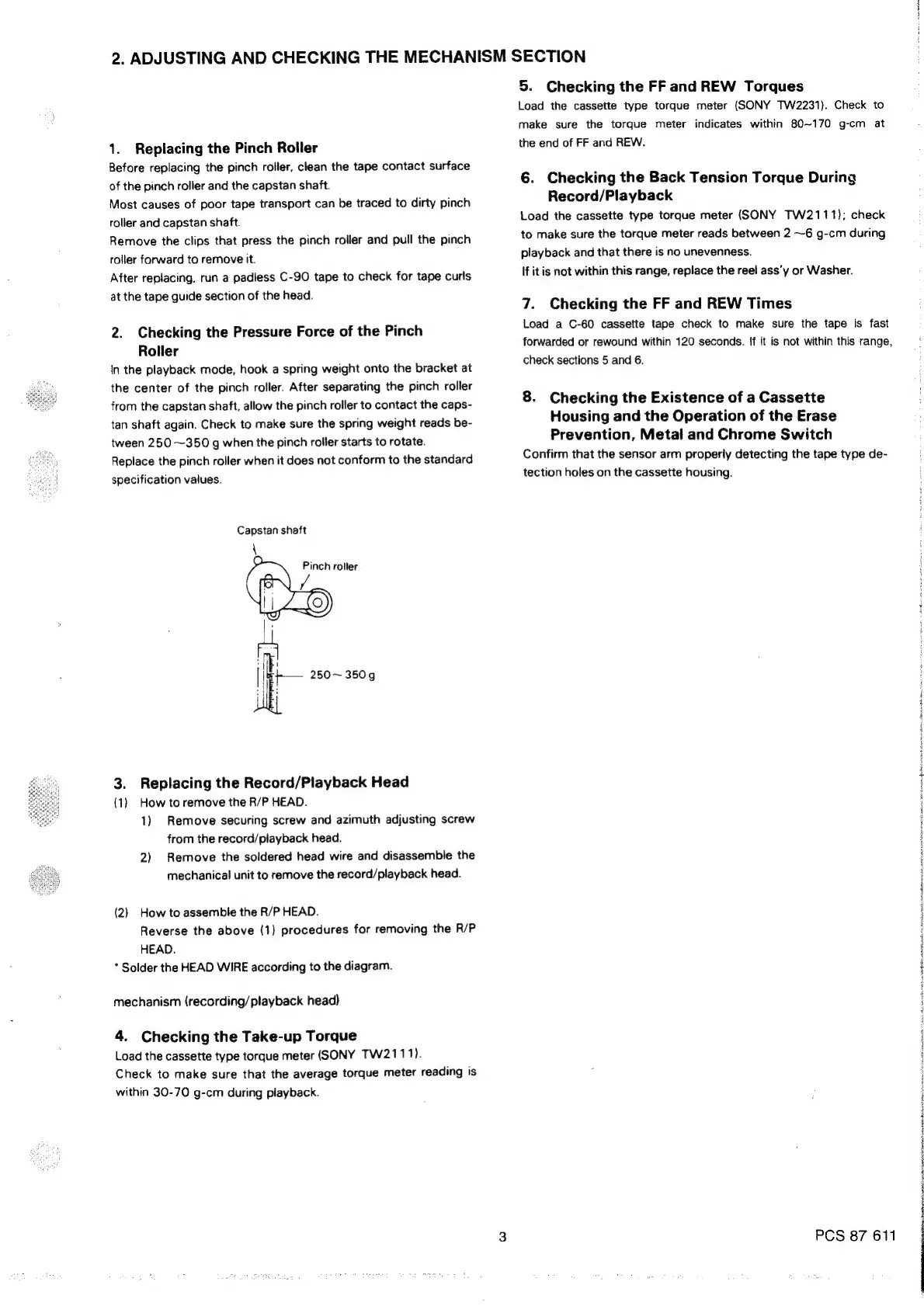
2.
Checking
the
Pressure
Force
of
the
Pinch
Roller
In
the
playback
mode,
hook
a
spring
weight
onto
the
bracket
at
the
center
of
the
pinch
roller.
After
separating
the
pinch
roller
from
the
capstan
shaft,
allow
the
pinch
roller
to
contact
the
caps-
tan
shaft
again.
Check
to
make
sure
the
spring
weight
reads
be-
tween
250
~350
g
when
the
pinch
roller
starts
to
rotate.
Replace
the
pinch
roller
when
it
does
not
conform
to
the
standard
specification
values.
Capstan
shaft
f
3.
Replacing
the
Record/Playback
Head
(1)
How
to
remove
the
R/P
HEAD.
1)
Remove
securing
screw
and
azimuth
adjusting
screw
from
the
record/playback
head.
2)
Remove
the
soldered
head
wire
and
disassemble
the
mechanical
unit
to
remove
the
record/playback
head.
(2)
How
to
assemble
the
R/P
HEAD.
Reverse
the
above
(1)
procedures
for
removing
the
R/P
HEAD.
*
Solder
the
HEAD
WIRE
according
to
the
diagram.
mechanism
(recording/playback
head)
4.
Checking
the
Take-up
Torque
Load
the
cassette
type
torque
meter
(SONY
TW2111).
Check
to
make
sure
that
the
average
torque
meter
reading
is
within
30-70
g-cm
during
playback.
5.
Checking
the
FF
and
REW
Torques
Load
the
cassette
type
torque
meter
(SONY
TW2231).
Check
to
make
sure
the
torque
meter
indicates
within
80~170
g-cm
at
the
end
of
FF
and
REW.
6.
Checking
the
Back
Tension
Torque
During
Record/Playback
Load
the
cassette
type
torque
meter
(SONY
TW2111);
check
to
make
sure
the
torque
meter
reads
between
2
~6
g-cm
during
playback
and
that
there
is
no
unevenness.
If
it
is
not
within
this
range,
replace
the
reel
ass’y
or
Washer.
7.
Checking
the
FF
and
REW
Times
Load
a
C-60
cassette
tape
check
to
make
sure
the
tape
is
fast
forwarded
or
rewound
within
120
seconds.
If
it
is
not
within
this
range,
check
sections
5
and
6.
8.
Checking
the
Existence
of
a
Cassette
Housing
and
the
Operation
of
the
Erase
Prevention,
Metal
and
Chrome
Switch
Confirm
that
the
sensor
arm
properly
detecting
the
tape
type
de-
tection
holes
on
the
cassette
housing.
PCS
87
611
:
|
!

Related product manuals