EasyManua.ls Logo

Marantz SD555 - Page 8

Marantz SD555
28 pages
Print Icon
To Next Page IconTo Next Page
To Previous Page IconTo Previous Page
Loading...
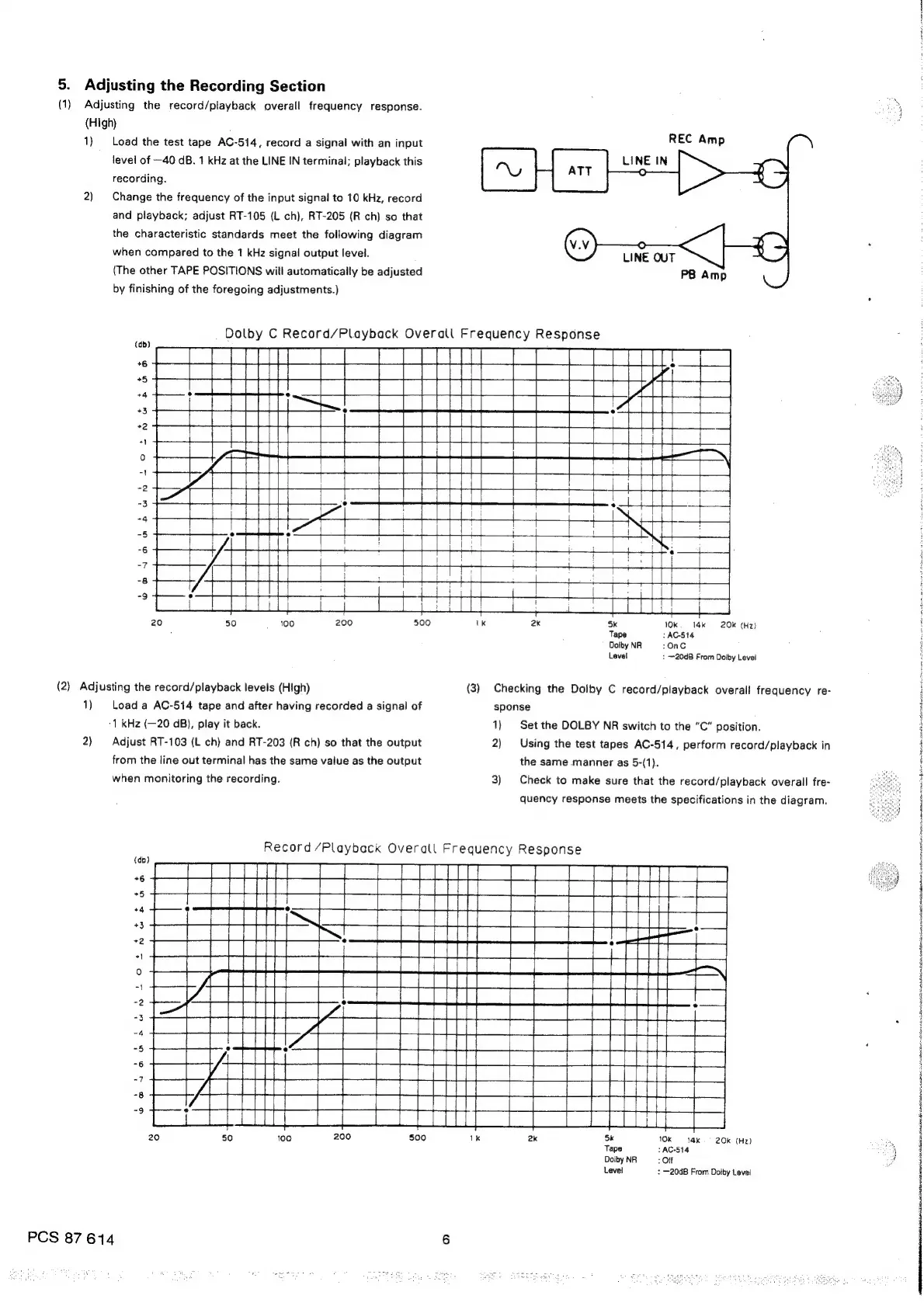
5.
Adjusting
the
Recording
Section
.
(1)
Adjusting
the
record/playback
overall
frequency
response.
~
(High)
1)
Load
the
test
tape
AC-514,
record
a
signal
with
an
input
level
of
—40
dB.
1
kHz
at
the
LINE
IN
terminal;
playback
this
recording.
2)
Change
the
frequency
of
the
input
signal
to
10
kHz,
record
and
playback;
adjust
RT-105
(L
ch),
RT-205
(R
ch)
so
that
the
characteristic
standards
meet
the
following
diagram
when
compared
to
the
1
kHz
signal
output
level.
(The
other
TAPE
POSITIONS
will
automatically
be
adjusted
by
finishing
of
the
foregoing
adjustments.)
Dolby
C
Record/Playback
Overall
Frequency
Response
Seri
moeesiii
(db)
Ce
eden
ae
5k
10k
14k
20k
(Hz)
Tape
:AC-514
DolbyNR
=:
OnC
Level
:
~20dB
From
Dolby
Level
(2)
Adjusting
the
record/playback
levels
(High)
(3)
Checking
the
Dolby
C
record/playback
overall
frequency
re-
1)
Load
a
AC-514
tape
and
after
having
recorded
a
signal
of
sponse
‘1
kHz
(—20
dB),
play
it
back.
1)
Set
the
DOLBY
NR
switch
to
the
“C”
position.
2)
Adjust
RT-103
(L
ch)
and
RT-203
(R
ch)
so
that
the
output
2)
Using
the
test
tapes
AC-514,
perform
record/playback
in
from
the
line
out
terminal
has
the
same
value
as
the
output
the
same
manner
as
5-(1).
when
monitoring
the
recording.
3)
Check
to
make
sure
that
the
record/playback
overall
fre-
quency
response
meets
the
specifications
in
the
diagram.
Record
/Playback
Overall
Frequency
Response
sn
dees
naar
incsnser
sneha
Asha
isos
nt
20
50
100
200
500
1k
2k
5k
10k
14k
=
20k
(Hz)
a,
Tape
:AC514
a)
DelbyNR
—-:
OFF
-
Level
+
—20dB
From
Dolby
Level
PCS
87
614
6

Related product manuals