EasyManua.ls Logo

Marantz SR1010 - Page 13

Marantz SR1010
27 pages
Print Icon
To Next Page IconTo Next Page
To Previous Page IconTo Previous Page
Loading...
PRESENT
TIME
SETTING
[
Operation
using
the
buttons
on
the
main
unit]
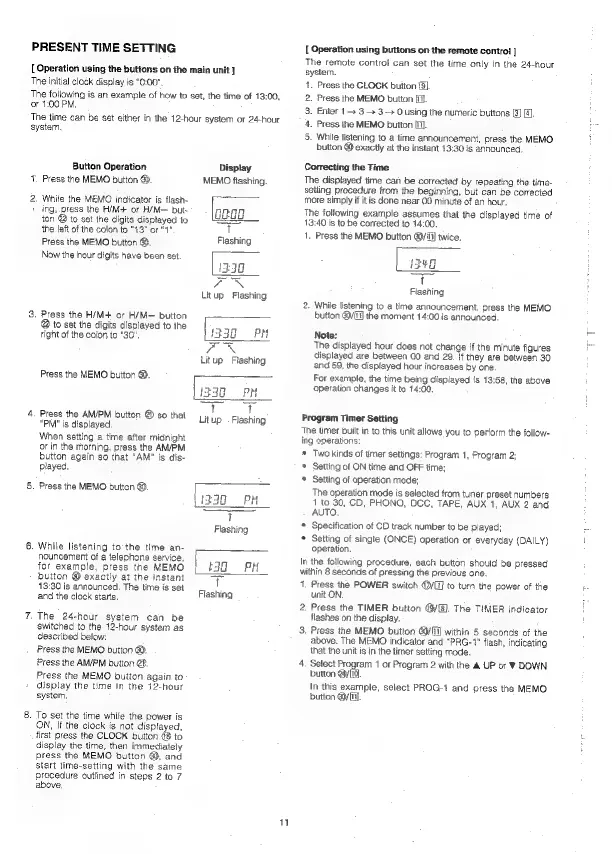
The
Initial
clock
display
is
“0:00”,
The
following
is
an
example
of
how
to
set,
the
time
of
13:00,
or
1:00
PM.
The
time
can
be
set
either
in
the
12-hour
system
or
24-hour
system,
Button
Operation
Display
Y.
Press
the
MEMO
button
4.
MEMO
flashing.
2,
While
the
MEMO
indicator
is
flash-
»
ing,.press
the
H/M+
or
H/M—
but-
og00
ton
@
to
set
the
digits
displayed
to
the
left
of
the
colon
to
“43”
or
“1"
T
Flashing
Press
the
MEMO
button
@.
Now
the
hour
digits
have
been
set.
3.
Press
the
H/M+
or
H/M—
button
@
to
set
the
digits
displayed
to
the
right
of
the
colon
to
"30".
Litup
Flashing
Press
the
MEMO
button
@.
$40
PM
ae
fs
4.
Press
the
AM/PM
button
@)
so
that
"PM"
is
displayed.
Litup
.
Flashing
When
setting
a
time
after
midnight
or
in
the
morning,
press
the
AM/PM
button
again
so
that
"AM"
is
dis-
played,
5.
Press
the
MEMO
button
@.
1330
PM
me
t
Flashing
6.
While
listening
to
the
time
an-
nouncement
of
a
telephone
service,
for
example,
press
the
MEMO
3G
BR
button
@
exactly
at
the
instant
>
13:30
is
announced.
The
time
is
set
Flashi
and
the
clock
starts.
asning
7,
The
24-hour
system
can
be
switched
to
the
12-hour
system
as
described
below:
Press
the
MEMO
button
@.
Press
the
AM/PM
button
@.
Press
the
MEMO
buiton
again
to
display
the
time
in
the
12-hour
system.
8.
To
set
the
time
while
the
power
is
ON,
if
the
clock
is
not
displayed,
first
press
the
CLOCK
button
to
display
the
time,
then
immediately
press
the
MEMO
button
@;
and
start
time-setting
with
the
same
procedure
outlined
in
steps
2
to
7
above,
1
[
Operation
using
buttons
on
the
remote
contro!
]
The
remote
control
can
set
the
time
only
in
the
24-hour
system.
1.
Press
the
CLOCK
button
/3]
2.
Press
the
MEMO
button
[fil.
3.
Enter
1
3 3
O
using
the
numeric
buttons
4.
Press
the
MEMO
button
[1].
5.
While
listening
to
a
time
announcement,
press
the
MEMO
button
@
exactly
at
the
instant
13:30
is
announced,
Correcting
the
Time
The
displayed
time
can
be
corrected
by
repeating
the
time-
setting
procedure
from
ihe
beginning,
but
can
be
corrected
more
simply
if it
is
done
near
00
minute
of
an
hour.
The
following
example
assumes
that
the
displayed
time
of
13:40
is
to
be
corrected
to
14:00.
1.
Press
the
MEMO
button
@/'l]
twice.
Flashing
2.
While
listening
to
a
time
announcement,
press
the
MEMO
button
G0/{ii]
the
moment
14:00
is
announced.
Note:
The
displayed
hour
does
not
change
if
the
minute
figures
displayed
are
between
00
and
29.
if
they
are
between
30
and
59,
the
displayed
hour
increases
by
one.
For
example,
the
time
being
displayed
is
13:58,
the
above
operation
changes
it
to
14:00.
Program
Timer
Setting
The
timer
built
in to
this
unit
allows
you
to
perform
the
follow-
ing
operations:
*
Two
kinds
of
timer
settings:
Program
1,
Program
2;
*
Setting
of
ON
time
and
OFF
time;
*
Setting
of
operation
mode;
The
operation
mode
is
selected
from
tuner
preset
numbers
1
to
30,
CD,
PHONO,
DCC,
TAPE,
AUX
1,
AUX
2
and
AUTO.
*
Specification
of
CD
track
number
to
be
played:
*
Setting
of
single
(ONCE)
operation
or
everyday
(DAILY)
operation.
In
the
following
procedure,
each
button
should
be
pressed
within
8
seconds
of
pressing
the
previous
one.
1,
Press
the
POWER
switch
4/1]
to
turn
the
power
of
the
unit
ON.
2.
Press
the
TIMER
button
@/[B].
The
TIMER
indicator
flashes
on
the
display.
3.
Press
the
MEMO
button
@/fi]
within
5
seconds
of
the
above.
The
MEMO
indicator
and
“PRG-1”
flash,
indicating
that
the
unit
is
in
the
timer
setting
mode.
4.
Select
Program
1
or
Program
2
with
the
&
UP
or
¥
DOWN
button
4y[i9.
In
this
example,
select
PROG-1
and
press
the
MEMO
button
@0y
fi].

Related product manuals