EasyManua.ls Logo

Marantz SR1010 - Page 14

Marantz SR1010
27 pages
Print Icon
To Next Page IconTo Next Page
To Previous Page IconTo Previous Page
Loading...
[
Operation
using
the
buttons
on
the
main
unit
]
5.
“—
-:—
ON”
is
displayed.
Enter
the
timer
ON
time
in
hours
and
minutes
using
the
H/M+
and
H/M—
buttons
@,
and
press
the
MEMO
button
@
after
each
entry.
(The
entry
order
is
hour
figures
»
MEMO
minute
figures
MEMO.
The
entry
can
be
made
either
in
the
24-hour
systern
or
12-hour
system.)
When
the
display
changes
to
“~
~:—
~
OFF”,
enter
the
timer
OFF
time
in
hours
and
minutes
using
the
H/M+
and
H/M—
buttons
@,
and
press
the
MEMO
button
&
after
each
entry.
a
[
Operation
using
the
buttons
on
the
remote
control
}
5,
“~
—i-
ON’
is
displayed.
Enter
the
timer
ON
time
using
the
numeric
buttons
[3]
[4].
To
enter
13:30,
press
1
>
3
>
3-0.
After
entry,
press
the
MEMO
button
11).
6,
Similarly,
enter
the
timer
OFF
time
using
the
numeric
buttons
3]
[4]
and
press
the
MEMO
button
il]
after
entry.
7.
“AUTO”
starts
to
flash
on
the
dispiay.
With
AUTO
timer
operation,
when
the
ON
time
comes,
the
unit
searches
the
components
automatically
in
the
order
TAPE
>
DCC
-+
CD
TUNER
to
detect
the
presence
of
a
source
(if
a
disc
or
tape
is
set),
and
plays
the
first
detected
source.
[
To
set
the
timer
with
AUTO
timer
operation
]
A,
Press
the
MEMO
button
60/[1]]
while
“AUTO"
is
flashing.
(If
AUTO
timer
operation
is
required,
the
AUTO
operation
is
set
automatically
in
8
seconds,
even
when
the
MEMO
button
is
not
pressed.)
B.
“ONCE”
starts
to
flash
on
the
display.
Select
ONCE
or
DAILY
by
pressing
the
UP
or
DOWN
button
29/[0.
The
ONCE
operation
executes
the
set
timer
operation
only
once,
after
which
the
memory
is
cleared.
The
DAILY
operation
executes
the
set
timer
operation
every
day.
After
selecting
“ONCE”
or
“DAILY”,
press
the
MEMO
button
@/il).
The
ONCE
or
DAILY
operation
is
set
automatically
in
8
seconds
even
if
the
MEMO
button
is
not
pressed.
Notes:
*
Timer
operations
such
as
timer
playback
are
not
possible
if
a
Marantz
CD
player
or
tape
deck
is
not
connected
through
the
remote
control
bus.
¢
The
power
supply
from
the
AC
OUTLET
3
on
the
rear
panel
of
the
main
unit
is
turned
on/off
in
conjunction
with
the
timer
operation.
The
AC
OUTLET
has
a
maximum
capacity
of
100
W;
Do
not
connect
products
which
have
a
higher
power
consumption.
The
system
components
of
Marantz
Slim
Line
Series
can
be
turned
ON
through
the
remote
control
bus
line,
and
can
therefore
be
connected
directly
to
the
wall
mains
outlets.
42
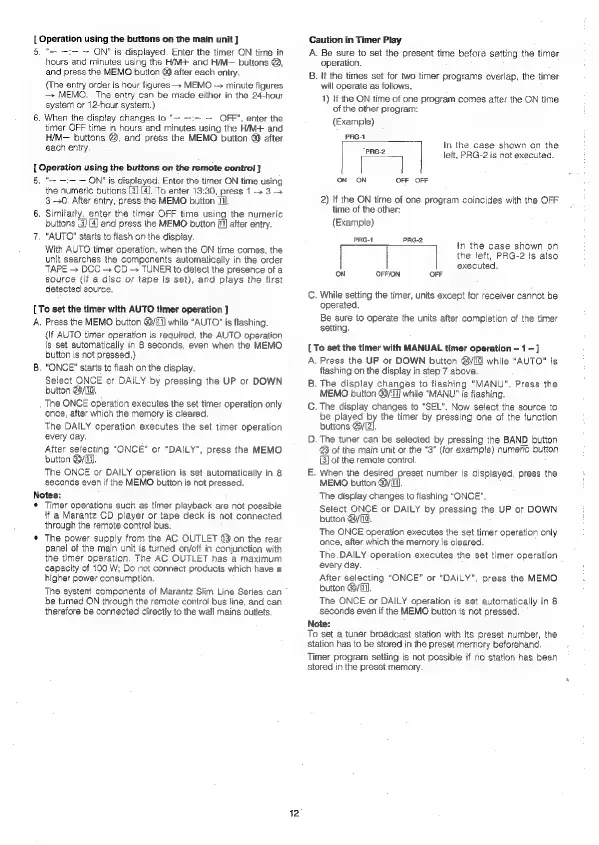
Caution
in
Timer
Play
A.
Be
sure
to
set
the
present
time
before
setting
the
timer
operation.
B.
if
the
times
set
for
two
timer
programs
overlap,
the
timer
will
operate
as
follows.
1)
if
the
ON
time
of
one
program
comes
after
the
ON
time
of
the
other
program:
(Exampie)
PRGA
-
In
the
case
shown
on
the
eae
left,
PRG-2
is
not
executed.
ON
ON
OFF
OFF
2)
If
the
ON
time
of
one
program
coincides
with
the
OFF
time
of
the
other:
(Example)
PRG-1
PRG-2
In
the
case
shown
on
the
left,
PRG-2
is
also
executed.
ON
OFFION
OFF
C.
While
setting
the
timer,
units
except
for
receiver
cannot
be
operated.
Be
sure
to
operate
the
units
after
completion
of
the
timer
setting.
[
To
set
the
timer
with
MANUAL
timer
operation
~
1
—]
A.
Press
the
UP
or
DOWN
button
@/[10
while
“AUTO”
is
flashing
on
the
display
in
step
7
above.
B.
The
display
changes
to
flashing
“MANU”,
Press
the
MEMO
button
60/117]
while
"MANU"
is
flashing.
C.
The
display
changes
to
“SEL”.
Now
select
the
source
to
be
played
by
the
timer
by
pressing
one
of
the
function
buttons
@yE2].
D.
The
tuner
can
be
selected
by
pressing
the
BAND
button
@
of
the
main
unit
or
the
“3"
(for
example)
numeric
button
[3]
of
the
remote
control.
—.
When
the
desired
preset
number
is
displayed,
press
the
MEMO
button
@/i11)
The
display
changes
to
flashing
"ONCE".
Select
ONCE
or
DAILY
by
pressing
the
UP
or
DOWN
button
@y[id.
The
ONCE
operation
executes
the
set
timer
operation
only
once,
after
which
the
memory
is
cleared.
The.
DAILY
operation
executes
the
set
timer
operation
every
day.
After
selecting
“ONCE”
or
“DAILY”,
press
the
MEMO
button
yf),
The
ONCE
or
DAILY
operation
is
set
automatically
in
8
seconds
even
if
the
MEMO
button
is
not
pressed.
Note:
To
set
a
tuner
broadcast
station
with
its
preset
number,
the
station
has
to
be
stored
in
the
preset
memory
beforehand
Timer
program
setting
is
not
possible
if
no
station
has
been
stored
in
the
preset
memory.

Related product manuals