EasyManua.ls Logo

Marantz SR1030 - Page 6

Marantz SR1030
14 pages
Print Icon
To Next Page IconTo Next Page
To Previous Page IconTo Previous Page
Loading...
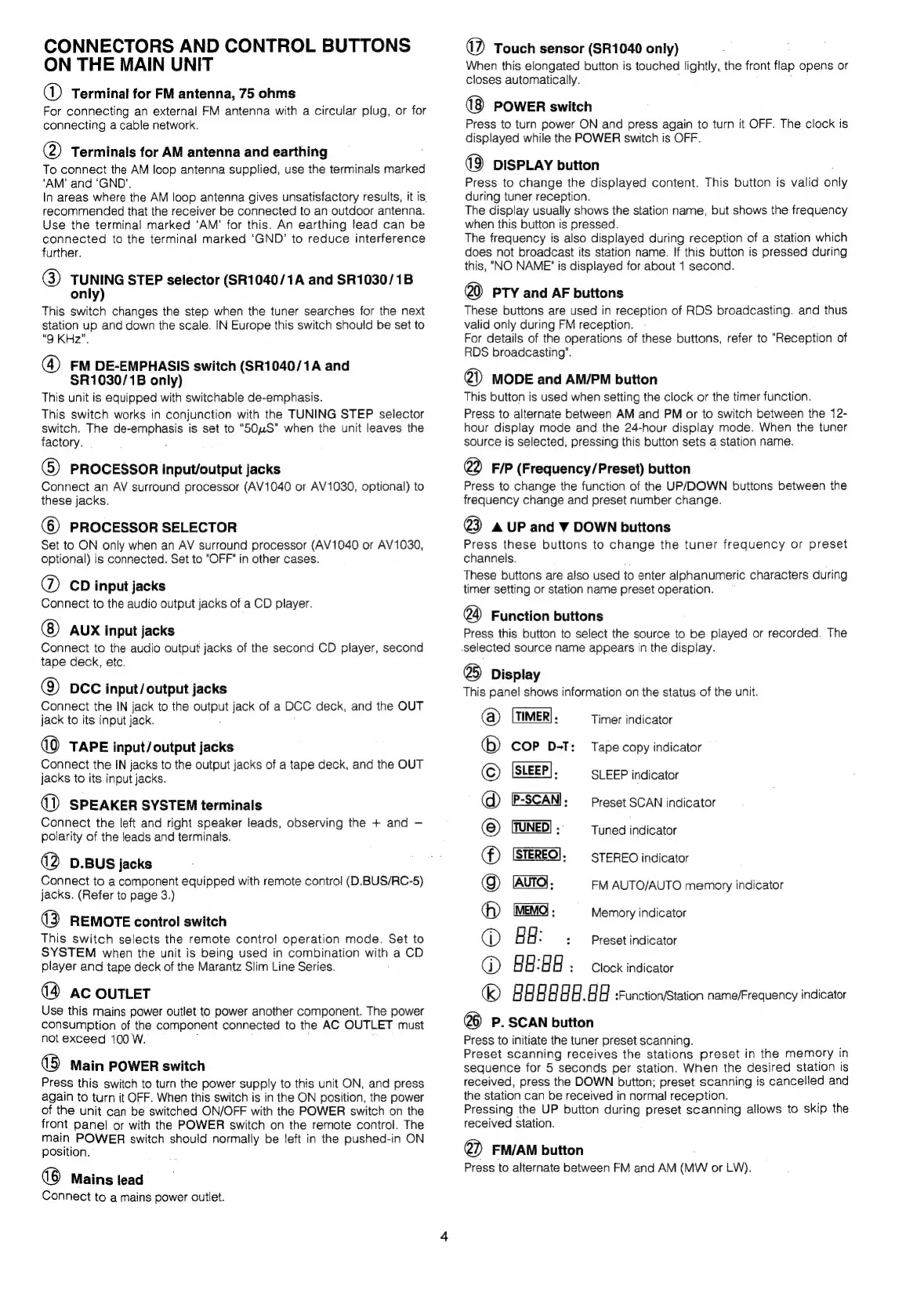
CONNECTORS
AND
CONTROL
BUTTONS
ON
THE
MAIN
UNIT
@
Terminal
for
FM
antenna,
75
ohms
For
connecting
an
external
FM
antenna
with
a
circular
plug,
or
for
connecting
a
cable
network.
@)
Terminals
for
AM
antenna
and
earthing
To
connect
the
AM
loop
antenna
supplied,
use
the
terminals
marked
‘AM’
and
‘GND’.
In
areas
where
the
AM
loop
antenna
gives
unsatisfactory
results,
it
is.
recommended
that
the
receiver
be
connected
to
an
outdoor
antenna.
Use
the
terminal
marked
‘AM’
for
this.
An
earthing
lead
can
be
connected
to
the
terminal
marked
‘GND’
to
reduce
interference
further.
@)
TUNING
STEP
selector
(SR1040/1A
and
SR1030/1B
only)
This
switch
changes
the
step
when
the
tuner
searches
for
the
next
station
up
and
down
the
scale.
IN
Europe
this
switch
should
be
set
to
"9
KHz”.
@
FM
DE-EMPHASIS
switch
(SR1040/1A
and
$R1030/1B
only)
This
unit
is
equipped
with
switchable
de-emphasis.
This
switch
works
in
conjunction
with
the
TUNING
STEP
selector
switch.
The
de-
eernenaele
is
set
to
“S50uS”
when
the
unit
leaves
the
factory.
(5)
PROCESSOR
input/output
jacks
Connect
an
AV
surround
processor
(AV1040
or
AV1030,
optional)
to
these
jacks.
(©)
PROCESSOR
SELECTOR
Set
to
ON
only
when
an
AV
surround
processor
(AV1040
or
AV1030,
optional)
is
connected.
Set
to
"OFF"
in
other
cases.
®
CD
input
jacks
Connect
to
the
audio
output
jacks
of
a
CD
player.
AUX
input
jacks
Connect
to
the
audio
output
jacks
of
the
second
CD
player,
second
tape
deck,
etc.
Q)
DCC
input/output
jacks
Connect
the
IN
jack
to
the
ce
jack
of
a
DCC
deck,
and
the
OUT
jack
to
its
input
jack.
0
TAPE
input/output
jacks
Connect
the
IN
jacks
to
the
output
jacks
of
a
tape
deck,
and
the
OUT
jacks
to
its
input
jacks.
()
SPEAKER
SYSTEM
terminals
Connect
the
left
and
right
speaker
leads,
observing
the
+
and
polarity
of
the
leads
and
terminals.
(2
D.BUS
jacks
Connect
to
a
component
equipped
with
remote
control
(D.BUS/RC-5)
jacks.
(Refer
to
page
3.)
(3
REMOTE
control
switch
This
switch
selects
the
remote
contro!
operation
mode.
Set
to
SYSTEM
when
the
unit
is
being
used
in
combination
with
a
CD
player
and
tape
deck
of
the
Marantz
Slim
Line
Series.
(4
ac
ouTLeT
Use
this
mains
power
outlet
to
power
another
component.
The
power
consumption
of
the
component
connected
to
the
AC
OUTLET
must
not
exceed
100
W.
(5
Main
POWER
switch
Press
this
switch
to
turn
the
power
supply
to
this
unit
ON,
and
press
again
to
turn
it
OFF.
When
this
switch
is
in
the
ON
position,
the
power
of
the
unit
can
be
switched
ON/OFF
with
the
POWER
switch
on
the
front
panel
or
with
the
POWER
switch
on
the
remote
control.
The
main
POWER
switch
should
normally
be
Jeft
in
the
pushed-in
ON
position.
(8
Mains
tead
Connect
to
a
mains
power
ouilet.
WD
Touch
sensor
(SR1040
only)
When
this
elongated
button
is
touched
lightly,
the
front
flap
opens
or
closes
automatically.
(8
POWER
switch
Press
to
turn
power
ON
and
press
again
to
turn
it
OFF.
The
clock
is
displayed
while
the
POWER
switch
is
OFF.
(9)
DISPLAY
button
Press
to
change
the
displayed
content.
This
bution
is
valid
only
during
tuner
reception.
The
display
usually
shows
the
station
name,
but
shows
the
frequency
when
this
button
is
pressed.
The
frequency
is
also
displayed
during
reception
of
a
station
which
does
not
broadcast
its
station
name.
If
this
button
is
pressed
during
this,
"NO
NAME"
is
displayed
for
about
1
second.
@
PTY
and
AF
buttons
These
buttons
are
used
in
reception
of
RDS
broadcasting.
and
thus
valid
only
during
FM
reception.
For
details
of
the
operations
of
these
buttons,
refer
to
"Reception
of
RDS
broadcasting".
@)
MODE
and
AM/PM
button
This
button
is
used
when
setting
the
clock
or
the
timer
function.
Press
to
alternate
between
AM
and
PM
or
to
switch
between
the
12-
hour
display
mode
and
the
24-hour
display
mode.
When
the
tuner
source
is
selected,
pressing
this
button
sets
a
station
name.
@
F/P
(Frequency/Preset)
button
Press
to
change
the
function
of
the
UP/DOWN
buttons
between
the
frequency
change
and
preset
number
change.
@
AUP
and
W
DOWN
buttons
Press
these
buttons
to
change
the
tuner
frequency
or
preset
channels.
These
buttons
are
also
used
to
enter
alphanumeric
characters
during
timer
setting
or
station
name
preset
operation.
@
Function
buttons
Press
this
button
to
select
the
source
to
be
played
or
recorded.
The
selected
source
name
appears
in
the
display.
@
Display
This
panel
shows
information
on
the
status
of
the
unit.
(@)
[TIMER].
Timer
indicator
Tape
copy
indicator
SLEEP
indicator
Preset
SCAN
indicator
Tuned
indicator
STEREO
indicator
Memory
indicator
@
©
®
@
(Auro,
FM
AUTO/AUTO
memory
indicator
Ga)
@
HH:
:
Preset
indicator
®@
88:88
:
Clock
indicator
|
|
|
a
a]
|
.
|
H
:Function/Station
name/Frequency
indicator
@6)
P.
SCAN
button
Press
to
initiate
the
tuner
preset
scanning.
Preset
scanning
receives
the
stations
preset
in
the
memory
in
sequence
for
5
seconds
per
station.
When
the
desired
station
is
received,
press
the
DOWN
button;
preset
scanning
is
cancelled
and
the
station
can
be
received
in
normal
reception.
Pressing
the
UP
button
during
preset
scanning
allows
to
skip
the
received
station.
@
FM/AM
button
Press
to
alternate
between
FM
and
AM
(Mw
or
LW).

Other manuals for Marantz SR1030

Related product manuals