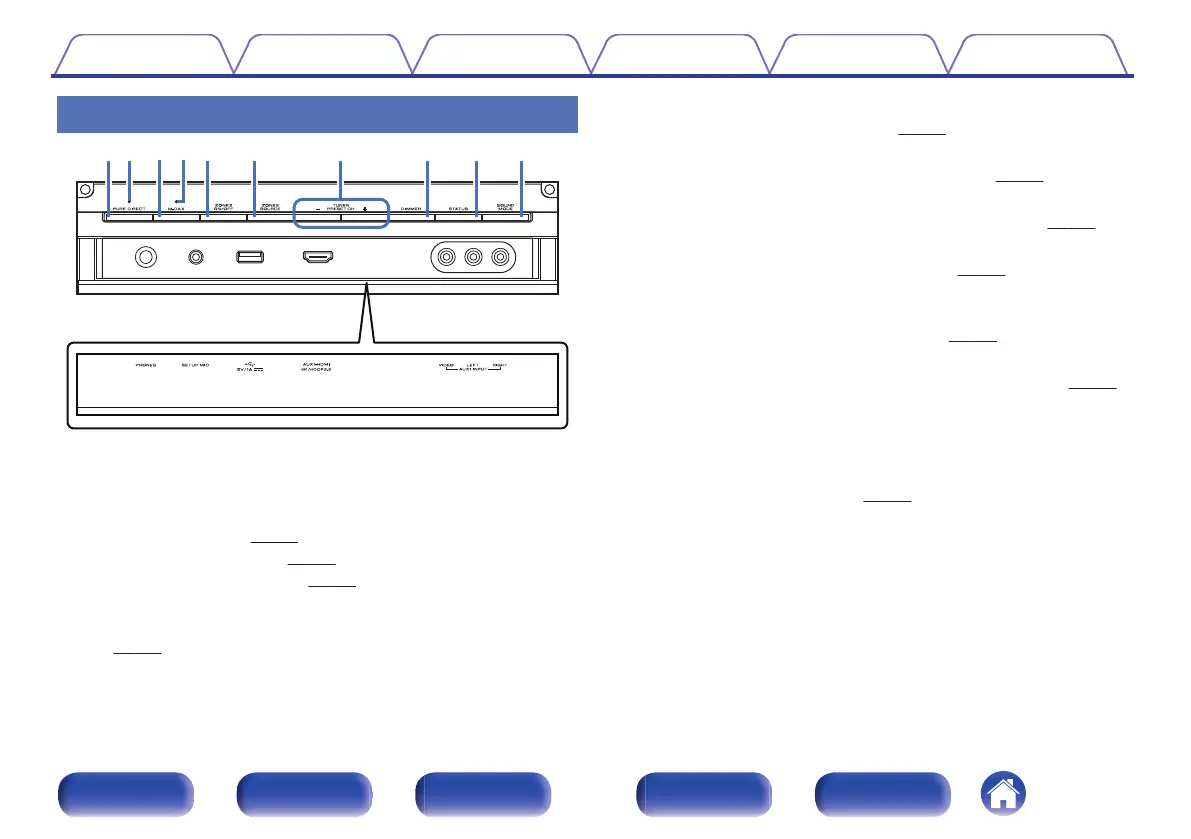
With the door open
.
A
PURE DIRECT button
This switches the sound mode between Direct, Pure Direct and Auto
surround.
0
“Direct playback” (v
p. 135)
0
“Pure Direct playback” (v p. 135)
0
“Auto surround playback” (v
p. 136)
B
PURE DIRECT indicator
This lights when the “Pure Direct” mode is selected as the sound mode.
(v
p. 135)
C
M-DAX button
This switches the M-DAX mode. (v
p. 171)
D
M-DAX indicator
This lights when the M-DAX mode is selected. (v p. 171)
E
ZONE2 ON/OFF button
This turns the power of ZONE2 (another room) on/off. (v
p. 160)
F
ZONE2 SOURCE button
This selects the input source for ZONE2. (v
p. 160)
G
Tuner preset channel buttons
(TUNER PRESET CH +, –)
These select preset broadcast stations. (v
p. 101)
H
DIMMER button
Each press of this switches the brightness of the display. (v p. 239)
I
STATUS button
Each press of this switches the status information that is shown on the
display.
J
SOUND MODE button
Switching the sound mode. (v
p. 133)
Contents
Connections Playback Settings Tips Appendix
18
Front panel Display Rear panel Remote Index



 To Next Page