EasyManua.ls Logo

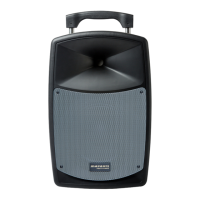
Marantz Voice Rover - User Manual

Marantz Voice Rover
11 pages
Print Icon
To Next Page IconTo Next Page
Loading...
Voice Rover
User Guide
English ( 2 – 9 )
Guía del usuario
Español ( 10 – 17 )
Guide d’utilisation
Français ( 18 – 25 )
Guida per l’uso
Italiano ( 26 – 33 )
Benutzerhandbuch
Deutsch ( 34 – 41 )
A
ppendix
English ( 42 )

Questions and Answers

Summary

User Guide

Introduction

Overview of the Voice Rover's features, capabilities, and initial setup steps.

Box Contents

Lists all items included in the product packaging for the Voice Rover.

Support Information

Details on how to obtain further product support and information.

Battery and Setup

Rechargeable Batteries

Guidelines for battery usage, storage, repair, and disposal for longevity.

Connection Diagram

Visual guide illustrating how to connect various devices to the Voice Rover.

Product Features

Rear Panel Controls

Detailed identification and function of controls and ports on the rear panel.

Media Panel Functions

Explanation of controls for managing USB, SD card, and Bluetooth playback.

Operation

Wireless Mic Setup

Steps for setting up and optimizing the wireless microphone connection.

Mute Level Adjustment

Guidance on adjusting the mute level for reduced interference.

Auto-Sync Channel

Procedure for setting the Auto-Sync Channel to avoid interference.

Pairing Bluetooth Devices

Instructions for connecting and playing audio from Bluetooth-enabled devices.

Media Modes

Bluetooth Mode Operations

Details on accessing and managing Bluetooth audio sources and settings.

USB Mode Operations

Instructions for playing audio files from a USB drive.

SD Card Mode Operations

Instructions for playing audio files from an SD card.

Troubleshooting

Common Problems and Solutions

Table addressing common issues like power, signal, interference, and audio distortion.

Specifications and Trademarks

Technical Specifications

Detailed technical data for the Voice Rover, including power, dimensions, and ranges.

Trademarks and Licenses

Information on product trademarks and licensing agreements.

Summary

User Guide

Introduction

Overview of the Voice Rover's features, capabilities, and initial setup steps.

Box Contents

Lists all items included in the product packaging for the Voice Rover.

Support Information

Details on how to obtain further product support and information.

Battery and Setup

Rechargeable Batteries

Guidelines for battery usage, storage, repair, and disposal for longevity.

Connection Diagram

Visual guide illustrating how to connect various devices to the Voice Rover.

Product Features

Rear Panel Controls

Detailed identification and function of controls and ports on the rear panel.

Media Panel Functions

Explanation of controls for managing USB, SD card, and Bluetooth playback.

Operation

Wireless Mic Setup

Steps for setting up and optimizing the wireless microphone connection.

Mute Level Adjustment

Guidance on adjusting the mute level for reduced interference.

Auto-Sync Channel

Procedure for setting the Auto-Sync Channel to avoid interference.

Pairing Bluetooth Devices

Instructions for connecting and playing audio from Bluetooth-enabled devices.

Media Modes

Bluetooth Mode Operations

Details on accessing and managing Bluetooth audio sources and settings.

USB Mode Operations

Instructions for playing audio files from a USB drive.

SD Card Mode Operations

Instructions for playing audio files from an SD card.

Troubleshooting

Common Problems and Solutions

Table addressing common issues like power, signal, interference, and audio distortion.

Specifications and Trademarks

Technical Specifications

Detailed technical data for the Voice Rover, including power, dimensions, and ranges.

Trademarks and Licenses

Information on product trademarks and licensing agreements.

Marantz Voice Rover Specifications

General IconGeneral
TypePortable Bluetooth Speaker
ConnectivityBluetooth
Power SourceBattery
MicrophoneYes
Bluetooth Version5.0