CL030049
PG 3
ENGLISH
• In normal display mode, press MODE button, to turn on Countdown timer display, the LCD display
will show “TM” and the number is 0:00
• Press UP button, the countdown timer hour will increase one unit, press and hold UP button,
the countdown button will increase 8 units per second.
• Press DOWN button, the countdown timer hour will decrease one unit, press and hold DOWN button,
the countdown button will decrease 8 units per second.
• Press SNOOZE button to start countdown timer
• When countdown timer is running, the “:” and “TM” will icker.
• User can set the countdown time when timer is paused.
• When countdown is paused, press DOWN and UP together to return the timer to zero.
• When the countdown is running, press MODE button can return to normal display, but the day of week
and “TM” will switch display every 5 seconds.
• Countdown range from 0:00 to 23:59
• When the countdown times up, the clock will alarm and number and “TM” will icker
• At normal display, the countdown times up, the clock will alarm and “TM” will icker
• Press any button to stop alarm
• Alarm will sound for 2 minutes
After power on or reset, the LCD will show full information for 3 seconds and into normal display.
will show “TM” and the number is 0:00
• Calendar default date is 1st of January, 2015 00:00, time zone 0, week display is M/D
• Temperature unit °C
• 12HR
• Language: English
• When the power lower than 2.5v, will show the low power mark
• ALARM: OFF
• Alarm time default: AL1 is 7: 00, AL2 is 0:00, memory day is 0:00
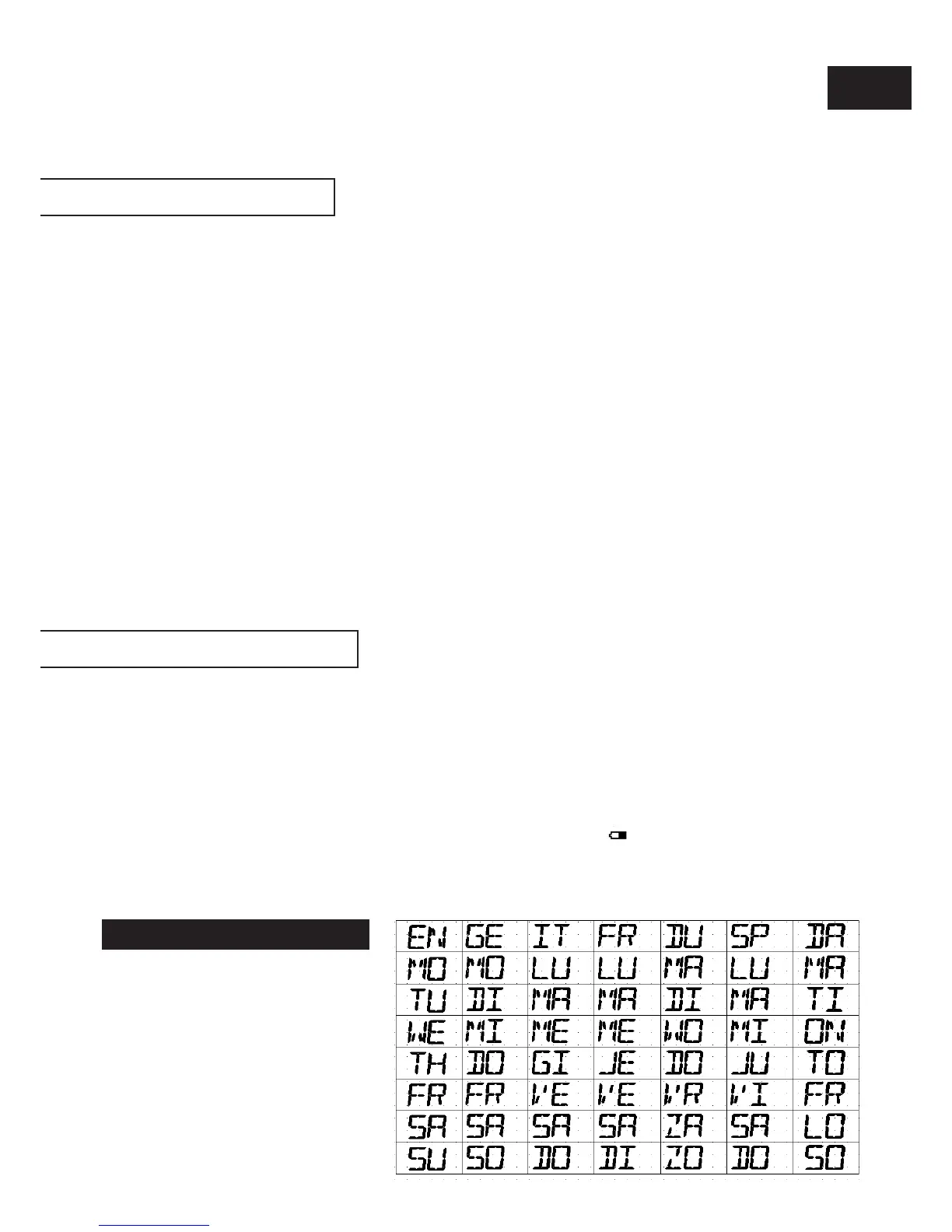
• languages display in week
COUNTDOWN TIMER
POWER ON AND RESET
LANGUAGES DISPLAY IN WEEK


 To Next Page