EasyManua.ls Logo

Marconi Instruments 2955 - Page 58

Marconi Instruments 2955
84 pages
Print Icon
To Next Page IconTo Next Page
To Previous Page IconTo Previous Page
Loading...
OPERATION
Sub-audible
tone
(6)
Select
a sub-audible
tone
by pressing
the
MODE key
(?)
which
is
arrowed
by
SUB-AUDIBLE.
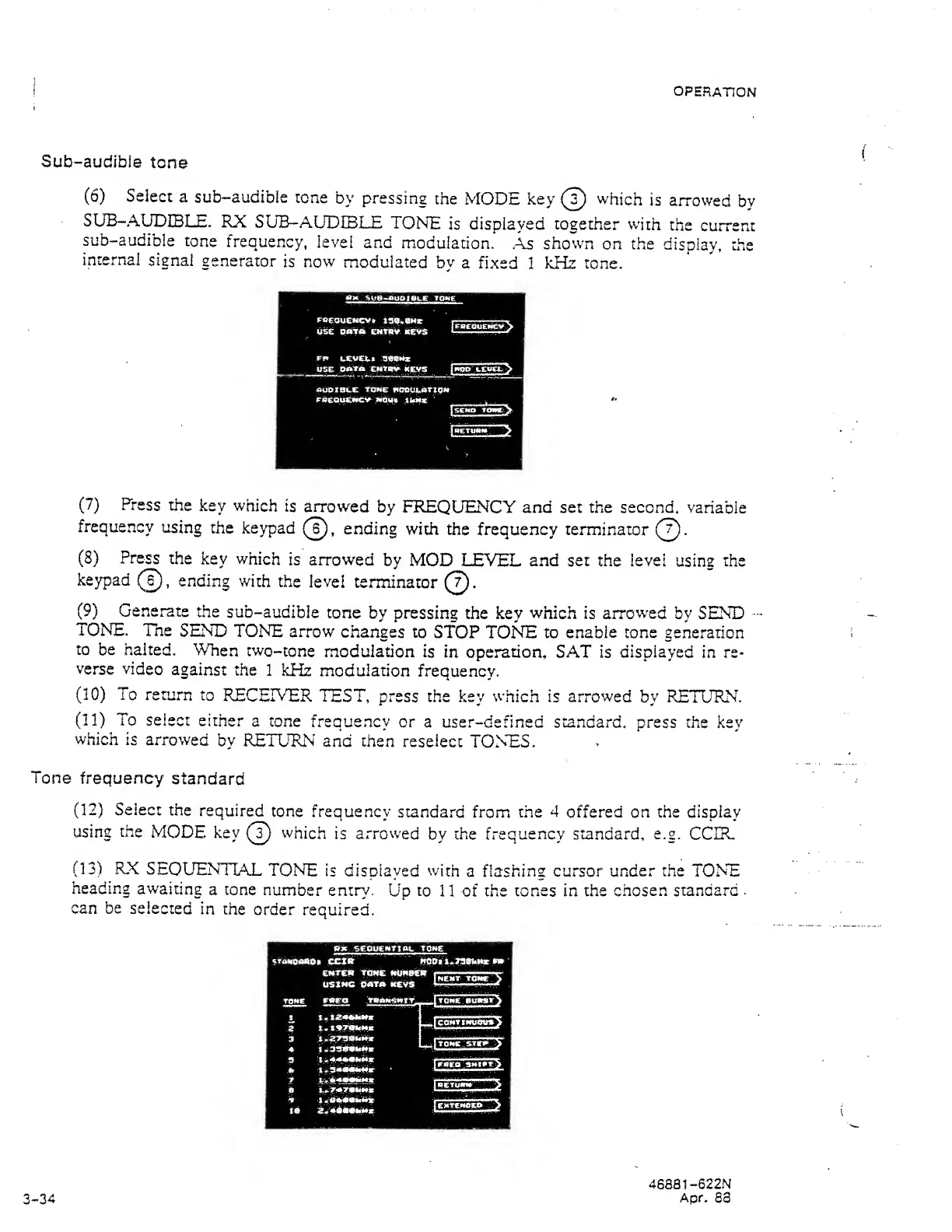
RX
SUB-AUDIBLE
TONE
is displayed together
with
the
current
sub-audible
tone
frequency,
level
and
modulation.
.As
shown
on the
display,
the
internal
signal
generator
is now
modulated
by a
fixed
1 kHz tone.
OM
SUB-auaiBL.E
tome
EAeQuCNCy*
is«y.e»«r
MSE
DMTiK
ENfl^.
.keVs
leaMz
USE CwTUV
keys
<auat8i.e TOME
fiobui.aTX0M
.EUEUtiEifCV'
;*iau»
.iUmx
'
(7)
Press
the
key which
is arrowed
by
FREQUENCY and set the second,
variable
frequency
using
the
keypad
(?),
ending with the
frequency terminator
(?).
(8)
Press
the
key
which
is arrowed
by MOD
LEVEL
and set
the
level
using
the
keypad
(T),
ending
with
the
level
terminator
(T).
(9)
Generate
the
sub-audible
tone
by
pressing
the key
which is arrowed
by SEND
TONE,
The
SEND
TONE
arrow
changes
to
STOP
TONE
to
enable tone
generation
to
be halted.
When
two-tone
modulation
is
in operation, SAT is displayed in re-
verse
video
against
the
1 kHz
modulation
frequency.
(10)
To
return to
RECEIVER
TEST, press the
key
which
is
arrowed
by RETURN,
(11)
To
select either
a tone
frequency
or
a user-defined standard, press the
key
which
is arrowed
by
RETURN
and then
reselect
TONES.
Tone
frequency
standard
(12)
Select
the
required
tone
frequency
standard
from
the 4
offered on
the display
using
the
MODE
key
(?)
which
is
arrowed
by the
frequency standard,
e.g.
CCIR.
(13)
RX
SEQUENTIAL
TONE
is
displayed with
a flashing cursor
under
the
TONE
heading awaiting
a tone
number
entry.
Up
to
11 of the tones in the
chosen
standard
.
can be
selected
in the
order
required.
3-34
46881-622N
Apr.
S3