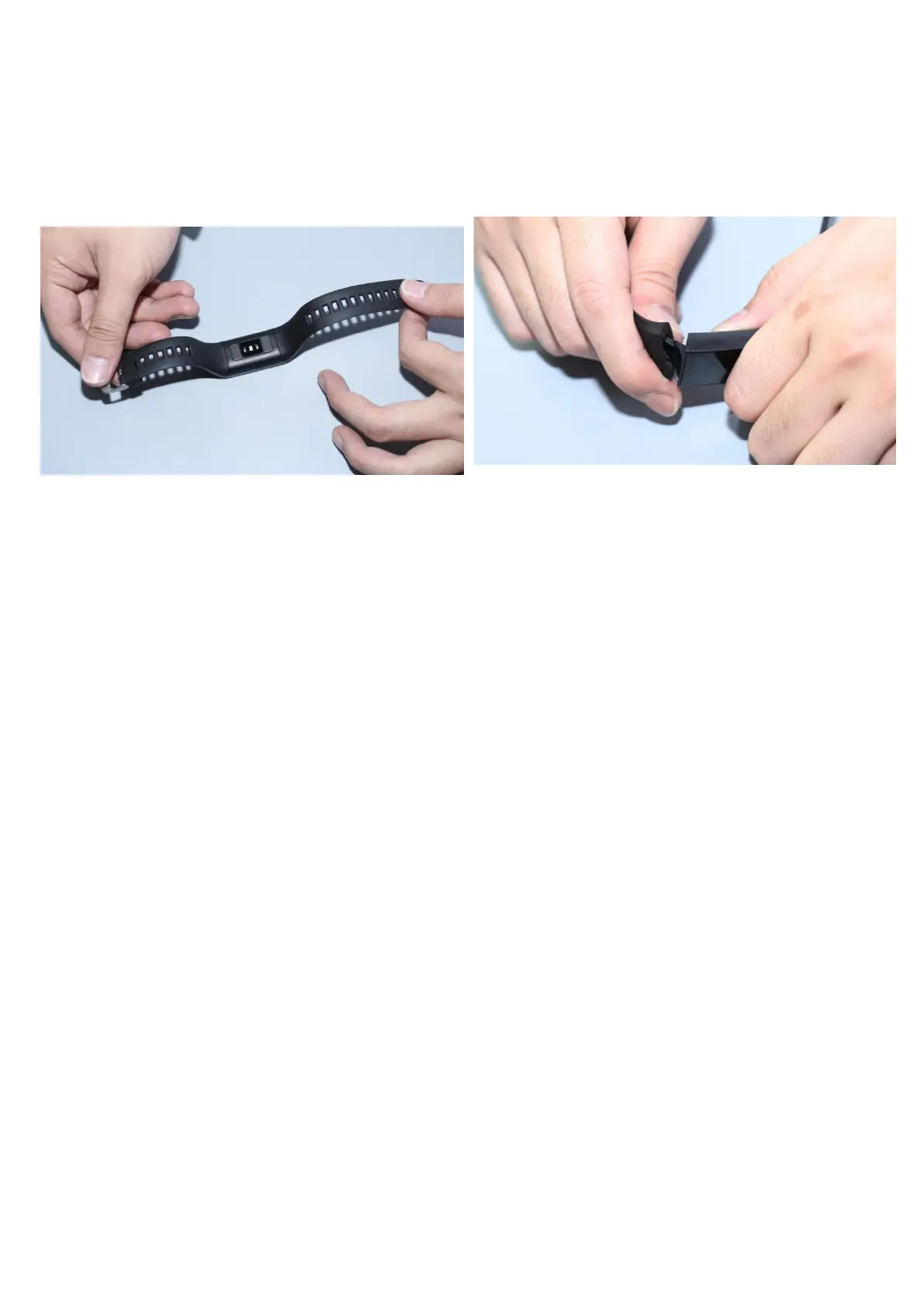
1.3 Watch strap disassembly and assembly instructions:
1.1 Standby dial plate interface
1.2 Step count
The step count is enabled by default. This interface displays the current
number of steps, kilometers, calories and heart rate. The data are cleared
every day at 12 am.
1.3 Health
1) Heart rate, correctly wears the bracelet (left hand/right hand) on the wrist,
enter the heart rate menu, and continuously measure the heart rate value.
After the bracelet is bound to the app, the heart rate data is synchronized to
the app in real time.
2) Blood pressure, correctly wears the bracelet (left hand/right hand) on the
wrist, enter the blood pressure menu, measure the single blood pressure value.
After the bracelet is bound to the app, the blood pressure data is synchronized
to the app in real time.
3) Sleep, sleep monitoring period: 21:00 to 9:00 the next day, After the bracelet
generates data and exits sleep monitoring, the bracelet sleep data can be
synchronized to the APP after the bracelet is bound to APP.
1.4 heart rate variation
Make sure you are properly wear the bracelet on the wrist during ECG
test. After the function is on, touch the screen position with finger to start


 To Next Page