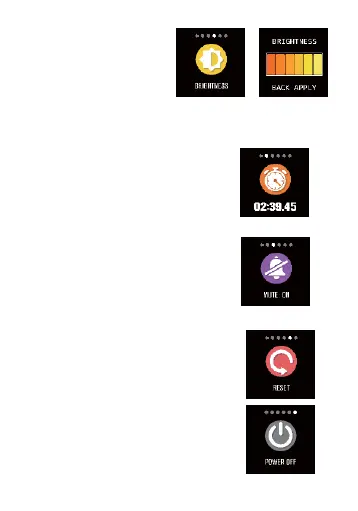
12.1
Brightness
regulation
You can hold
the touch area
to enter "brightness
regulation",
you can click
the touch key to select
brightness and momentarily
press the side
key to return.
12.2
Stopwatch
You can hold the stopwatch
page
to "start" timing, and
click "pause"
timing and hold
it again to "stop"
timing.
12.3
Mute
By default, mute function is in the
"closed"
state, if the smart bracelet does
not need to
vibrate, you can switch to the
mute interface, and hold the touch
button for two seconds to
"open" or
"close" it.
12.4
Restoring the factory setting
You can hold the touch area for
over 3s
to start to clear off all
messages in smart bracelet, and
restore the factory setting.
12.5
Power-off
After you hold the side key on the main
interface for 3 seconds, the power-off
interface
will pop up and you can power it


 To Next Page