Downloading and Binding of Smart bracelet APP
1.
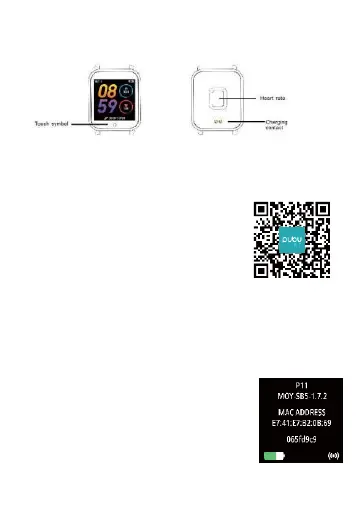
Schematic diagram of main body of smart bracelet
2.
Power-on
We can hold the touch button for 5 seconds or plug in
the charging clamp to charge the smart bracelet.
3.
Download and install APP
1>Scan QR code with mobile
phone and download APP.
2>For IOS system, we can select APP
store;
for Android system, we can select
Application
Treasure to download and
install PubuFit.
Note: Your mobile phone must support
Android 5.1
or IOS8.0 or above, and Bluetooth
4.0 or above.
4.
Check mac address
You can get the smart bracelet MAC by
holding the main interface
for two
seconds. MAC address, used to indicate
the hardware
address of smart bracelet,
is the only sign of the smart bracelet and
cannot be modified. If you check the
smart bracelet with mobile phone, you


 To Next Page