can find the corresponding smart bracelet by checking the
MAC number. The MAC address is used to identify the
smart bracelet and connected to the mobile phone quickly.
5.
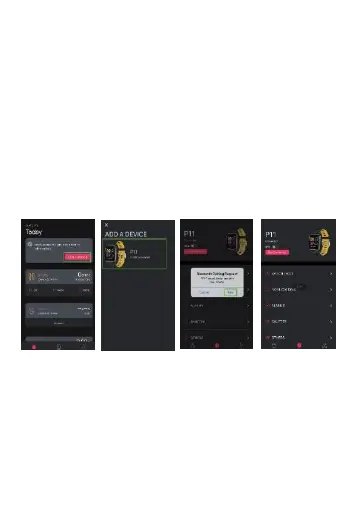
Smart bracelet binding by APP
1.
Switch
to
the
home
page and
click
"ADD"
or
"ADD A
DEVICE"
2.
Choose
your
device in
the
device
list
scanned.
3.
For IOS system,
there will be
Bluetooth
Pairing
Request and you
can click Bluetooth
"Pairing" to confirm;
connect it directly
for
Android system.
4.
Successf
ul
binding
.
For Android, we can disconnect it from the phone by
clicking on the Remove Device. For some particular model
of mobile phone, after it
is unbound, it is necessary to click
set up- Bluetooth- paired device-
canceling the pairing.
After IOS is unbound, you need to click set up- Bluetooth,
click on
the symbol on the right, and choose to ignore the
device
.


 To Next Page
 Loading...