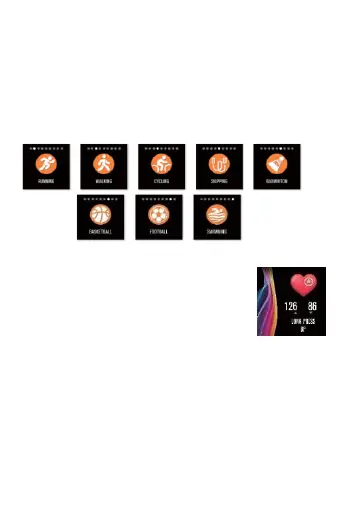
In the sports interface, you can enter the sports mode
after holding the touch button for two seconds. There are
seven kinds of sports, including walking, running, cycling,
rope skipping, badminton,
basketball, football and
swimming. If you choose the "walking"
mode, it will start
recording the sport parameters after you hold the
touch
button for two seconds and you can hold the touch key
for two seconds to select "pause", "exit" or "return".
6. Blood pressure
You can click on the touch area to
switch to the blood pressure
measurement interface,
hold the
blood pressure interface for 2
seconds and it will display "in
measurement".
After measurement,
the motor will vibrate
once and display
the current test data.
You should measure blood pressure in the quiet place
with
appropriate temperature, rest for at least 5 minutes
before
measurement to avoid tension, anxiety and
emotional excitement,
measure blood pressure for three
times, with two minutes apart each
time, and record the
average of three readings.
7.
Blood oxygen


 To Next Page