CONNECTIONS
CONNECTIONS
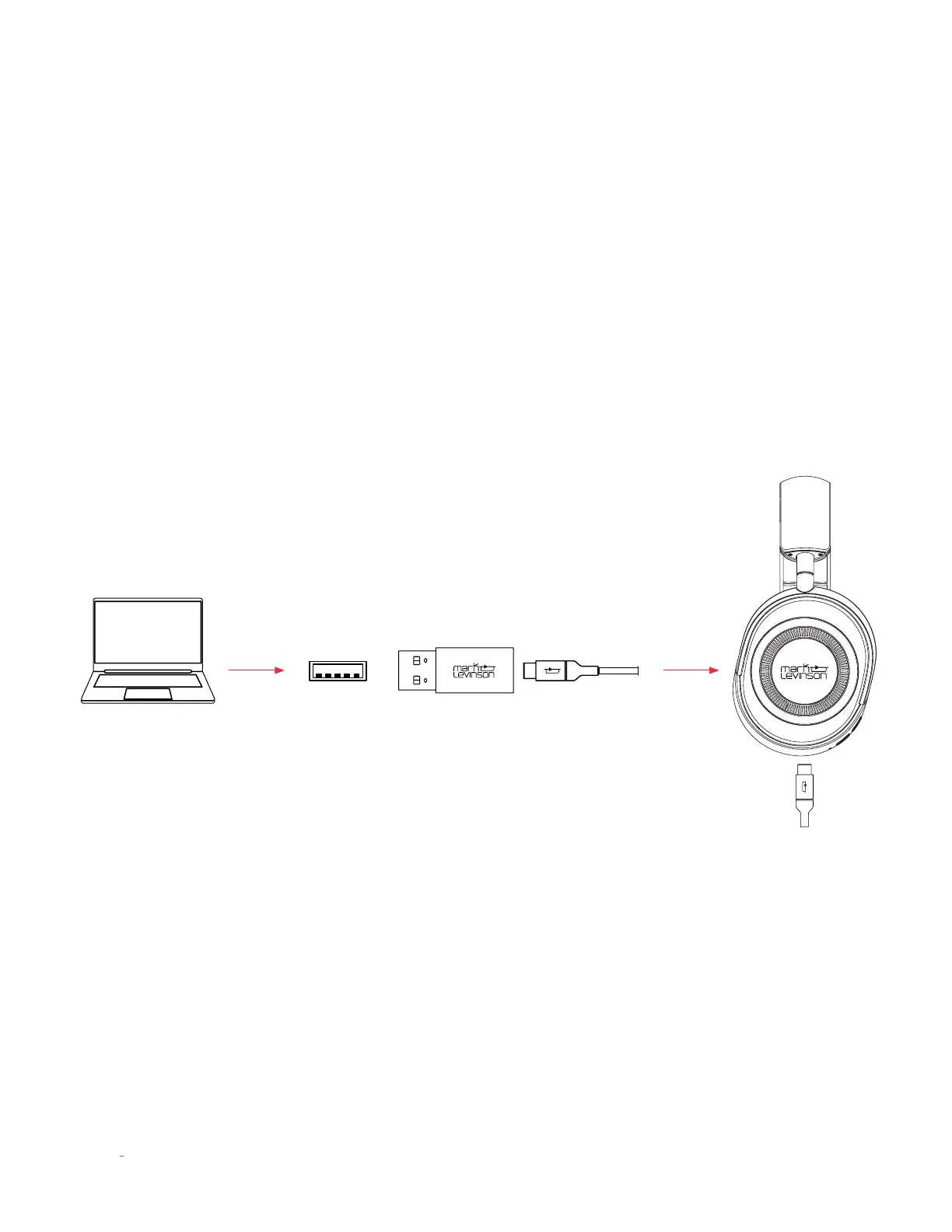
USB DIGITAL DIRECT
The № 5909 can be connected and used to listen to content via USB Digital Direct using the standard USB-C to USB-C charging
cable included.
1. Plug one end of the USB-C to USB-C cable directly into one of your computer's USB connections (use the included USB-C
to USB-A adaptor if needed).
2. Plug the other end of the USB-C cable into the USB-C input on the right ear cup of the headphone.
3. From your computer device, open the "sound settings" and locate and select the "No 5909" under the speaker label.
4. Adjust your volume via the slider on your computer.
5. Start your content - enjoy.
NOTE: ANC functions will continue to operate via the left ear cup ANC button AND the headphone will charge while in this
connection method.
Computer
USB-C
USB-C to USB-A Charging adaptor + USB-C Charging Cable
10
N
0
5909 HEAPHONE / OWNER’S MANUAL


 To Next Page