17
EN
6.2.5.6 Setting temperature and humidity values
Default factory settings: Temperature : 26°C
Relative humidity : 75%
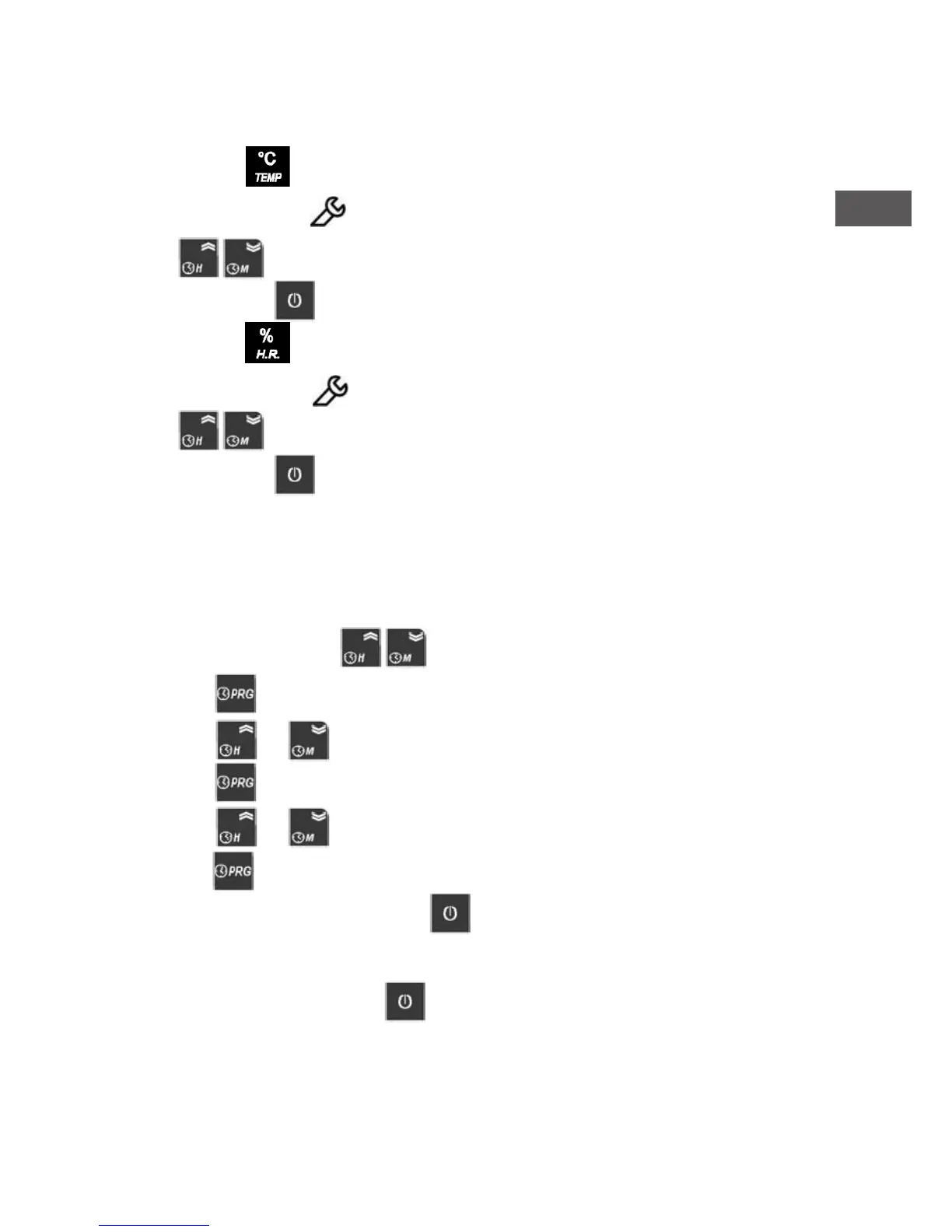
Keep pressed the key until “SP” is displayed (then release the key). The display shows
the set point value and the symbol blinking.
Use the keys to increase or decrease the value.
To conrm press the key or wait 10”sec.
Keep pressed the key until “SP “ is displayed ( then release the key). The display shows
the set point value and the symbol blinking.
Use the keys to increase or decrease the value.
To conrm press the key or wait 10”sec.
6.2.5.7 Locking/Unlocking remote control unit
It is possible to lock the remote control unit to avoid the control by anyone.
To lock the remote command unit the HL parameter value must be modied from NO to YES.
Modify the HL parameter as follows:
• Keep pressed together the keys more than 2”sec until the display shows PA.
• Press the key twice.
• Press the or keys to nd the parameter to be changed. In this case choose HL.
• Press the key to see the current setted value.
• Press the or keys to change the value.
• Press the key again to go back.
To save the modication and exit press the key or wait 30”sec.
When the remote control is locked, display shows Loc when pressing every key. To temporary
unlock the remote control, keep the key pressed until the display shows off. The remote
control goes automatically back to locked status after 15”sec. from last key pressing.


 To Next Page