6.4 CHANNEL MODE SETTING
1) Press the
【ENTER】button in 【CHMD】menu, then enter to the channel mode setting.
2) Press the
【UP/DOWN】button to select【9CH】,【6CH】,【4CH】,【3CH】,【3CH.】
3) Press the
【ENTER】button to escape and save.
6.5 DIMMING MODE SETTING
1) Press the
【ENTER】button in【DIM】menu, then enter to the dimming mode setting.
2) Press the
【UP/DOWN】button to select【LIN】,【SQR】,【ISQR】,【SCUR】,【LIN.】,【SQR.
】,【ISQR.】and【SCUR.】.
3) Press the
【
ENTER】button to escape and save.
Illustrations:When setting
【LIN.】,【SQR.】,【ISQR.】and 【SCUR.】
in 【DIM 】
menu, there will be
added a little delay
dimming effect for smooth..
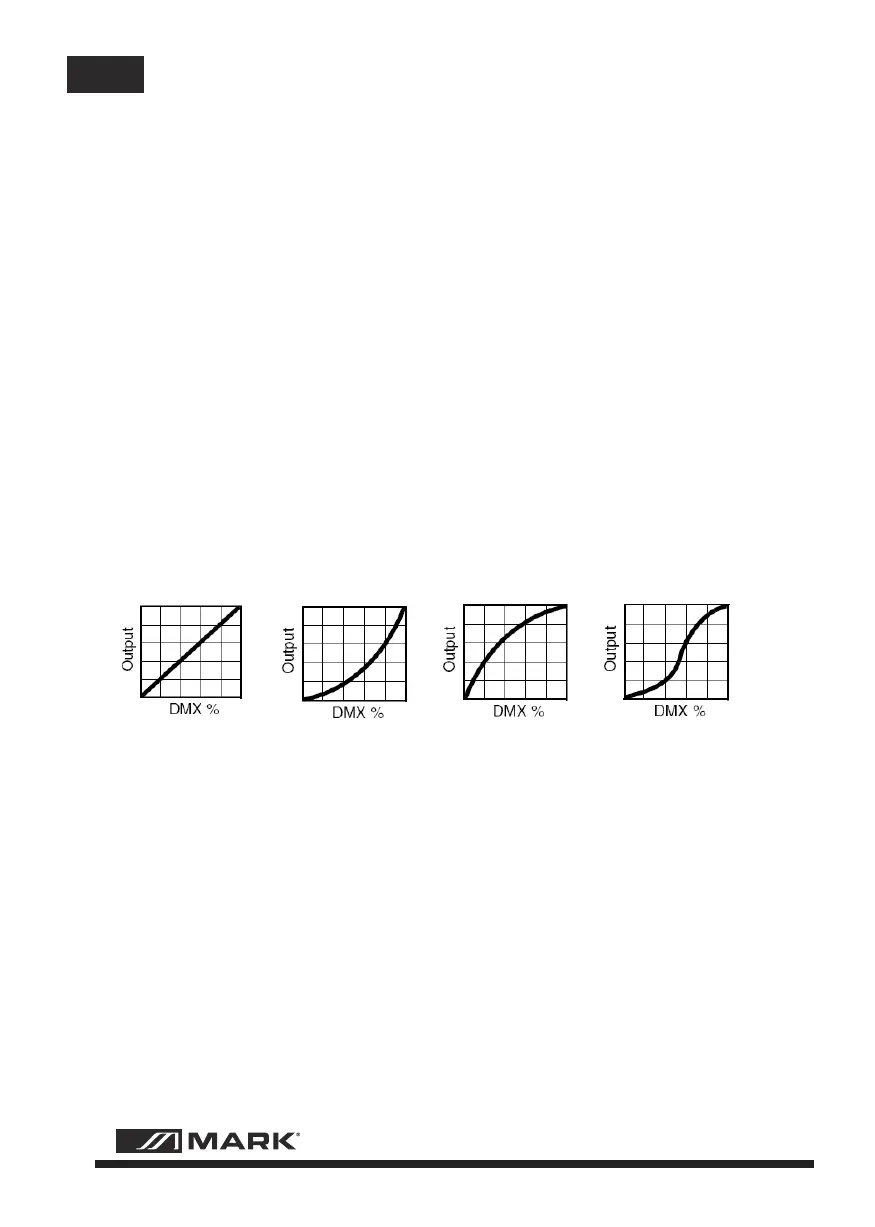
Dimming curve:
Linear curve:
square law curve:
Inverse Square law curve:
S-curve:
6.6 DISPLAY SETTING
1) Press the【ENTER】button in【DISY】menu, then enter to the display setting.
2) Press the【UP/DOWN】button to select【ON】,【2 MINITES OFF】
3) Press the【ENTER】button to escape and save.
6.7 AUTO LOCK KEY SETTING
1) Press the
【ENTER】button in【LOCK】menu, then enter auto lock key setting.
2) Press the
【UP/DOWN】button to select【YES】,【NO】
3) Press the
【ENTER】button to esca
pe and save.
Instructions:
When set to [YES], it will lock automatically after two minutes to prevent accidental triggering flood
flushing, and then press any key for 10 seconds to unlock.
MBAR 381 IP - 9 - User Manual/Manual de Uso
EN


 To Next Page
 Loading...